Introduzione
Grazie per l'acquistoasing the Sharper Image Digital Camera. This compact and easy-to-use digital camera is designed to capture your precious moments with clarity. Featuring a 3.0 MP effective still image resolution and 4x digital zoom, it is ideal for everyday photography. This manual provides detailed instructions to help you set up, operate, and maintain your camera for optimal performance.
Informazioni sulla sicurezza
- Sicurezza della batteria: Use only the specified battery type. Do not mix old and new batteries, or different types of batteries. Insert batteries with correct polarity. Remove batteries if the camera will not be used for an extended period.
- Acqua e umidità: Keep the camera away from water and excessive moisture. Do not operate the camera with wet hands.
- Temperatura: Avoid exposing the camera to extreme temperatures (hot or cold) or direct sunlight for prolonged periods.
- Pulizia: Per la pulizia utilizzare un panno morbido e asciutto. Non utilizzare detergenti liquidi o solventi.
- Smontaggio: Non tentare di smontare o riparare la fotocamera da soli. Per qualsiasi intervento di assistenza, rivolgersi a personale qualificato.
- Disposizione: Smaltire la fotocamera e le batterie secondo le normative locali.
Contenuto della confezione
Si prega di verificare che tutti gli articoli siano presenti nel pacco:
- Sharper Image Digital Camera (Model F3405471)
- Cavo USB
- Cinturino da polso
- Manuale dell'utente (questo documento)
- (Optional: Software CD, Pouch, Batteries - check your specific packaging)
Prodotto finitoview
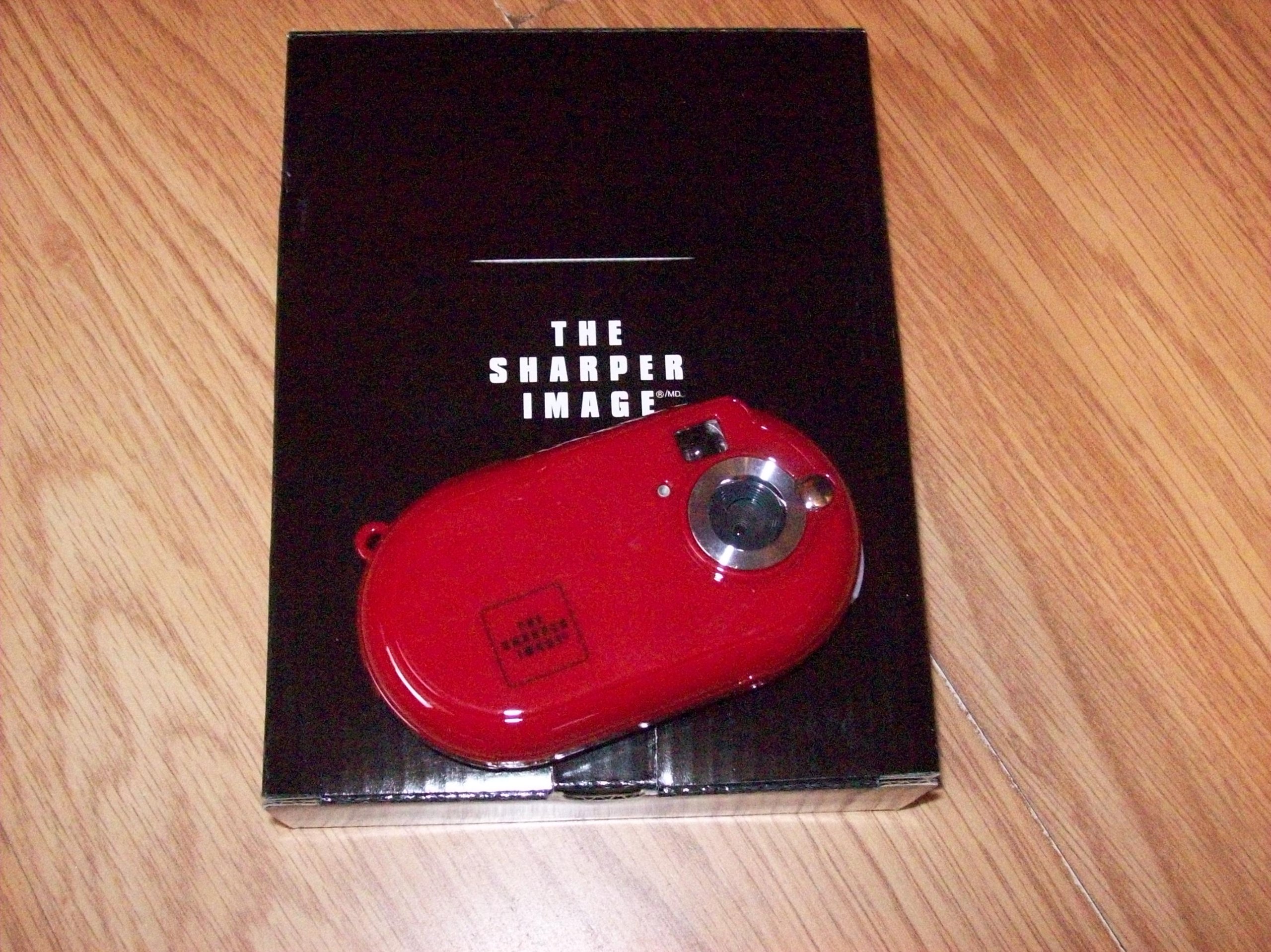
Figure 1: The Sharper Image Digital Camera (red, oval-shaped) resting on its black packaging box, which features the "THE SHARPER IMAGE" logo.
The Sharper Image Digital Camera is a compact device with a distinctive red, oval-shaped body. It features a lens assembly on the front, along with a flash and a small indicator light. The camera is designed for portability and ease of use, making it suitable for capturing everyday moments.
Componenti chiave:
- Lente: Cattura immagini.
- Flash: Fornisce illuminazione in condizioni di scarsa illuminazione.
- Pulsante dell'otturatore: Attiva la fotocamera per scattare una foto.
- Pulsante di accensione: Accende/spegne la fotocamera.
- LCD Screen (if applicable): Displays menus, captured images, and live view.
- Pulsanti di navigazione: For menu navigation and playback.
- Vano batteria: Contiene le batterie.
- Slot per scheda di memoria: For inserting an SD card or similar storage media.
- Porta USB: For connecting to a computer to transfer photos.
Impostare
- Inserire le batterie: Open the battery compartment cover. Insert the required batteries (e.g., AAA or AA, refer to the compartment label) ensuring correct polarity (+/-). Close the cover securely.
- Inserire la scheda di memoria: Locate the memory card slot. Insert a compatible memory card (e.g., SD card) until it clicks into place. Ensure the card is inserted in the correct orientation.
- Fissare il cinturino da polso: Thread the wrist strap through the designated loop on the camera body to prevent accidental drops.
- Accensione: Press and hold the Power button until the camera turns on.
- Impostazioni iniziali: If prompted, set the date, time, and language using the navigation buttons and confirmation button.
Istruzioni per l'uso
Scattare foto:
- Attiva: Premere il pulsante di accensione per accendere la fotocamera.
- Inquadra il tuo scatto: Use the LCD screen or viewfinder (if available) to compose your image.
- Zoom (Digital): Use the zoom buttons (if present) to digitally zoom in or out. Note that digital zoom may reduce image quality compared to optical zoom.
- Scatta una foto: Press the Shutter button fully down to capture the image. The camera may take a moment to process and save the photo.
Viewing Photos (Playback Mode):
- Entra in riproduzione: Premere il pulsante Riproduzione (spesso indicato da un'icona a forma di triangolo).
- Sfoglia: Use the left/right navigation buttons to scroll through your captured images.
- Uscita dalla riproduzione: Press the Playback button again or the Shutter button to return to shooting mode.
Collegamento a un computer:
- Collegare il cavo: With the camera turned off, connect one end of the USB cable to the camera's USB port and the other end to a free USB port on your computer.
- Turn On Camera: Turn on the camera. It should be recognized as a removable disk or mass storage device by your computer.
- Trasferire Files: Open the camera's drive on your computer and copy the desired image files to your computer's hard drive.
- Disconnettiti in sicurezza: Prima di scollegare il cavo USB, estrarre in modo sicuro la fotocamera dal computer.
Manutenzione
- Pulizia del corpo macchina: Utilizzare un panno morbido e privo di lanugine per pulire il corpo della fotocamera. Per lo sporco ostinato, leggermente dampBagnare il panno con acqua e poi asciugarlo.
- Pulizia della lente: Use a lens cleaning brush or a soft, clean microfiber cloth specifically designed for optics. Gently wipe the lens in a circular motion. Do not use abrasive materials or harsh chemicals.
- Magazzinaggio: When not in use, store the camera in a cool, dry place, away from direct sunlight and extreme temperatures. If storing for a long period, remove the batteries to prevent leakage.
- Cura della batteria: Rechargeable batteries should be fully charged before storage and periodically recharged if stored for extended periods.
Risoluzione dei problemi
| Problema | Possibile causa/soluzione |
|---|---|
| La fotocamera non si accende. |
|
| Non è possibile scattare foto. |
|
| Le immagini sono sfocate. |
|
| La fotocamera non è riconosciuta dal computer. |
|
Specifiche
| Caratteristica | Dettaglio |
|---|---|
| Numero di modello del prodotto | F3405471 |
| Optical Zoom Magnification | 4X. |
| Configurazione dell'obiettivo | Ingrandire |
| Tipo di motore | Digital, Digital Zoom |
| Batterie incluse | NO |
| Peso dell'articolo | 907.18 grammi |
| Nome del modello | Sharper Image Digital Camera |
| Effective Still Image Resolution | 3 MP |
Garanzia e supporto
For warranty information and technical support, please refer to the warranty card included with your product or visit the official Sharper Image websito. Conservare la ricevuta d'acquisto come prova d'acquisto per eventuali reclami in garanzia.
If you encounter issues not covered in the Troubleshooting section, please contact Sharper Image customer service for assistance.