1. Finitaview
The Casio AE1000W Digital Watch is designed for durability and functionality, offering a range of features suitable for daily wear and travel. This manual will guide you through its various functions and ensure optimal use.
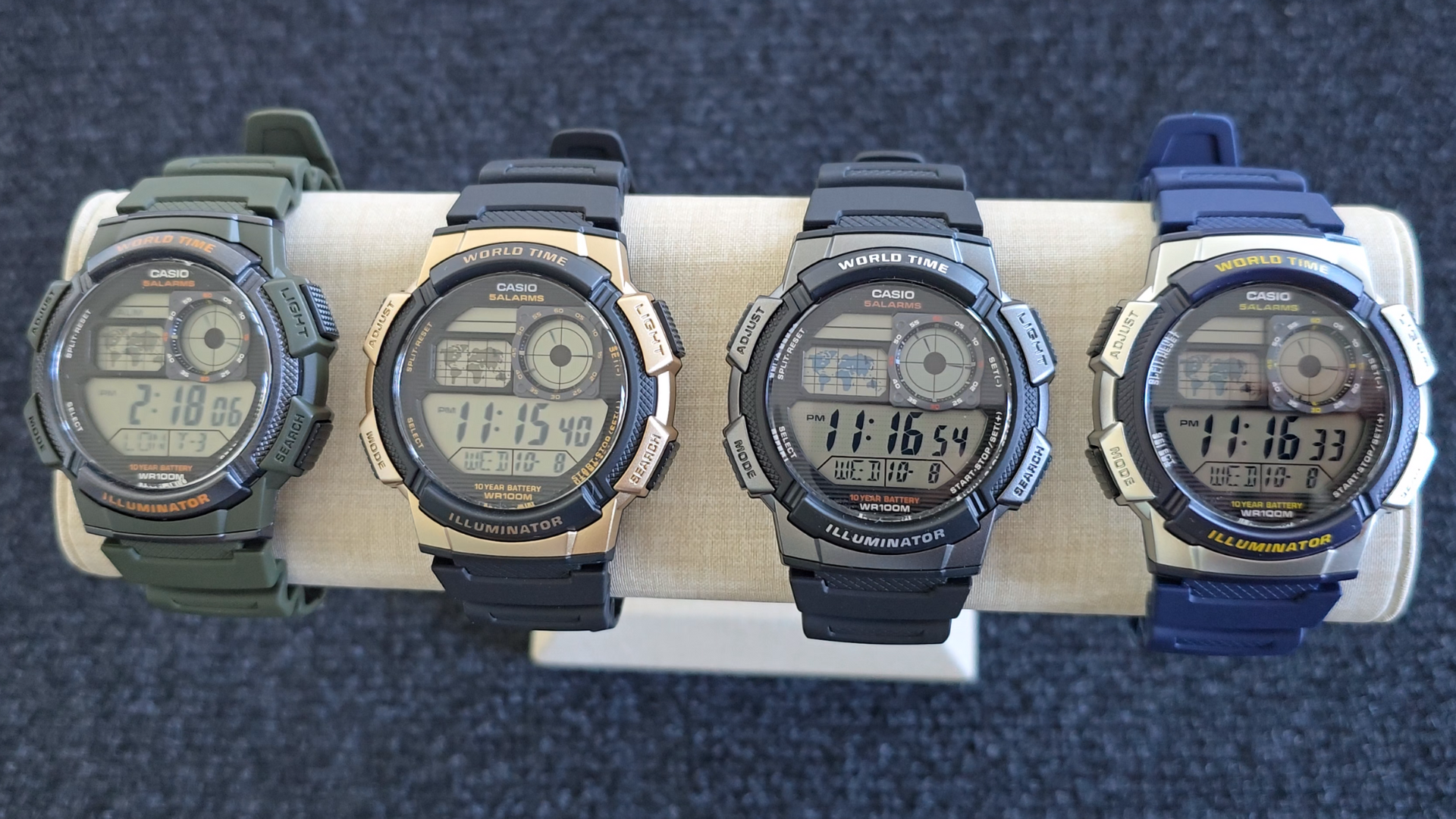
Image: Casio AE1000W Digital Watch series in various color options.
2. Caratteristiche principali
- Ora mondiale: Displays current time in 48 cities (31 time zones) with a world map indicator.
- Allarmi multipli: Features five independent daily alarms.
- Cronometro: 1/100-second stopwatch with measuring modes: elapsed time, split time, 1st-2nd place times.
- Conto alla rovescia: Measuring unit: 1 second, Countdown range: 24 hours.
- Luce LED: Illuminates the watch face for easy reading in low light conditions.
- Resistenza all'acqua: 100 meters (330 feet) suitable for swimming and snorkeling.
- Durata della batteria di 10 anni: Batteria a lunga durata per un uso prolungato.
- Movimento al quarzo: Garantisce un cronometraggio accurato.
- Cristallo di vetro: Durable watch face protection.

Image: Emblem highlighting the 10-year battery life feature.
3. Impostazione
3.1 Impostazione iniziale di ora e data
- In modalità cronometraggio, tenere premuto il tasto REGOLARE finché il codice della città non inizia a lampeggiare.
- Utilizzare il RICERCA E MODALITÀ buttons to select your desired city code (Home City).
- Premere il tasto REGOLARE button to move to the DST (Daylight Saving Time) setting. Use RICERCA per attivare/disattivare l'ora legale.
- Premere REGOLARE again to cycle through the settings: 12/24-hour format, Seconds, Hour, Minute, Year, Month, Day. Use RICERCA E MODALITÀ per modificare i valori.
- Una volta che tutte le impostazioni sono corrette, premere il tasto REGOLARE pulsante per uscire dalla modalità di impostazione.
4. Istruzioni per l'uso
Modalità di navigazione 4.1
Premere il tasto MODALITÀ button to cycle through the different modes: Timekeeping, World Time, Alarm, Stopwatch, and Countdown Timer.
4.2 Funzione Ora Mondiale
In World Time Mode, the watch displays the current time in 48 cities across 31 time zones. The world map indicator visually highlights the selected time zone.
- Entrare nella modalità Ora mondiale premendo il tasto MODALITÀ pulsante.
- Utilizzare il RICERCA button to scroll through the different city codes. The time for the selected city will be displayed, and the corresponding area on the world map will be highlighted.
- To swap your Home City time with a World Time City, press and hold the REGOLARE pulsante mentre ci si trova in modalità Ora mondiale.
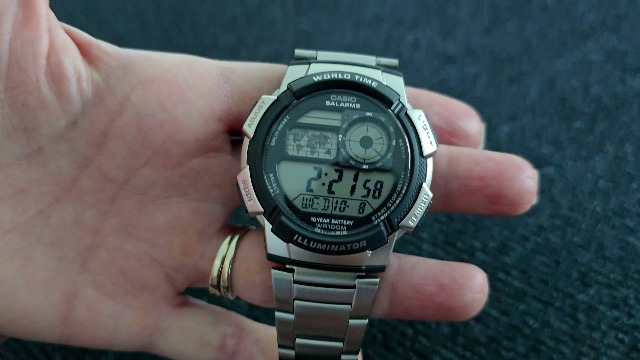
Immagine: Frontale view of the Casio AE1000W watch, showing the digital display and world map.
4.3 Allarmi
The watch features five daily alarms. You can set each alarm independently.
- Entrare in modalità Allarme premendo il tasto MODALITÀ button until "ALM" appears.
- Utilizzare il RICERCA button to cycle through the five alarms (AL1 to AL5) and the Hourly Segnale orario (SIG).
- To set an alarm, select the desired alarm (e.g., AL1) and press and hold the REGOLARE finché le cifre dell'ora non lampeggiano.
- Utilizzo RICERCA E MODALITÀ per impostare l'ora e i minuti.
- Premere REGOLARE per confermare e uscire.
- To turn an alarm On/Off, select the alarm and press the REGOLARE brevemente il pulsante.
4.4 Cronometro
The stopwatch measures elapsed time, split times, and 1st-2nd place times.
- Entrare in modalità cronometro premendo il tasto MODALITÀ button until "STW" appears.
- Premere START/STOP/SET(+) per avviare e arrestare il cronometro.
- Premere DIVIDI/RESET to record split times or reset the stopwatch to zero.
4.5 Conto alla rovescia
Il timer per il conto alla rovescia può essere impostato fino a 24 ore.
- Entrare nella modalità conto alla rovescia premendo il tasto MODALITÀ button until "TMR" appears.
- Per impostare il conto alla rovescia, tenere premuto il tasto REGOLARE finché le cifre dell'ora non lampeggiano.
- Utilizzo RICERCA E MODALITÀ per impostare l'ora e i minuti.
- Premere REGOLARE per confermare.
- Premere START/STOP/SET(+) per avviare e interrompere il conto alla rovescia.
4.6 retroilluminazione a LED
Premere il tasto LEGGERO button to illuminate the watch face for a few seconds, making it easy to read in the dark.
5. Manutenzione
- Pulizia: Wipe the watch with a soft, dry cloth. For water-resistant models, you can rinse it with fresh water after exposure to saltwater.
- Resistenza all'acqua: While water-resistant to 100M, avoid operating buttons underwater to prevent water ingress.
- Batteria: The watch features a 10-year battery. When the display becomes dim or functions become erratic, it may be time for a battery replacement by a qualified technician.
- Temperatura: Evitare di esporre l'orologio a temperature estreme, alla luce solare diretta per periodi prolungati o a forti campi magnetici.
6. Risoluzione Dei Problemi
- Ora errata: Ensure your Home City is correctly set and Daylight Saving Time (DST) is adjusted as needed. Refer to Section 3.1.
- I pulsanti non rispondono: Check if the watch is in a specific setting mode. Exit any setting mode by pressing the REGOLARE button. If the issue persists, a full reset may be required (refer to the full Casio manual for advanced reset procedures).
- Il display è scuro: This may indicate a low battery. While rated for 10 years, environmental factors can affect battery life. Consider professional battery replacement.
7. Specifiche
| Caratteristica | Dettaglio |
|---|---|
| Marca | Casio |
| Numero di modello | AE-1000W-1BVCF |
| Dimensioni del prodotto | 2.4 x 4.09 x 3.78 pollici |
| Peso dell'articolo | 1.41 once |
| Materiale | Resina |
| Batterie | 1 batteria al litio metallico (inclusa) |
| Resistenza all'acqua | 100 metri (330 piedi) |
| Movimento | Quarzo |
| Tipo di visualizzazione | Digitale con display analogico LC |
8. Garanzia e supporto
Per informazioni sulla garanzia e sull'assistenza clienti, fare riferimento al sito ufficiale Casio webo contattare direttamente il servizio clienti. Conservare la ricevuta d'acquisto come prova d'acquisto per eventuali reclami in garanzia.
Supporto online: Visitare il Supporto Casio Websito for FAQs, manuals, and service center locations.


