Introduzione
This manual provides essential instructions for the setup, operation, and maintenance of your Logitech Stereo Headset H110. Please read this guide thoroughly before using the product to ensure optimal performance and longevity.
Contenuto della confezione
The Logitech Stereo Headset H110 package typically includes:
- Logitech Stereo Headset H110
- Documentazione utente (questo manuale)
Prodotto finitoview
The Logitech Stereo Headset H110 is designed for clear audio communication and listening. It features a comfortable over-the-head design with an adjustable microphone.

Immagine 1: The Logitech Stereo Headset H110, showing the adjustable headband, earcups with foam padding, and the flexible microphone boom.
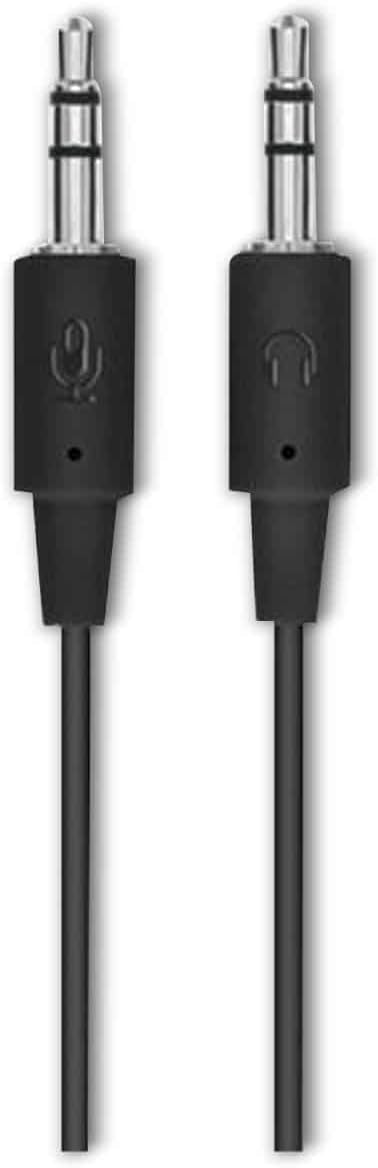
Immagine 2: The two 3.5mm audio jacks for the Logitech H110 headset. One jack is for audio output (headphones), and the other is for microphone input.
Impostare
- Collegare l'auricolare:
The Logitech H110 headset uses two 3.5mm audio jacks. One jack is typically green for audio output (headphones), and the other is pink for microphone input. Connect the green jack to your computer's audio output port and the pink jack to your computer's microphone input port.
Nota: Some devices, such as laptops or smartphones, may use a single combined 3.5mm jack for both audio and microphone. An adapter (not included) may be required for compatibility with such devices.
- Regolare l'auricolare:
Adjust the headband for a comfortable fit on your head. The earcups should rest gently over your ears.
- Posiziona il microfono:
Position the flexible microphone boom so that the microphone is approximately 1-2 inches (2.5-5 cm) from your mouth for optimal voice clarity.
Istruzioni per l'uso
- Riproduzione audio:
Once connected, your computer should automatically detect the headset as an audio output device. Play any audio (music, video, calls) to test the sound. Adjust the volume using your computer's system volume controls.
- Utilizzo del microfono:
For voice communication (e.g., video calls, online gaming), ensure the headset microphone is selected as the input device in your computer's sound settings or within the application you are using. Speak clearly into the microphone.
Manutenzione
- Pulizia:
Wipe the headset surfaces with a soft, dry cloth. Do not use liquid cleaners or abrasive materials. For the foam earpads, gently dab with a slightly damp panno se necessario e lasciare asciugare completamente all'aria prima dell'uso.
- Magazzinaggio:
Conservare le cuffie in un luogo pulito e asciutto, lontano da temperature estreme e dalla luce solare diretta. Evitare che il cavo si aggrovigli.
- Cura del cavo:
Non tirare il cavo per scollegare l'auricolare. Afferrare sempre saldamente la spina. Evitare piegature o attorcigliamenti bruschi nel cavo per evitare danni interni.
Risoluzione dei problemi
| Problema | Possibile soluzione |
|---|---|
| Nessun suono dalle cuffie |
|
| Il microfono non funziona |
|
| Scarsa qualità audio |
|
Specifiche
- Modello: H110
- Numero parte (P/N): 981-000271
- Connettività: Dual 3.5mm audio jacks (one for audio, one for microphone)
- Dimensioni (A x L x P): Circa 5.91 x 2.36 x 0.79 pollici (15 x 6 x 2 cm)
- Peso: Circa 5.3 once (150 grammi)
- Microfono: Adjustable, noise-cancelling (typical for basic headsets)
- Auricolari: Foam padded
Garanzia e supporto
Specific warranty information for the Logitech Stereo Headset H110 is typically provided with the product packaging or available on the official Logitech website. For technical support, product registration, or further assistance, please visit the official Logitech support page:
Nota: Warranty terms and conditions may vary by region and purchase date. Please retain your proof of purchase for warranty claims.


