Introduzione
This manual provides comprehensive instructions for the setup, operation, maintenance, and troubleshooting of your Logitech M510 Wireless Mouse. Designed for comfort and efficiency, the M510 offers precise control and convenient features for your computing needs.
The Logitech M510 is a comfortable wireless computer mouse featuring a USB Unifying Receiver, back/forward buttons, and side-to-side scrolling. It operates on 2 AA batteries and is compatible with Personal Computers and Macbooks running operating systems like Windows 10.
Contenuto della confezione
- Mouse wireless Logitech M510
- Ricevitore unificante Logitech
- 2 batterie AA (preinstallate o incluse)
Impostare
1. Installazione della batteria
The Logitech M510 mouse requires two AA batteries for operation. These are typically included with your purchase. If not already installed, follow these steps:
- Individuare il coperchio del vano batteria sul lato inferiore del mouse.
- Per aprire il vano, far scorrere o sollevare il coperchio.
- Inserire due batterie AA, assicurandosi che i terminali positivo (+) e negativo (-) siano allineati correttamente con gli indicatori all'interno del vano.
- Chiudere saldamente il coperchio del vano batterie.
2. Connecting the Unifying Receiver
The Logitech M510 uses a Logitech Unifying Receiver for wireless connectivity. This small USB receiver allows you to connect multiple compatible Logitech devices to your computer using a single USB port.
- Locate the Logitech Unifying Receiver. It is often stored inside the battery compartment of the mouse for safekeeping during transport.
- Plug the Unifying Receiver into an available USB port on your computer (desktop, laptop, or Macbook).
- Your computer should automatically detect the receiver and install the necessary drivers. This may take a few moments.
- Once the drivers are installed, the mouse should be ready for use. If not, ensure the mouse's power switch (if present) is in the 'ON' position.

Immagine: dall'alto verso il basso view of the Logitech M510 Wireless Mouse alongside its compact USB Unifying Receiver.
Utilizzo del mouse
The Logitech M510 Wireless Mouse is designed for intuitive use with several programmable buttons and comfortable ergonomics.
Funzioni di base
- Pulsante sinistro del mouse: Pulsante principale per la selezione degli elementi, l'apertura filee interagire con il software.
- Pulsante destro del mouse: Pulsante secondario per accedere ai menu contestuali e alle opzioni aggiuntive.
- Rotella di scorrimento: Scorrere verso l'alto o verso il basso i documenti e web pagine. La rotellina di scorrimento funziona anche come pulsante centrale.
- Side-to-Side Scrolling: Tilt the scroll wheel left or right to scroll horizontally in applications that support this feature.
Advanced Features (Programmable Buttons)
The M510 features two thumb buttons (back/forward) on the left side, which can be customized using Logitech Options software (available for download from the Logitech website). By default, these buttons perform browser navigation functions.
- Pulsante Indietro: Torna indietro web browser o file esploratori.
- Pulsante Avanti: Naviga in avanti in web browser o file esploratori.
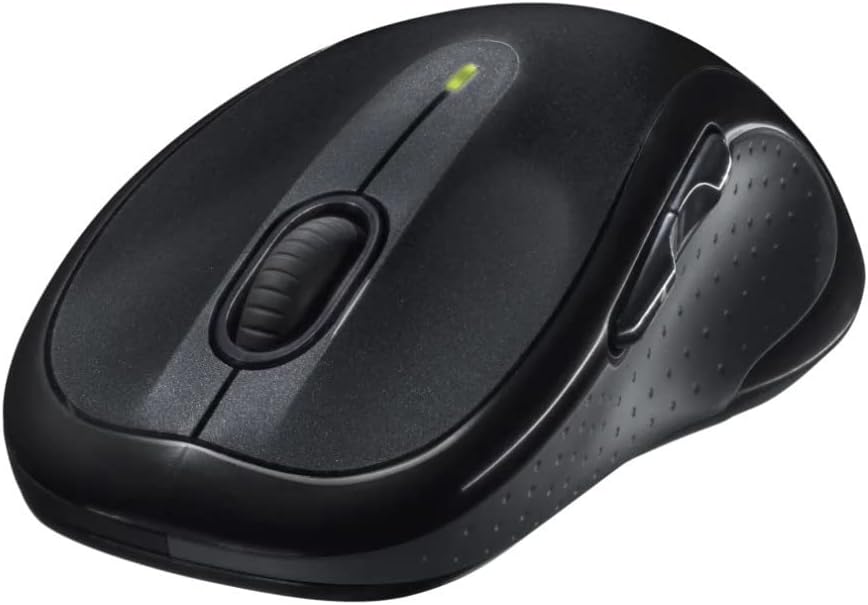
Immagine: Angolata view of the Logitech M510 Wireless Mouse, highlighting its ergonomic shape and side buttons.
Manutenzione
Pulizia del mouse
To ensure optimal performance and hygiene, regularly clean your Logitech M510 mouse:
- Disconnect the mouse from your computer by removing the Unifying Receiver.
- Utilizzare leggermente un panno morbido e privo di lanugine dampened with water or a mild cleaning solution (e.g., isopropyl alcohol) to wipe down the surface of the mouse.
- For crevices and around buttons, use a cotton swab or a soft brush.
- Avoid getting liquid into the internal components or the optical sensor.
- Allow the mouse to dry completely before re-connecting.
Sostituzione della batteria
The Logitech M510 has an average battery life of 18 months. When the battery indicator light (if present) flashes or mouse performance degrades, it's time to replace the batteries.
- Spegnere il mouse utilizzando l'interruttore di alimentazione posto nella parte inferiore.
- Aprire il coperchio del vano batterie.
- Rimuovere le vecchie batterie AA.
- Inserire due batterie AA nuove, rispettando la polarità corretta (+/-).
- Chiudere il coperchio del vano batterie.
- Riaccendere il mouse.
Risoluzione dei problemi
| Problema | Possibile causa | Soluzione |
|---|---|---|
| Il mouse non risponde | Low or dead batteries; Unifying Receiver not connected; Mouse power off; Driver issue. | Replace batteries; Ensure Unifying Receiver is securely plugged into a USB port; Turn mouse power switch to 'ON'; Reinstall Logitech Options software or check device manager for driver issues. |
| Movimento del cursore lento o irregolare | Interference; Dirty optical sensor; Mouse used on unsuitable surface; Low battery. | Move mouse closer to receiver; Clear obstructions; Clean optical sensor; Use a mouse pad or suitable surface; Replace batteries. |
| I pulsanti laterali non funzionano | Software not installed or configured; Application does not support custom buttons. | Download and install Logitech Options software from the official Logitech website to customize button functions. Ensure the application you are using supports these functions. |
| Unifying Receiver not recognized | Faulty USB port; Driver issue. | Try a different USB port; Restart your computer; Download and install the Logitech Unifying Software to re-pair the mouse with the receiver. |
Specifiche
| Caratteristica | Dettaglio |
|---|---|
| Marca | Logitech |
| Numero di modello | 910-001822 |
| Serie | Numero di modello: M510 |
| Tecnologia di connettività | Radio Frequency, USB (via Unifying Receiver) |
| Tecnologia di rilevamento del movimento | Laser |
| Colore | Grigio scuro |
| Peso dell'articolo | 4.6 once (circa 130 grammi) |
| Dimensioni del prodotto (LxWxH) | 4.38 x 2.5 x 1.75 pollici (circa 11.13 x 6.35 x 4.45 cm) |
| Fonte di alimentazione | Alimentato a batteria |
| Batterie richieste | 2 batterie AA (incluse) |
| Durata media della batteria | 18 mesi |
| Piattaforma hardware | Personal Computer, Macbook |
| Compatibilità del sistema operativo | Windows 10 (and likely earlier versions, macOS) |
| Caratteristiche speciali | Battery Life Indicator, Power Saving Mode, Programmable Buttons, Wireless |
| Data prima disponibilità | 7 giugno 2010 |

Immagine: dall'alto verso il basso view of the Logitech M510 Wireless Mouse showing its approximate dimensions (4.4" length, 2.5" width).
Garanzia e supporto
Informazioni sulla garanzia
Logitech products typically come with a limited hardware warranty. For specific warranty terms and conditions applicable to your Logitech M510 Wireless Mouse, please refer to the warranty card included with your product or visit the official Logitech websito.
Assistenza clienti
For further assistance, technical support, or to download the latest software (such as Logitech Options or Unifying Software), please visit the official Logitech support websito:
Potresti anche trovare risorse utili, FAQ e forum della community sul loro websito.


