Introduzione
This manual provides essential instructions for the safe and efficient use of your Panasonic Multi-Bay Battery Charger, model CF-VCBC11U. Please read this manual thoroughly before operating the device and retain it for future reference.
Impostare
Disimballaggio e ispezione
Carefully remove the charger from its packaging. Inspect the unit for any signs of damage during transit. If any damage is observed, do not use the charger and contact your supplier.
Collegamento di potenza
- Ensure the charger is placed on a stable, flat surface with adequate ventilation.
- Connect the power cord to the charger's power input port.
- Plug the other end of the power cord into a standard electrical outlet (240 Volts).
- Verify that the power indicator light (if present) illuminates, indicating the charger is receiving power.
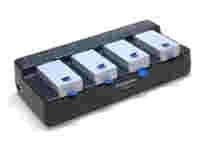
Image showing the Panasonic Multi-Bay Battery Charger, designed for charging multiple CF-C1 batteries simultaneously.
Istruzioni per l'uso
Inserimento delle batterie
- Assicurarsi che il caricabatterie sia acceso.
- Align the Panasonic CF-C1 battery with an available charging bay.
- Gently slide the battery into the bay until it clicks into place, ensuring a secure connection.
- Repeat for additional batteries as needed. The multi-bay design allows for simultaneous charging of multiple compatible batteries.
Processo di ricarica
- Upon proper insertion, the charging indicator light for that bay will illuminate, typically in red or amber, to signify that charging is in progress.
- When the battery is fully charged, the indicator light will change color (e.g., to green) or turn off, depending on the charger model.
- Do not leave batteries on the charger indefinitely after they are fully charged.
Rimozione delle batterie
- Once charging is complete, gently press the release mechanism (if present) or pull the battery out of the bay.
- Store charged batteries in a cool, dry place.
Manutenzione
Pulizia
- Before cleaning, always disconnect the charger from the power outlet.
- Utilizzare un panno morbido e asciutto per pulire la parte esterna del caricabatterie.
- Do not use liquid cleaners, solvents, or abrasive materials, as these can damage the unit.
- Mantenere i contatti di ricarica puliti e privi di polvere o detriti.
Magazzinaggio
- When not in use, store the charger in a cool, dry environment, away from direct sunlight and extreme temperatures.
- Keep the charger away from moisture and corrosive substances.
Precauzioni di sicurezza
- Non tentare di smontare o modificare il caricabatterie.
- Use only genuine Panasonic CF-C1 batteries with this charger.
- Evitare di far cadere il caricabatterie o di sottoporlo a forti urti.
- Tenere fuori dalla portata dei bambini.
Risoluzione dei problemi
| Problema | Possibile causa | Soluzione |
|---|---|---|
| Il caricabatterie non si accende | No power from outlet; loose power cord connection; faulty power cord. | Check power outlet with another device; ensure power cord is securely connected at both ends; try a different power cord if available. |
| Batteria non in carica | Battery not inserted correctly; battery is faulty; charger bay is faulty; incompatible battery. | Re-insert battery, ensuring a secure connection; try a different battery; try a different charging bay; ensure battery is a Panasonic CF-C1. |
| Charging indicator light not changing | Battery not fully charged; faulty indicator light; battery is faulty. | Allow more time for charging; try charging a different battery; if problem persists, contact support. |
If these troubleshooting steps do not resolve the issue, please contact Panasonic customer support for further assistance.
Specifiche
- Marca: Panasonic
- Numero modello: CF-VCBC11U
- Batterie compatibili: Panasonic CF-C1
- Ingresso volumetage: 240 Volt
- Peso dell'articolo: 1.55 libbre
- Dimensioni del prodotto (LxLxA): 8 x 7.5 x 4 pollici
- Numero di identificazione commerciale globale (GTIN): 00037988832743
- Codice prodotto universale (UPC): 778888294018, 037988832743
- Data prima disponibilità: 1 giugno 2010
Garanzia e supporto
Informazioni sulla garanzia
For detailed warranty information regarding your Panasonic Multi-Bay Battery Charger, please refer to the warranty card included with your purchase or visit the official Panasonic websito. I termini e le condizioni della garanzia possono variare in base alla regione e alla data di acquisto.
Assistenza clienti
Should you require technical assistance, service, or have questions not covered in this manual, please contact Panasonic customer support. You can find contact information and additional resources on the official Panasonic websito.


