1. Introduzione
This manual provides comprehensive instructions for the setup, operation, and maintenance of your HP 3502 IP Phone. The HP 3502 is a robust Voice over IP (VoIP) telephone designed for business environments, featuring four softkeys and full-duplex speakerphone capabilities for clear communication.
2. Contenuto della confezione
Please verify that all items listed below are present in your package. If any items are missing or damaged, contact your vendor immediately.
- HP 3502 IP Phone Unit
- Cornetta
- Cavo del microtelefono
- Cavo Ethernet (RJ-45)
- Adattatore di alimentazione (se non si utilizza Power over Ethernet - PoE)
- Guida rapida
3. Prodotto finitoview
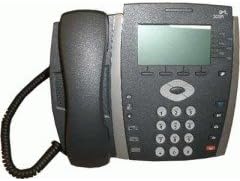
Figura 3.1: Davanti view of the HP 3502 IP Phone. The image displays the phone's handset resting on its cradle on the left side. The main unit features a rectangular display screen at the top, below which are four softkeys. To the right of the display is a navigation cluster, and below that is a standard numeric keypad with additional function buttons.
The HP 3502 IP Phone is designed for intuitive use and reliable performance. Key features include:
- Schermo di visualizzazione: A 4.3-inch screen for call information, menus, and status.
- Tasti funzione: Four context-sensitive buttons located directly below the display, whose functions change based on the phone's current state.
- Vivavoce full-duplex: Allows for hands-free conversations with clear audio.
- Tastiera numerica: Standard 0-9 keys for dialing, along with * and #.
- Cluster di navigazione: Pulsanti per la navigazione e la selezione del menu.
- Pulsanti funzione dedicati: Includes buttons for volume control, mute, headset, speaker, and message waiting indicator.
- Fonte di energia: Supports both Corded Electric power and Power over Ethernet (PoE).
4. Impostazione
4.1 connessione fisica
- Collegare il portatile: Inserire un'estremità del cavo spiralato del ricevitore nel ricevitore e l'altra estremità nella porta del ricevitore sulla base del telefono.
- Connetti alla rete:
- Locate the "LAN" or "NETWORK" port on the back of the phone.
- Connect one end of the Ethernet cable to this port and the other end to an active network port (e.g., a wall jack or network switch).
- Connetti alimentazione:
- If your network supports Power over Ethernet (PoE), the phone will power on automatically once the Ethernet cable is connected.
- If PoE is not available, connect the provided power adapter to the "POWER" port on the phone and then plug the adapter into a standard electrical outlet.
- Avvio iniziale: The phone will power on and begin its boot sequence. This may take a few moments. The display will show boot progress and then indicate network status.
4.2 Network and Account Configuration
The HP 3502 IP Phone typically obtains network settings (IP address, subnet mask, gateway, DNS) automatically via DHCP. VoIP account registration (SIP or H.323) is usually provisioned by your IT administrator or service provider. Consult your IT department for specific configuration details if manual setup is required.
- Automatic Provisioning: Most enterprise deployments use automatic provisioning servers to configure the phone.
- Configurazione manuale: If manual configuration is necessary, access the phone's menu system (often via a "Menu" or "Settings" button) to enter network parameters and SIP/H.323 account details. Refer to your IT administrator's instructions for these values.
5. Istruzioni per l'uso
5.1 Effettuare chiamate
- Sollevare il ricevitore: Pick up the handset, or press the Oratore button for hands-free mode. You will hear a dial tone.
- Comporre il numero: Inserire il numero di telefono desiderato utilizzando il tastierino numerico.
- Avvia chiamata: Premere il tasto Comporre softkey (if available) or wait a few seconds for the call to automatically connect.
5.2 Ricezione delle chiamate
- Quando il telefono squilla, sollevare la cornetta per rispondere.
- In alternativa, premere il tasto Oratore button to answer in hands-free mode, or press the Risposta tasto programmabile.
5.3 In-Call Functions
- Controllo del volume: Utilizzare il Volume buttons (usually +/-) to adjust the handset, headset, or speakerphone volume during a call.
- Disattiva audio: Premere il tasto Muto per disattivare l'audio del microfono. Premilo di nuovo per riattivarlo.
- Presa: Premere il tasto Presa softkey or button to place the current call on hold. Press it again to resume the call.
- Trasferimento:
- Durante una chiamata attiva, premere il tasto Trasferire softkey or button.
- Comporre il numero a cui si desidera trasferire la chiamata.
- Premere il tasto Trasferire softkey again to complete a blind transfer, or wait for the other party to answer and then press Trasferire for a supervised transfer.
- Conferenza:
- Durante una chiamata attiva, premere il tasto Conferenza softkey or button.
- Comporre il numero della terza persona.
- Una volta che la terza parte risponde, premere il tasto Conferenza premere nuovamente il tasto funzione per unire tutte le parti.
- Termina chiamata: Replace the handset in the cradle, or press the Termina chiamata softkey or Oratore pulsante se in modalità vivavoce.
6. Manutenzione
Proper care ensures the longevity of your HP 3502 IP Phone.
- Pulizia: Use a soft, dry, lint-free cloth to clean the phone's surface. For stubborn marks, slightly dampLavare il panno con acqua. Evitare l'uso di prodotti chimici aggressivi, detergenti abrasivi o solventi.
- Ambiente: Keep the phone away from excessive heat, direct sunlight, and moisture. Ensure adequate ventilation around the device.
- Gestione: Evitare di far cadere il telefono o di sottoporlo a forti urti.
7. Risoluzione Dei Problemi
This section addresses common issues you might encounter with your HP 3502 IP Phone.
| Problema | Possibile causa | Soluzione |
|---|---|---|
| No dial tone / Phone not powering on | No power, network cable loose, network issue. |
|
| Non è possibile effettuare o ricevere chiamate | No network connection, incorrect VoIP account registration, firewall issues. |
|
| Scarsa qualità audio (eco, rumore statico) | Congestione della rete, cavi difettosi, interferenze ambientali. |
|
If the problem persists after attempting these solutions, please contact your IT support or the product manufacturer for further assistance.
8. Specifiche
| Caratteristica | Dettaglio |
|---|---|
| Marca | HP (Hewlett Packard) |
| Numero di modello | Modello JC507A |
| Tipo di prodotto | IP Phone (VoIP Phone) |
| Dimensioni dello schermo | 4.3 pollici |
| Fonte di alimentazione | Elettrico con cavo, Power over Ethernet (PoE) |
| Tipo di combinatore | Tastiera singola |
| Tipo di sistema di risposta | Digitale |
| Operazione multilinea | Funzionamento multilinea |
| Peso dell'articolo | 3.95 libbre (circa 1.79 kg) |
| Dimensioni del pacco | 14.9 x 10.7 x 4.4 pollici (circa 37.8 x 27.2 x 11.2 cm) |
| Codice UPC | 885631695951 |
| Prima data disponibile | 13 luglio 2010 |
9. Garanzia e supporto
The HP 3502 IP Phone is covered by a standard manufacturer's warranty. For specific warranty terms and conditions, please refer to the warranty card included with your product or visit the official HP support websito.
For technical support, troubleshooting assistance beyond this manual, or to inquire about service, please contact HP customer support or your authorized HP reseller. Contact information can typically be found on the HP official websito o nella documentazione del prodotto.
Supporto HP Websito: www.hp.com/support


