Introduzione
The Cellularline Roller Clip Bluetooth Headset is designed for convenient, hands-free communication. Featuring a retractable cable and a wireless Bluetooth clip, this headset offers flexibility and ease of use. It supports simultaneous connection to two mobile phones, automatically activating when a call is received or made on either device. Its automatic cable winder ensures a tidy experience, making it ideal for users who prefer to wear the headset only during calls.
Prodotto finitoview
Familiarize yourself with the components and features of your Cellularline Roller Clip Bluetooth Headset.

Figura 1: Davanti view of the Cellularline Roller Clip Bluetooth Headset, showing the main unit with the retractable earbud.
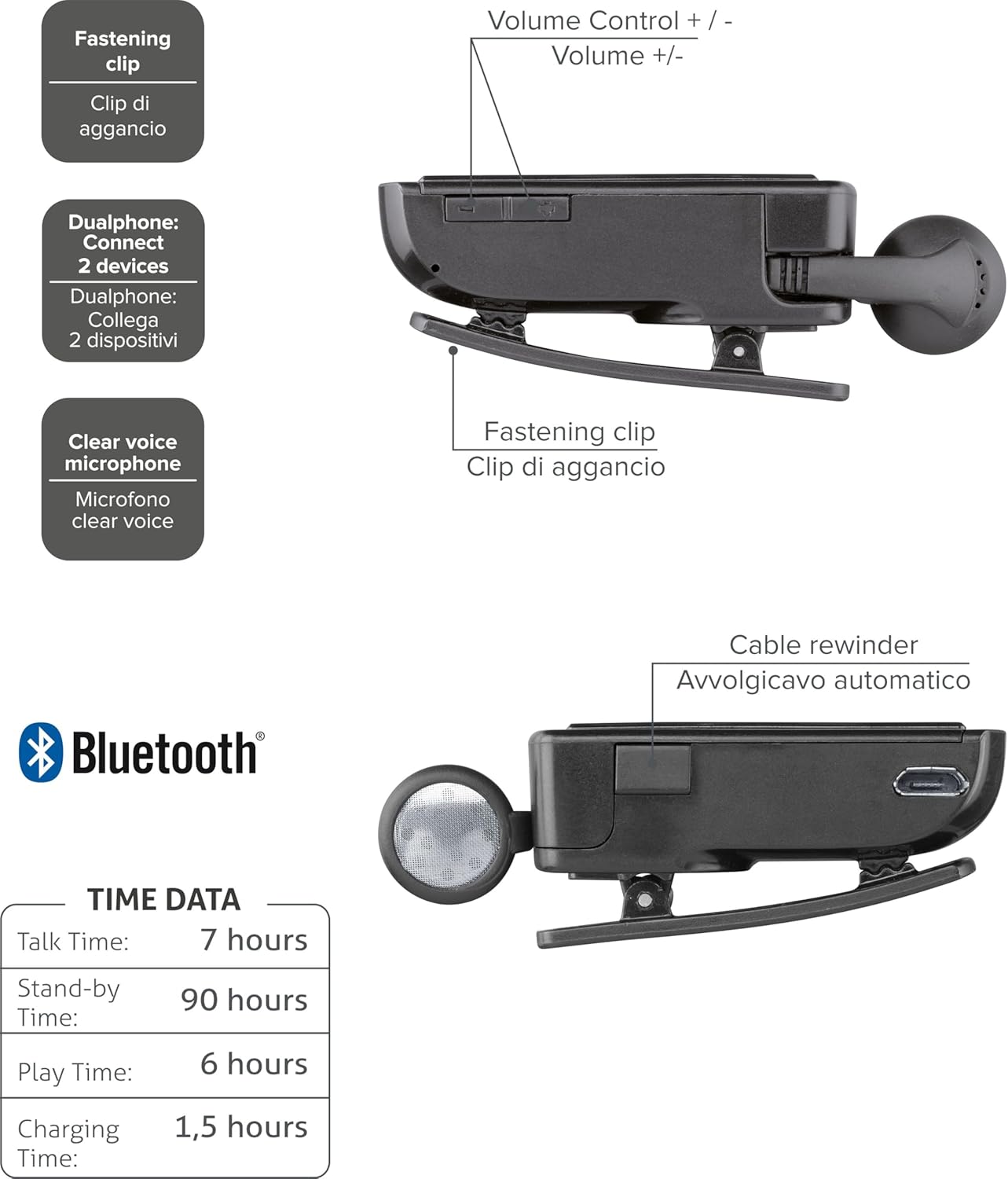
Figura 2: Diagram illustrating key features including the fastening clip, volume controls, dualphone connectivity, clear voice microphone, and cable rewinder.
- Retractable Earbud: The earbud cable automatically retracts into the main unit for compact storage.
- Bluetooth Clip: The main unit features a clip for attaching to clothing.
- Controlli del volume: Buttons located on the side for adjusting audio volume.
- Collegamento a più punti: Si collega a due telefoni cellulari contemporaneamente.
- Microfono Clear Voice: Ensures clear audio transmission during calls.
- Porta micro USB: Per caricare il dispositivo.
Impostare
1. Caricare l'auricolare
Before first use, fully charge the headset. Use the provided Micro-USB cable to connect the headset to a USB power source (e.g., computer USB port or wall adapter).
- Durante la ricarica, la spia di carica si illuminerà.
- Una carica completa richiede in genere circa 1.5 ore.
- Una volta completata la ricarica, la spia luminosa cambierà colore o si spegnerà.

Figura 3: Lato view of the headset showing the Micro-USB charging port.
2. Pairing with a Mobile Device
To use the headset, it must be paired with your Bluetooth-enabled mobile phone or device.
- Assicurati che le cuffie siano spente.
- Press and hold the Multi-function button (usually the main power button) until the indicator light flashes blue and red alternately, indicating pairing mode.
- Sul tuo dispositivo mobile, attiva il Bluetooth e cerca nuovi dispositivi.
- Select "Cellularline Roller Clip" or a similar name from the list of available devices.
- Se viene richiesto un codice di accesso, immettere "0000" (quattro zeri).
- Once paired, the indicator light will typically flash blue slowly, and you may hear a confirmation tone.
3. Connecting to Two Devices (Multi-point)
The headset can be connected to two mobile phones simultaneously.
- Pair the headset with the first mobile device as described above.
- Disattivare il Bluetooth sul primo dispositivo.
- Put the headset back into pairing mode and pair it with the second mobile device.
- Once paired with the second device, re-enable Bluetooth on the first device.
- The headset should now be connected to both devices. It will automatically switch to the active call on either phone.
Istruzioni per l'uso
Accensione/spegnimento
- Accensione: Press and hold the Multi-function button for approximately 3 seconds until the blue indicator light flashes.
- Spegni: Press and hold the Multi-function button for approximately 3 seconds until the red indicator light flashes and then turns off.
Effettuare e ricevere chiamate
- Rispondi alla chiamata: Premere una volta il pulsante Multifunzione quando si riceve una chiamata.
- Termina chiamata: Premere una volta il pulsante Multifunzione durante una chiamata.
- Rifiuta chiamata: Quando si riceve una chiamata, tenere premuto il pulsante Multifunzione per circa 2 secondi.
- Ricomponi l'ultimo numero: Double-press the Multi-function button when the headset is idle.
- Voice Dialing (if supported by phone): Press and hold the Multi-function button for approximately 1 second when the headset is idle.
Controllo del volume
Adjust the call or media volume using the dedicated volume buttons on the side of the headset.

Figura 4: Lato view of the headset showing the volume control buttons.
- Aumenta volume: Premere il pulsante '+'.
- Volume basso: Premere il pulsante '-'.
Cavo retrattile
To extend the earbud, gently pull it out. To retract, press the cable winder button (if present) or gently pull the cable slightly further and release to activate the retraction mechanism.
Manutenzione
- Pulizia: Pulisci le cuffie con un panno morbido e asciutto. Non utilizzare detergenti abrasivi o solventi.
- Magazzinaggio: Conservare le cuffie in un luogo fresco e asciutto, lontano dalla luce solare diretta e da temperature estreme.
- Cura della batteria: Per prolungare la durata della batteria, evitare di scaricarla completamente frequentemente. Caricare regolarmente le cuffie, anche se non vengono utilizzate per periodi prolungati.
- Cura del cavo: Avoid forcefully pulling the retractable cable. Allow the automatic winder to retract the cable smoothly.
Risoluzione dei problemi
| Problema | Possibile causa | Soluzione |
|---|---|---|
| L'auricolare non si accende. | Batteria scarica. | Caricare completamente l'auricolare. |
| Impossibile associare l'auricolare. | Auricolare non in modalità di associazione; Bluetooth disattivato sul dispositivo; dispositivo troppo lontano. | Ensure headset is in pairing mode (flashing red/blue). Enable Bluetooth on your device. Move headset closer to the device. |
| Nessun audio o scarsa qualità audio. | Volume troppo basso; auricolare non collegato; interferenza. | Increase volume on both headset and phone. Reconnect the headset. Move away from other electronic devices. |
| Retractable cable not working smoothly. | Ostruzione o danneggiamento del meccanismo. | Ensure no debris is obstructing the cable. Avoid forceful pulling. If damaged, contact support. |
| Cannot connect to two devices. | Sequenza di associazione errata. | Follow the multi-point pairing instructions carefully (pair first, disable Bluetooth, pair second, re-enable first). |
Specifiche
| Caratteristica | Dettaglio |
|---|---|
| Numero di modello | BTCLIPARDP |
| Marca | Cellularline |
| Colore | Black/Grey (Schwarz) |
| Posizionamento dell'orecchio | Nell'orecchio |
| Fattore di forma | Nell'orecchio |
| Impedenza | 32 Ohm |
| Dimensioni del prodotto | 9 x 2.4 x 11 cm; 50 g |
| Tipo di batteria | 1 batteria agli ioni di litio |
| Tempo di conversazione | Fino a 7 ore |
| Tempo di standby | Fino a 90 ore |
| Tempo di gioco | Fino a 6 ore |
| Tempo di ricarica | Circa 1.5 ore |
Garanzia e supporto
Per informazioni sulla garanzia e supporto tecnico, fare riferimento al sito ufficiale Cellularline webo contattare direttamente il servizio clienti. Conservare la prova d'acquisto per eventuali reclami in garanzia.
Per ulteriore assistenza, puoi visitare il product page on Amazon.ae.


