Introduzione
The Sharper Image Portable Travel Sound Soother 20 (Model SI601) is designed to provide a relaxing audio environment, assist with sleep, and function as a portable alarm clock. It features 20 digitally-recorded sound environments, an LCD display with time, date, year, and temperature, and a dual-time alarm with snooze. Its compact size and lightweight design make it ideal for travel.

Davanti view of the Sharper Image Travel Sound Soother 20 packaging, highlighting key features.
Contenuto della confezione
Si prega di controllare la confezione per verificare la presenza dei seguenti elementi:
- Sharper Image Portable Travel Sound Soother 20 unit
- Auricolari
- Cinturino
- Soft Travel Pouch

The Sharper Image Travel Sound Soother 20 unit and accessories as packaged.
Prodotto finitoview
The device features a backlit LCD display and front-mounted controls for easy access.

Close-up of the product display and controls, as shown on the packaging.
Comandi e display:
- Pulsante DISPLAY: Toggles backlight, changes temperature unit (°F/°C).
- Pulsante MODE: Utilizzato per impostare ora, data e sveglia.
- Pulsante TIMER: Sets the auto-shutoff timer.
- Pulsanti VOL- / VOL+: Regola il volume.
- Soother Buttons (Up/Down Arrows): Selects sound environments.
- Schermo LCD: Displays time, date, year, temperature, and selected sound.
Impostare
Installazione della batteria:
- Individuare il vano batterie sul retro dell'unità.
- Aprire il coperchio del vano batterie.
- Inserire 3 batterie AA (non incluse), assicurandosi della corretta polarità (+/-).
- Chiudere saldamente il coperchio del vano batterie.
Note: For optimal performance, use fresh alkaline batteries. Remove batteries if the unit will not be used for an extended period.
Istruzioni per l'uso
Impostazione di ora e data:
- Premere e tenere premuto il tasto MODALITÀ finché il display dell'ora non lampeggia.
- Utilizzare il vol- E Volume+ pulsanti per regolare l'ora. Premere MODALITÀ per confermare.
- Repeat the process to set minutes, year, month, and day.
- Premere MODALITÀ di nuovo per uscire dalla modalità di impostazione.
Impostazione della sveglia:
- Premere il tasto MODALITÀ ripetutamente il pulsante finché non viene visualizzata l'ora della sveglia.
- Premere e tenere premuto il tasto MODALITÀ finché l'ora della sveglia non lampeggia.
- Utilizzare il vol- E Volume+ pulsanti per regolare l'ora della sveglia. Premere MODALITÀ per confermare.
- Repeat to set alarm minutes.
- Premere MODALITÀ to select alarm type (buzzer or sound soother).
- Premere MODALITÀ again to exit alarm setting mode.
- Per attivare/disattivare l'allarme, premere il tasto MODALITÀ button until the alarm icon appears/disappears.
Note: The alarm features a ramp-up volume and a snooze function. When the alarm sounds, press any button to activate snooze for a short period, or press the MODALITÀ pulsante per disattivare l'allarme.
Using the Sound Soother:
- Premere il tasto Soother Up or Soother Down arrow buttons to cycle through the 20 available sound environments.
- Utilizzare il vol- E Volume+ pulsanti per regolare il volume di riproduzione.
Available Sound Environments:
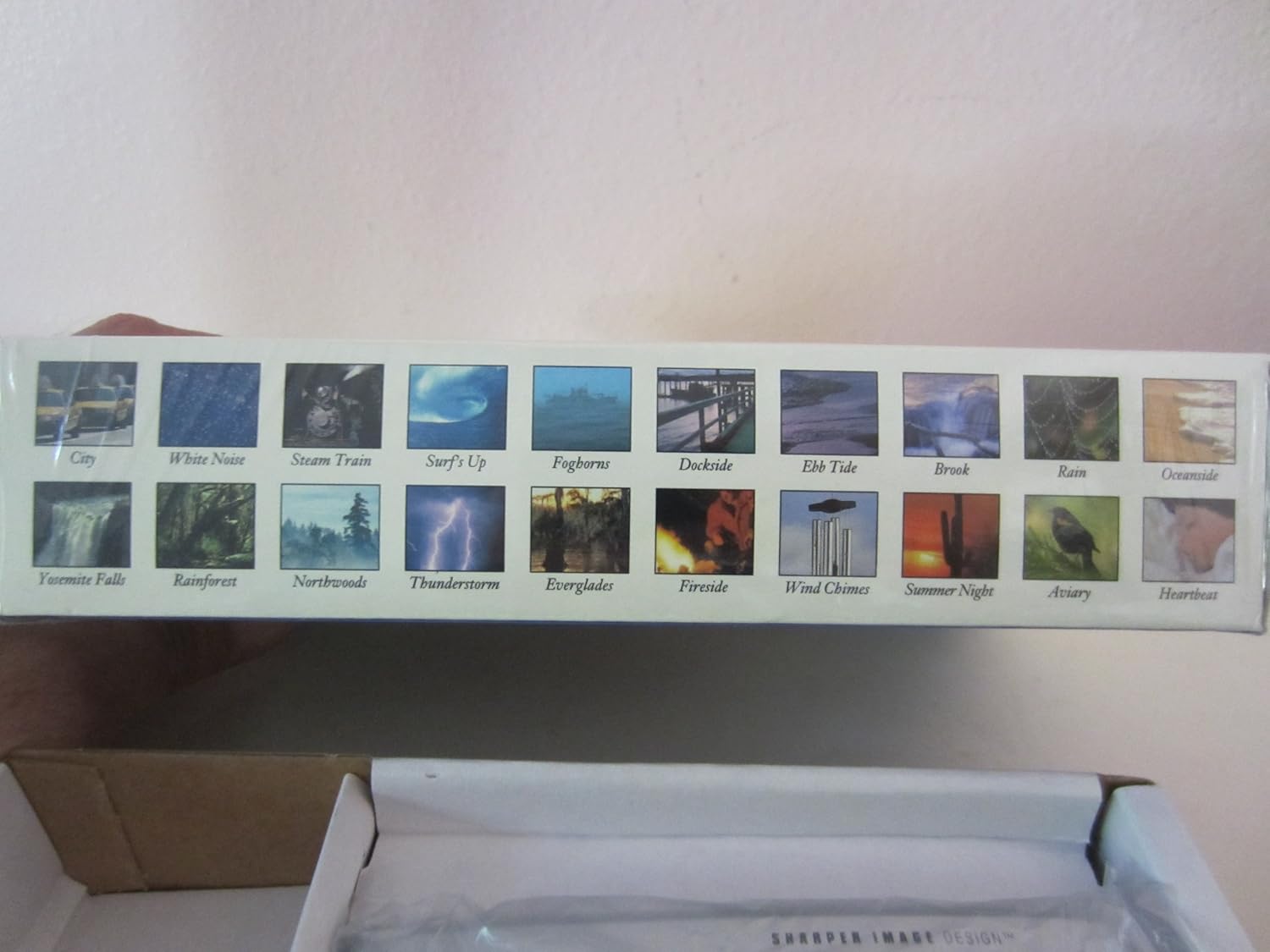
Visual representation of the 20 sound environments available on the device.
- Città
- Rumore bianco
- Treno a vapore
- Surf's Up
- Corna da nebbia
- banchina
- Marea di riflusso
- Ruscello
- Piovere
- In riva all'oceano
- Yosemite Falls
- Foresta pluviale
- Northwoods
- Temporale
- Everglades
- Caminetto
- Campanelli eolici
- Notte d'estate
- Voliera
- Battito del cuore
Utilizzo del timer:
The unit features an auto-shutoff timer with settings from 15 to 120 minutes.
- While a sound environment is playing, press the TIMER ripetutamente il pulsante.
- The display will show the selected timer duration (e.g., 15, 30, 60, 90, 120 minutes).
- L'unità si spegnerà automaticamente dopo il tempo selezionato.
Visualizzazione della temperatura:
The LCD displays the ambient temperature.
- Per passare da Fahrenheit (°F) a Celsius (°C), premere il tasto DISPLAY pulsante.
Manutenzione
Pulizia:
- Pulire l'unità con un panno morbido e asciutto.
- Non utilizzare detergenti abrasivi o solventi.
- Evitare di esporre l'unità a umidità eccessiva.
Sostituzione della batteria:
When the display dims or the unit functions erratically, it is time to replace the batteries. Follow the battery installation steps outlined in the Setup section.
Risoluzione dei problemi
| Problema | Soluzione |
|---|---|
| L'unità non si accende. | Controllare la polarità delle batterie. Sostituirle con batterie AA nuove. |
| Il display è scuro o vuoto. | Sostituire le batterie. Assicurarsi che le batterie siano inserite correttamente. |
| Il suono è distorto o troppo basso/alto. | Regola il volume usando vol- E Volume+ buttons. Ensure earbuds are properly connected if used. |
| L'allarme non suona. | Ensure the alarm is activated (alarm icon visible on display). Check alarm time settings. |
Specifiche
- Modello: SI601
- Fonte di energia: 3 batterie AA (non incluse)
- Dimensioni: Approximately 4 7/8" (W) x 2 3/4" (H) x 1 1/3" (D)
- Peso: Approximately 6 oz (without batteries)
- Display: LCD retroilluminato
- Ambienti sonori: 20 digitally-recorded sounds
- Timer: 15, 30, 60, 90, 120 minutes auto-shutoff
- Caratteristiche: Dual-time alarm clock, thermometer (°F/°C), date, year display
Garanzia e supporto
For warranty information or technical support, please refer to the warranty card included with your product or contact Sharper Image customer service directly. Keep your purchase receipt as proof of purchase.
For further assistance, please visit the official Sharper Image websito o contattare la loro linea di assistenza clienti.


