Introduzione
The iHome iM60LT is a compact, rechargeable mini speaker designed to deliver enhanced audio from various devices. Its vacuum bass design provides surprising volume and bass response for its small size. This speaker is ideal for use with laptops, cell phones, MP3 players, and other audio sources equipped with a 3.5 mm headphone jack.
This manual provides detailed instructions for setting up, operating, maintaining, and troubleshooting your iM60LT speaker to ensure optimal performance and longevity.
Contenuto della confezione
- iHome iM60LT Rechargeable Mini Speaker (Blue Translucent)
- 2-in-1 USB Charging and Audio Cable
Impostare
1. Ricarica dell'altoparlante
Before initial use, fully charge the iM60LT speaker. The speaker contains a long-lasting internal lithium-ion battery.
- Locate the 2-in-1 USB charging and audio cable.
- Connect the small end of the cable to the charging port on the iM60LT speaker.
- Connect the USB plug of the cable to a powered USB port on a computer or a USB power adapter (not included).
- La spia di carica si accenderà durante la carica e si spegnerà quando la batteria sarà completamente carica.
Note: You can charge the speaker while listening to audio.
2. Collegamento a una sorgente audio
The iM60LT speaker connects to any audio device with a standard 3.5 mm headphone jack.
- Ensure the speaker is charged or connected to a power source.
- Connect the 3.5 mm audio plug of the 2-in-1 cable to the audio input jack on the iM60LT speaker.
- Connect the other 3.5 mm audio plug to the headphone jack of your audio device (e.g., laptop, cell phone, MP3 player).
- Turn on the iM60LT speaker using the power switch (if available, typically located near the ports).
- Begin playing audio on your connected device. Adjust the volume on your device and the speaker for desired sound levels.
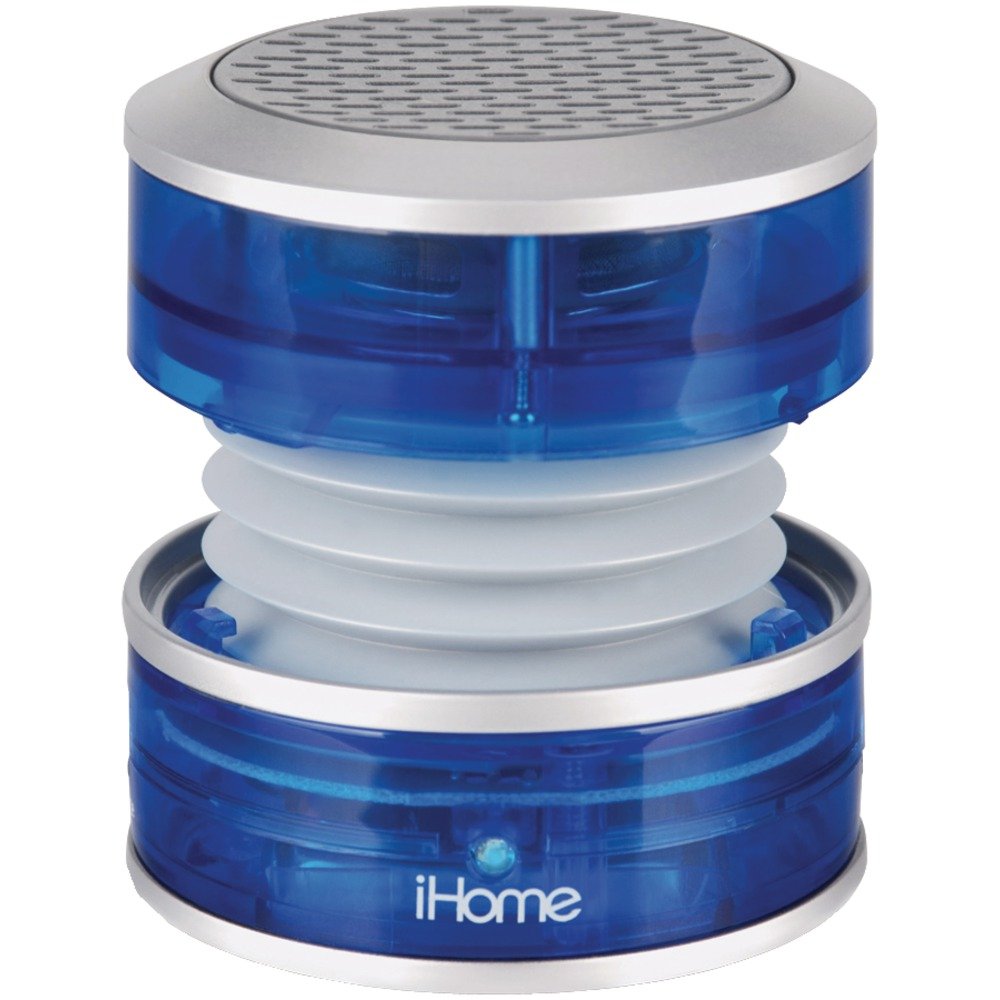
Image: The iHome iM60LT Mini Speaker, blue translucent, connected to a laptop via its audio cable, demonstrating its compact size and connectivity.
Istruzioni per l'uso
1. Accensione/spegnimento
- To power on the speaker, slide the power switch to the 'ON' position. A power indicator light may illuminate.
- Per spegnere, portare l'interruttore di alimentazione in posizione "OFF".
2. Regolazione del volume
Volume is primarily controlled through your connected audio device. Ensure the device's volume is set to an appropriate level.
3. Enhancing Bass with Vacuum Bass Design
The iM60LT features a unique vacuum bass design that allows for enhanced bass response.
- To activate the vacuum bass feature, gently twist the top and bottom sections of the speaker to expand its body. This creates a larger resonance chamber for deeper bass.
- To return to a compact form, twist the sections back together.
4. Connecting Multiple Speakers (Simulated Stereo)
For a simulated stereo sound experience or increased volume, you can connect multiple iM60LT speakers.
- Connect the first iM60LT speaker to your audio source as described in the 'Connecting to an Audio Source' section.
- Using an additional 3.5mm audio cable (not included), connect the line-out jack of the first speaker to the audio input jack of a second iM60LT speaker.
- Repeat this process to daisy-chain additional speakers.
Manutenzione
- Keep the speaker clean by wiping it with a soft, dry cloth. Do not use liquid cleaners or solvents.
- Evitare di esporre l'altoparlante a temperature estreme, luce solare diretta o umidità. L'altoparlante non è impermeabile.
- Conservare l'altoparlante in un luogo fresco e asciutto quando non viene utilizzato.
- Do not attempt to disassemble or modify the speaker, as this will void the warranty and may cause damage.
Risoluzione dei problemi
| Problema | Soluzione |
|---|---|
| Nessun suono dall'altoparlante. |
|
| Volume basso o suono distorto. |
|
| L'altoparlante non si carica. |
|
Specifiche
- Nome modello: iM60LT
- Tipo di altoparlante: Altoparlanti portatili
- Caratteristica speciale: Portatile
- Dispositivi compatibili: MP3 Player, Laptops, Cell Phones, Portable Game Devices
- Colore: Blue Translucent
- Peso dell'articolo: 91 grammi (3.21 once)
- Impedenza: 2 Ohm
- È impermeabile: NO
- Numero di articoli: 1
- Tecnologia di comunicazione wireless: Bluetooth (Note: While listed, primary connection is wired 3.5mm)
- Dimensioni altoparlante: 3.5 Millimeters (referring to audio jack size)
- Fonte di energia: Alimentato a batteria (batteria ricaricabile agli ioni di litio)
- Tipo di driver audio: Driver dinamico
- Dimensioni del prodotto: 2.36 x 2.13 x 2.28 pollici
- Potenza massima in uscita dell'altoparlante: 5 Watt
- Tecnologia di connettività: USB (for charging), 3.5mm Audio Jack (for audio input)
- Modalità di uscita audio: Stereo (when two speakers are connected)
Informazioni sulla garanzia
The iHome iM60LT Rechargeable Mini Speaker comes with a Limited Warranty. Please refer to the warranty card included with your product or visit the official iHome website for specific terms and conditions regarding warranty coverage, duration, and claims procedures.
This warranty typically covers defects in materials and workmanship under normal use. It does not cover damage caused by misuse, accidents, unauthorized modifications, or normal wear and tear.
Supporto
For further assistance, technical support, or to inquire about replacement parts, please contact iHome customer service. You can typically find contact information on the official iHome websito o sulla confezione del prodotto.
Please have your product model number (iM60LT) and purchase information ready when contacting support.


