1. Introduzione
This manual provides detailed instructions for the installation, operation, and maintenance of the Intel DH67BL Micro ATX Desktop Motherboard. The DH67BL is designed to support 2nd generation Intel Core processors in the LGA1155 package, offering robust performance for various computing needs.
Le caratteristiche principali includono:
- Chipset Intel H67 Express
- Support for LGA1155 Processors
- Supporto memoria DDR3
- Integrated Graphics Support with DVI and HDMI outputs
- Porte SATA 6Gb/s
- Porte USB 3.0
- PCI Express 2.0 x16 Slot
- LAN Gigabit
- Audio ad alta definizione
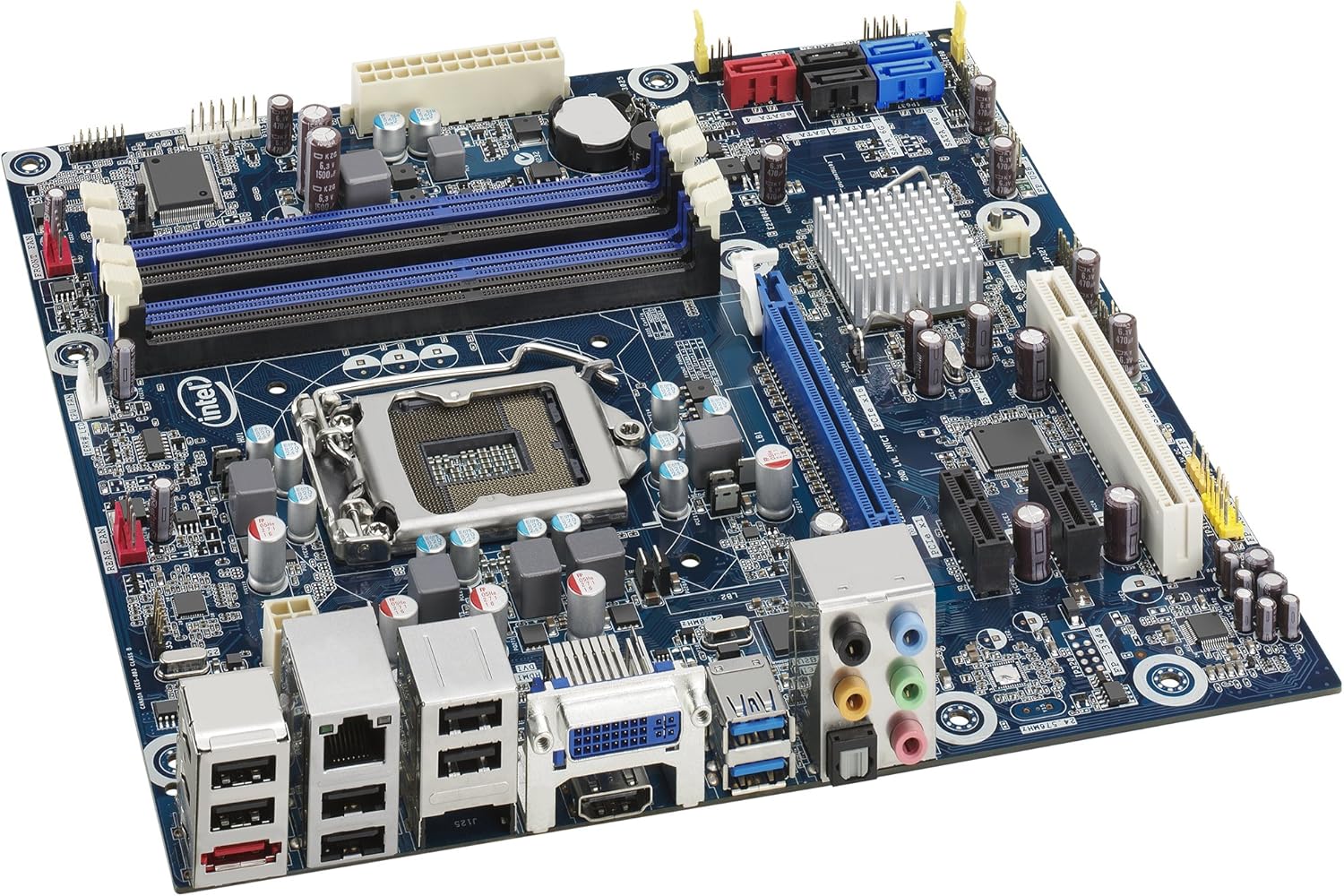
2. Configurazione e installazione
Before beginning installation, ensure your workspace is static-free. Use an anti-static wrist strap and work on a non-conductive surface.
2.1 Installazione della CPU
- Individuare il socket della CPU LGA1155 sulla scheda madre.
- Gently push down the load lever and pull it to the side to open the socket retention frame.
- Allineare attentamente la CPU con il socket, assicurandosi che il triangolo dorato sulla CPU corrisponda al triangolo sul socket. Non forzare la CPU nel socket.
- Inserire la CPU nel socket.
- Close the retention frame and secure it by pushing the load lever back into place.
- Applicare uno strato sottile e uniforme di pasta termica sul dissipatore di calore integrato (IHS) della CPU.
- Install the CPU cooler according to its manufacturer's instructions, ensuring proper contact and secure mounting.
2.2. Installazione della memoria (RAM)
- Locate the DDR3 DIMM slots. The DH67BL typically has four slots.
- Aprire le clip di fissaggio su entrambe le estremità dello slot DIMM.
- Allineare la tacca sul modulo di memoria DDR3 con la chiave nello slot DIMM.
- Inserire saldamente il modulo di memoria nello slot finché le clip di fissaggio non scattano in posizione. Assicurarsi che entrambe le clip siano completamente chiuse.
- For dual-channel operation, refer to the motherboard's silkscreen for recommended slot pairing (e.g., slots 1 and 3, or 2 and 4).
2.3. Installazione del dispositivo di archiviazione (SATA)
- Identify the SATA 6Gb/s (SATA 3.0) and SATA 3Gb/s (SATA 2.0) ports on the motherboard. The DH67BL features two SATA 6Gb/s ports (often colored blue) and multiple SATA 3Gb/s ports (often colored black or red).
- Connect one end of a SATA data cable to a SATA port on the motherboard and the other end to your hard drive or solid-state drive.
- Collegare un cavo di alimentazione SATA dall'alimentatore (PSU) al dispositivo di archiviazione.
2.4. Installazione della scheda di espansione
- The DH67BL includes one PCI Express 2.0 x16 slot for a discrete graphics card and additional PCI Express x1 slots for other expansion cards.
- Align the expansion card with the desired slot.
- Press down firmly until the card is seated correctly in the slot and the retention clip (if present) engages.
- Fissare la scheda allo chassis con una vite.
2.5. Collegamenti di alimentazione
- Collegare il connettore di alimentazione principale ATX a 24 pin dell'alimentatore alla presa corrispondente sulla scheda madre.
- Connect the 4-pin ATX 12V power connector (CPU power) from your PSU to the socket near the CPU.
- Assicurarsi che tutti i connettori di alimentazione siano ben inseriti.
2.6. Connessioni I/O del pannello frontale e posteriore
- Connettori del pannello frontale: Connect the power button, reset button, HDD LED, and power LED cables from your chassis to the front panel header on the motherboard. Refer to the motherboard's silkscreen for correct pin assignments.
- Intestazioni USB: Connect front panel USB 2.0 and USB 3.0 ports from your chassis to the corresponding headers on the motherboard.
- Intestazioni audio: Collegare i cavi audio del pannello frontale al connettore audio.
- Pannello I/O posteriore: Connect peripherals such as keyboard, mouse, monitor (via DVI-I or HDMI), Ethernet cable, and audio devices to the ports on the rear I/O panel.
3. Istruzioni per l'uso
3.1. Primo avvio e accesso al BIOS
- Dopo aver installato e collegato tutti i componenti, accendere il sistema.
- During the initial boot sequence, press the DEL or F2 key repeatedly to enter the BIOS/UEFI setup utility. The exact key may vary; observe the on-screen prompts.
- In the BIOS, you can configure boot order, system time, and other hardware settings. Save changes before exiting.
3.2. Installazione del sistema operativo
Insert your operating system installation media (USB drive or DVD) and configure the boot order in the BIOS to boot from it. Follow the on-screen instructions to install your operating system.
3.3. Installazione del driver
After installing the operating system, install the necessary drivers for optimal performance. These typically include:
- Driver del chipset
- Integrated graphics drivers (if not using a discrete GPU)
- Driver audio
- Driver LAN (Ethernet)
- USB 3.0 drivers
- SATA/RAID drivers (if configuring RAID)
Drivers can usually be found on the Intel support website for the DH67BL model.
4. Manutenzione
4.1. Rimozione della polvere
Regularly clean dust from your computer's interior, especially from heatsinks and fans, to prevent overheating and ensure optimal performance. Use compressed air and ensure the system is powered off and unplugged before cleaning.
4.2. Aggiornamenti del BIOS
Controllare periodicamente il supporto Intel website for BIOS updates. BIOS updates can improve system stability, add support for new hardware, or fix bugs. Follow the instructions provided by Intel carefully when performing a BIOS update to avoid system damage.
5. Risoluzione Dei Problemi
Questa sezione fornisce soluzioni ai problemi più comuni che potresti riscontrare.
5.1. Nessun potere
- Assicurarsi che l'alimentatore (PSU) sia acceso e correttamente collegato alla presa a muro.
- Verify that the 24-pin ATX and 4-pin ATX 12V power connectors are securely seated on the motherboard.
- Controllare il collegamento del pulsante di accensione del pannello frontale alla scheda madre.
- Testare l'alimentatore con un altro sistema o con un tester per alimentatori, se disponibile.
5.2. Nessuna uscita di visualizzazione
- Ensure the monitor is powered on and connected to the correct video output (DVI-I or HDMI on the motherboard, or discrete graphics card).
- Reinstallare la scheda grafica (se installata) e i moduli di memoria.
- If using a discrete graphics card, try removing it and connecting the monitor to the motherboard's integrated graphics output.
- Clear the CMOS by removing the CMOS battery for a few minutes or using the clear CMOS jumper (refer to motherboard diagram).
5.3. Instabilità o arresti anomali del sistema
- Check for overheating. Ensure CPU cooler is properly installed and fans are functioning.
- Eseguire strumenti di diagnostica della memoria per verificare la presenza di moduli RAM difettosi.
- Assicurarsi che tutti i driver siano aggiornati.
- Verificare la stabilità dell'alimentatore e l'umiditàtage è sufficiente per tutti i componenti.
6. Specifiche
| Caratteristica | Dettaglio |
|---|---|
| Marca | Intel |
| Nome del modello | DH67BL |
| Fattore di forma | Micro-ATX |
| Presa CPU | LGA1155 |
| Processori compatibili | Intel Core i3-2100, Intel Core i5-2400, Intel Core i7-2600 (2nd Generation Intel Core Processors) |
| Tipo di chipset | Intel H67 Espresso |
| Tecnologia della memoria RAM | DDR3 |
| Velocità di clock della memoria | 1333 MHz (Max, actual speed depends on CPU and RAM) |
| Porte SATA | 2x SATA 6Gb/s, 3x SATA 3Gb/s |
| Porte USB | USB 3.0, USB 2.0 |
| Uscite video | DVI-I, HDMI |
| Slot di espansione | 1x PCI Express 2.0 x16, multiple PCI Express x1 |
| Rete locale | Ethernet Gigabit |
| Audio | Audio ad alta definizione |
| Dimensioni del prodotto | 9.6 x 9.6 x 1 pollici |
| Peso dell'articolo | 2.38 libbre |
7. Garanzia e supporto
Per informazioni sulla garanzia e supporto tecnico, fare riferimento al sito ufficiale Intel websito o contattare il servizio clienti Intel. Conservare la prova d'acquisto per eventuali reclami in garanzia.


