1. Introduzione
The Linksys SE1500 is a 5-Port Fast Ethernet Switch designed to expand your wired network. It allows you to connect up to five devices, such as computers, printers, storage devices, and gaming consoles, at speeds up to 100 Mbps. This device provides a simple and efficient way to add more wired connections to your existing network without complex configuration.

Figura 1: Fronte view of the Linksys SE1500 5-Port Fast Ethernet Switch.
2. Contenuto della confezione
Verifica che il pacco contenga i seguenti articoli:
- Linksys SE1500 5-Port 10/100 Switch
- Adattatore di alimentazione
- Guida rapida (non inclusa in questo manuale)
3. Caratteristiche del prodotto
The Linksys SE1500 switch offers the following key features:
- 5 porte Fast Ethernet: Provides five 10/100 Mbps ports for connecting wired devices.
- Auto-Sensing Ports: Automatically detects and optimizes the speed for each connected device.
- Qualità del servizio (QoS): Prioritizes traffic for smooth performance of bandwidth-intensive applications.
- Funzionalità di risparmio energetico: Includes auto power-down for unused ports and a port status switch to disable LED indicators, reducing energy consumption.
- Collega e usa: Requires no software configuration for basic operation.
4. Istruzioni per l'installazione
Follow these steps to set up your Linksys SE1500 switch:
- Posizionare l'interruttore: Posizionare l'interruttore su una superficie piana e stabile o montarlo in un luogo adatto. Assicurarsi che vi sia un'adeguata ventilazione attorno al dispositivo.
- Collegare l'adattatore di alimentazione: Plug the included power adapter into the 12V DC port on the back of the switch. Then, plug the other end of the power adapter into a standard electrical outlet. The power LED on the front of the switch should illuminate.
- Connettiti alla tua rete: Connect an Ethernet cable from your router or modem to any of the five numbered Ethernet ports on the back of the SE1500 switch.
- Connetti dispositivi: Connect your wired devices (e.g., computer, printer, gaming console) to the remaining Ethernet ports on the switch using Ethernet cables. The switch's auto-sensing ports will automatically detect the connection speed.
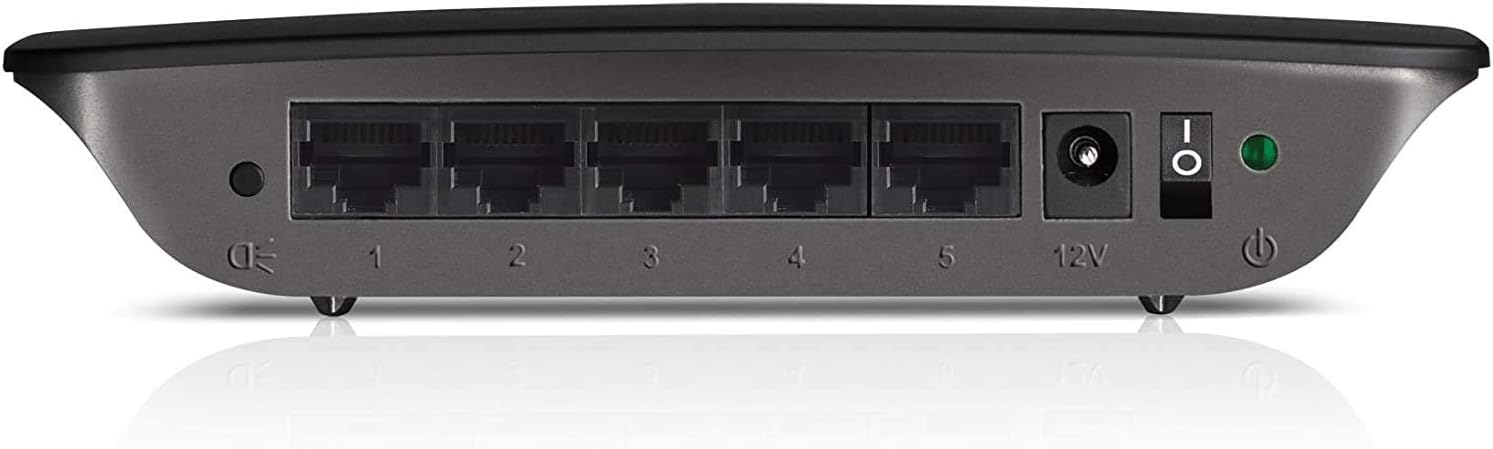
Figure 2: Rear panel of the Linksys SE1500, showing Ethernet ports, power input, and power switch.
5. Istruzioni per l'uso
The Linksys SE1500 is a plug-and-play device, meaning it typically requires no software configuration. Once connected, it operates automatically.
Indicatori LED
Il pannello frontale dello switch è dotato di indicatori LED per fornire informazioni sullo stato:
- LED di potenza: Si illumina quando l'interruttore è acceso.
- LED delle porte (1-5): Each numbered port has an associated LED.
- Verde pieno: Indicates a successful link connection at 100 Mbps.
- Ambra Solida: Indicates a successful link connection at 10 Mbps.
- Lampeggiante: Indica attività di rete (trasmissione dati).
- Spento: No link detected or port is inactive.
Modalità di risparmio energetico
The SE1500 automatically enters a power-saving mode when a connected device is turned off or when a port is unused. This feature helps reduce energy consumption. You can also use the port status switch on the rear panel to turn off the port LEDs if desired.
6. Manutenzione
To ensure optimal performance and longevity of your Linksys SE1500 switch, consider the following maintenance tips:
- Mantenere pulito: Regularly wipe the exterior of the switch with a soft, dry cloth. Avoid using liquid cleaners or aerosols.
- Garantire la ventilazione: Do not block the ventilation openings on the switch. Ensure it is placed in an area with good airflow to prevent overheating.
- Gestione dei cavi: Mantenere i cavi Ethernet ordinati per evitare disconnessioni accidentali o danni.
- Ciclo di alimentazione (se necessario): If the switch becomes unresponsive, disconnect the power adapter, wait 10 seconds, and then reconnect it.
7. Risoluzione Dei Problemi
If you encounter issues with your Linksys SE1500 switch, try the following troubleshooting steps:
- Nessun potere:
- Assicurarsi che l'adattatore di alimentazione sia collegato saldamente allo switch e a una presa elettrica funzionante.
- Verify the power switch on the rear panel is in the "On" position.
- Nessuna luce di collegamento:
- Verificare che il cavo Ethernet sia collegato saldamente sia alla porta dello switch sia al dispositivo collegato.
- Prova un cavo Ethernet diverso.
- Assicurarsi che il dispositivo collegato sia acceso e funzioni correttamente.
- If the port status switch is off, toggle it to enable the LEDs.
- Bassa velocità di rete:
- Ensure all connected devices and cables support Fast Ethernet (100 Mbps) for optimal performance.
- Check for excessive network traffic or issues with your internet service provider (ISP) or router.
- Connessione intermittente:
- Ispezionare i cavi Ethernet per verificare che non siano danneggiati.
- Try connecting devices to different ports on the switch.
- Power cycle the switch, router, and connected devices.
8. Specifiche
| Modello | SE1500 |
| Marca | Linksys |
| Numero di porte | 5 |
| Tipo di interfaccia | RJ45 |
| Velocità di trasferimento dati | 10/100 Mbps (Ethernet veloce) |
| Dimensioni del prodotto | 4.29 x 6.06 x 1.14 pollici |
| Peso dell'articolo | 5.4 once (0.34 libbre) |
| Colore | Nero |
| Dispositivi compatibili | Desktop, Gaming Console, Laptop, Printer |
| Componenti inclusi | 5-port 10/100 Switch, Power Adapter |
9. Garanzia e supporto
For detailed warranty information and technical support, please refer to the documentation included with your purchase or visit the official Linksys support websito. I termini e le condizioni della garanzia possono variare in base alla regione.
Supporto Linksys Websito: www.linksys.com/support