1. Introduzione
Thank you for choosing the MEDION Life X47023 Full HD Camcorder. This manual provides essential information for the safe and efficient operation of your device. Please read it thoroughly before use and keep it for future reference.
2. Informazioni sulla sicurezza
- Fonte di energia: Use only the specified power adapter and battery.
- Esposizione all'acqua: Non esporre la videocamera all'acqua o all'umidità.
- Temperatura: Avoid extreme temperatures. Operate and store the device within recommended ranges.
- Pulizia: Scollegare l'alimentazione prima di pulire. Utilizzare un panno morbido e asciutto.
- Smontaggio: Do not attempt to disassemble or repair the camcorder yourself. Refer all servicing to qualified personnel.
- Gestione della batteria: Handle batteries carefully. Do not short-circuit, incinerate, or expose to high temperatures.
3. Contenuto della confezione
Si prega di verificare che tutti gli articoli siano presenti nel pacco:
- MEDION Life X47023 Full HD Camcorder
- Batteria 1 x Li-ione
- Cavo HDMI
- AV/USB Cable
- Alimentazione USB
- Borsa per il trasporto
- Software CD
- Manuale dell'utente (questo documento)
4. Prodotto finitoview
Familiarize yourself with the components of your camcorder:
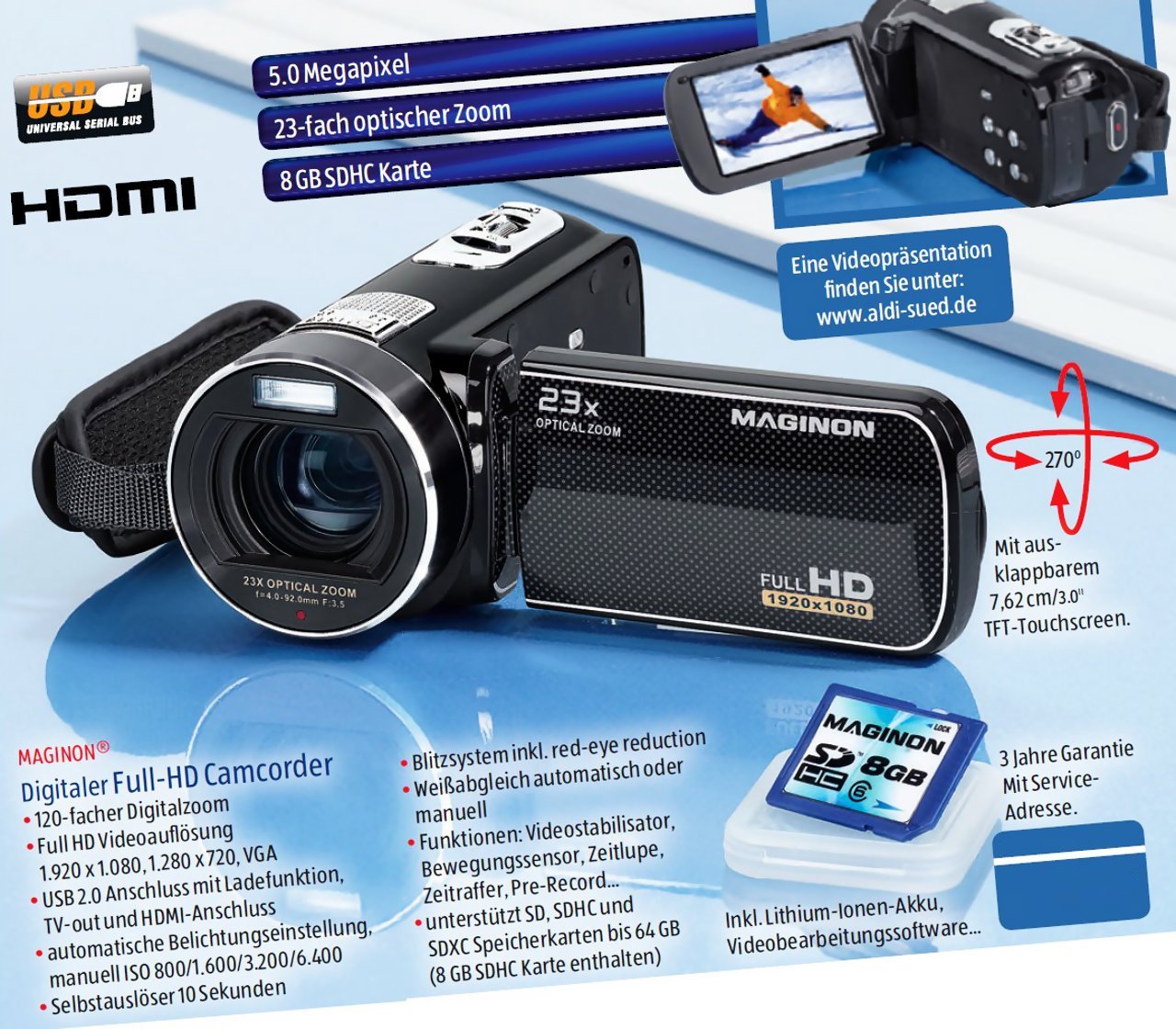
This image displays the MEDION Life X47023 Full HD Camcorder from various angles, highlighting its key features. The main view shows the camcorder with its lens, flash, and hand strap. An inset image on the left shows an 8GB SD card, indicating memory expansion. Text overlays point out "5.0 Megapixel" for photo resolution and "23x Optical Zoom" for the lens capability. Another inset on the top right shows the camcorder with its 7.62 cm (3.0 inch) TFT-Touchscreen display open and rotated, displaying a video scene. A red arrow graphic illustrates the 270-degree rotation capability of the touchscreen. The "FULL HD 1920x1080" logo is visible on the side of the camcorder's body. The "HDMI" and "USB" logos are also present, indicating connectivity options.
- Lente: Cattura video e immagini fisse.
- Torcia elettrica: Provides illumination for photos and videos in low light.
- 3.0'' TFT-Touchscreen Display: Display girevole per viewing and controlling camcorder functions.
- Leva dello zoom: Controlla lo zoom ottico e digitale.
- Pulsante di registrazione: Avvia e interrompe la registrazione video.
- Pulsante foto: Cattura immagini fisse.
- Vano batteria: Contiene la batteria agli ioni di litio.
- Slot per scheda di memoria: For SD/SDHC memory cards.
- Porta HDMI: For connecting to an HDTV.
- AV/USB Port: For connecting to a TV (AV) or computer (USB).
5. Impostazione
5.1. Installazione della batteria
- Aprire il coperchio del vano batteria nella parte inferiore della videocamera.
- Inserire la batteria agli ioni di litio, assicurandosi che i contatti siano allineati correttamente.
- Chiudere il coperchio del vano batteria finché non scatta in posizione.
5.2. Installazione della scheda di memoria
The camcorder requires an SD or SDHC memory card (not included) to store recordings.
- Individuare lo slot per la scheda di memoria, solitamente vicino al vano batteria o sul lato.
- Insert the memory card with the metal contacts facing down (or as indicated by the diagram near the slot) until it clicks.
- Per rimuoverla, spingere delicatamente la scheda finché non scatta fuori.
5.3. Carica della batteria
- Connect the USB power supply to a power outlet.
- Connect the AV/USB cable to the camcorder's USB port and the USB power supply.
- La spia di carica si illuminerà. La carica è completa quando la spia cambia colore o si spegne.
- Una carica completa richiede in genere circa 2-3 ore.
6. Utilizzo della videocamera
6.1. Accensione/spegnimento
- Per accendere: Open the LCD touchscreen display. The camcorder will automatically power on.
- Per spegnere: Close the LCD touchscreen display. The camcorder will automatically power off. Alternatively, press and hold the power button (if available) for a few seconds.
6.2. Registrazione video
- Ensure a charged battery and a memory card are installed.
- Power on the camcorder. It will typically start in video recording mode.
- Frame your shot using the touchscreen display.
- Premere il tasto Pulsante di registrazione (usually a red circle) to start recording. A red indicator will appear on the screen.
- Premere il tasto Pulsante di registrazione di nuovo per interrompere la registrazione.
6.3. Scattare foto
- While in video recording mode, press the Pulsante Foto (often indicated by a camera icon) to capture a still image.
- The camcorder will briefly pause video recording to take the photo, then resume.
6.4. Funzione Zoom
- Utilizzare il Leva dello zoom (typically located near the top or back) to zoom in or out.
- Push the lever forward to zoom in (telephoto) and pull it back to zoom out (wide-angle).
- The camcorder features 23x optical zoom and 120x digital zoom. Optical zoom maintains image quality, while digital zoom may reduce it.
6.5. Funzionamento del touchscreen
The 3.0-inch touchscreen allows for intuitive navigation and settings adjustments.
- Tap icons to select menu options or functions.
- Scorri per scorrere i menu o riprodurre files.
- The display can rotate 270 degrees for flexible viewangoli di inclinazione.
6.6. Riproduzione
- Switch the camcorder to playback mode (usually via a dedicated button or touchscreen icon).
- Browse through your recorded videos and photos using the touchscreen.
- Tocca un file A view it. Use on-screen controls for play, pause, fast forward, and rewind.
6.7. Connecting to a TV (HDMI/AV)
- HDMI: Connect the camcorder to an HDTV using the provided HDMI cable. Select the correct HDMI input on your TV.
- AV: Connect the camcorder to a standard definition TV using the AV part of the AV/USB cable. Select the correct AV input on your TV.
- Una volta connesso, puoi view your recordings on the TV screen.
6.8. Collegamento a un computer (USB)
- Connect the camcorder to your computer using the provided AV/USB cable.
- The camcorder will appear as a removable disk drive on your computer.
- You can then transfer video (MP4) and photo filesul tuo computer.
- The included software CD may contain additional tools for managing your media.
7. Manutenzione
7.1. Pulizia
- Per pulire il corpo della videocamera, utilizzare un panno morbido e privo di lanugine.
- For the lens and touchscreen, use a specialized lens cleaning cloth and solution. Do not apply liquid directly to the screen or lens.
- Evitare l'uso di detergenti o solventi abrasivi.
7.2. Cura della batteria
- Caricare completamente la batteria prima del primo utilizzo.
- If storing the camcorder for an extended period, remove the battery.
- Conservare le batterie in un luogo fresco e asciutto.
7.3. Conservazione
- Store the camcorder in its carrying bag to protect it from dust and scratches.
- Avoid storing in areas with high humidity or extreme temperature fluctuations.
8. Risoluzione Dei Problemi
| Problema | Possibile causa/soluzione |
|---|---|
| La videocamera non si accende. | Battery is not charged or incorrectly installed. Ensure battery is charged and properly seated. |
| Impossibile registrare video/scattare foto. | Memory card is full, not inserted, or corrupted. Insert a new card, format the current card (this will erase data), or check insertion. |
| Scarsa qualità delle immagini/video. | Lens is dirty. Clean the lens with a soft cloth. Insufficient lighting. Ensure adequate lighting for recording. |
| Camcorder not recognized by computer. | USB cable is not connected properly. Try a different USB port or cable. Ensure camcorder is powered on. |
9. Specifiche
| Caratteristica | Dettaglio |
|---|---|
| Marca | MEDION |
| Numero di modello | LaX47023 (50037683) |
| Risoluzione video | Risoluzione completa 1080p |
| Risoluzione della foto | Sensore CMOS da 5.0 megapixel |
| Zoom ottico | 23x |
| Digital Zoom | 120x |
| Display | 3.0-inch (7.62 cm) TFT Touchscreen, 270° rotatable |
| Formato video | MP4 |
| Formato audio | CAA |
| Connettività | HDMI, AV/USB |
| Supporti di memorizzazione | SD/SDHC Memory Card (not included) |
| Batteria | 1 x Li-ion Battery (included) |
| Dimensioni (L x P x A) | Dimensioni: 7 x 12.7 x 6.2 cm |
| Peso | 374 grammi |
10. Garanzia e supporto
For warranty information and technical support, please refer to the documentation provided with your purchase or visit the official MEDION websito. Conservare la prova d'acquisto per eventuali reclami in garanzia.


