Introduzione
Thank you for choosing the Casio AW-90H-2BVDF Wristwatch. This manual provides essential information regarding the setup, operation, and maintenance of your watch. Please read it carefully to ensure proper use and to maximize the lifespan of your timepiece.

Immagine: Frontale view of the Casio AW-90H-2BVDF Wristwatch, displaying its analog and digital time displays.
Guida generale
Your Casio AW-90H-2BVDF watch features both analog hands and a digital display. It typically includes multiple buttons for various functions. While specific button labels may vary, common functions are usually assigned to buttons located on the sides of the watch case.
- Pulsante Modalità: Passa attraverso diverse modalità (Cronometraggio, Sveglia, Cronometro, Doppio fuso orario).
- Pulsante di regolazione: Used to select items for setting in various modes.
- Pulsante di avvio/arresto: Used to start/stop stopwatch, or change values during setting.
- Pulsante luce: Attiva la retroilluminazione per l'illuminazione.
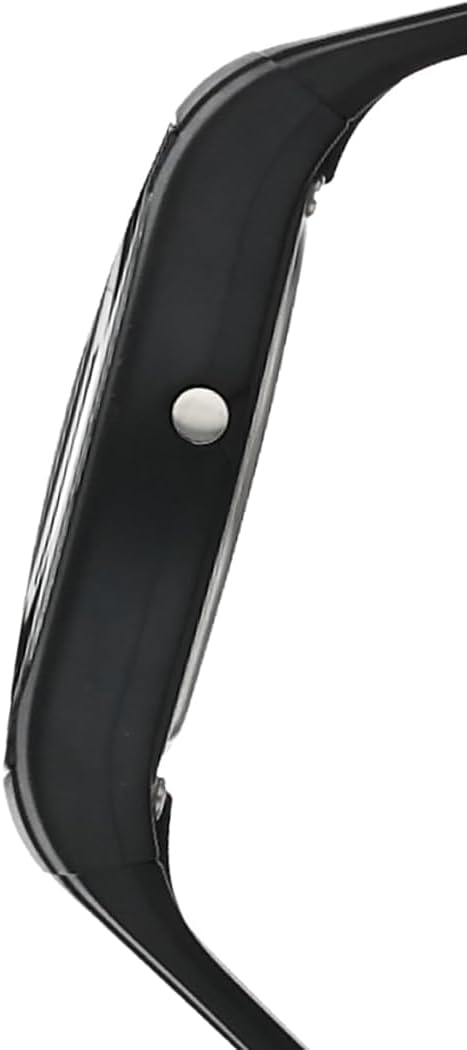
Immagine: Lato view of the Casio AW-90H-2BVDF Wristwatch, highlighting one of the control buttons.
Impostazione e cronometraggio
Impostazione dell'ora e della data digitali
- Nella modalità di indicazione dell'ora, premere il tasto Regolare button until the seconds digits start to flash, indicating the setting screen.
- Premere il tasto Modalità button to cycle through the setting options: Seconds → Hour → Minutes → Year → Month → Day.
- Utilizzare il Avvio/Arresto button to increase the flashing value. Hold down to change rapidly.
- Una volta che tutte le impostazioni sono corrette, premere il tasto Regolare pulsante per uscire dalla schermata di impostazione.
Adjusting Analog Hands
The analog hands are typically synchronized with the digital time. If they are out of alignment, refer to the specific hand adjustment procedure in the full module manual (available on the Casio website by searching your model number). Generally, this involves entering a hand setting mode and using buttons to move the hands.
Modalità operative
Premere il tasto Modalità pulsante per scorrere le varie funzioni dell'orologio:
- Modalità di indicazione dell'ora: Visualizza l'ora e la data correnti.
- Modalità sveglia: Imposta e attiva le sveglie giornaliere.
- Modalità cronometro: Misurare il tempo trascorso.
- Modalità doppio orario: View the time in a different time zone.
Utilizzo dell'allarme
- Enter the Alarm Mode using the Modalità pulsante.
- Premere il tasto Regolare button to enable setting the alarm time. The hour digits will flash.
- Utilizzare il Avvio/Arresto button to change the hour. Press Modalità to switch to minutes and adjust.
- Premere Regolare per confermare l'orario della sveglia.
- Per accendere/spegnere la sveglia, premere il tasto Avvio/Arresto button while in Alarm Mode (not in setting mode).
Utilizzando il cronometro
- Enter the Stopwatch Mode using the Modalità pulsante.
- Premere il tasto Avvio/Arresto pulsante per avviare il cronometro.
- Premere Avvio/Arresto di nuovo per fermarlo.
- Premere il tasto Regolare pulsante per azzerare il cronometro.
Illuminazione
Premere il tasto Leggero button (if available) to illuminate the digital display for a few seconds in low-light conditions.
Cura e manutenzione
Resistenza all'acqua
Your watch is marked with "WATER RESIST" on the case back, indicating it is suitable for everyday use and can withstand splashes or brief immersion in water. However, it is not designed for diving or prolonged water exposure. Do not operate buttons while the watch is wet or submerged.

Immagine: Posteriore view of the Casio AW-90H-2BVDF Wristwatch, showing the stainless steel case back with "WATER RESIST" engraving.
Pulizia
Pulire l'orologio con un panno morbido e asciutto per rimuovere sporco e umidità. Per lo sporco ostinato, utilizzare un panno morbido.ampened with water and a mild neutral detergent, then wipe dry. Avoid using volatile agents like thinner or benzine, which may damage the resin components.
Informazioni sulla batteria
This watch uses one CR123A battery (included). When the display becomes dim or functions become erratic, it is time to replace the battery. Battery replacement should ideally be performed by a qualified watch technician to ensure proper sealing and water resistance.
Magazzinaggio
When not in use for extended periods, store your watch in a dry place away from direct sunlight, extreme temperatures, and strong magnetic fields.
Risoluzione dei problemi
- Ora errata: Ensure you have correctly set both the digital and analog times. If the analog hands are misaligned, refer to the hand adjustment procedure.
- Schermo vuoto o poco luminoso: La batteria potrebbe essere scarica o esaurita. Sostituiscila.
- I pulsanti non rispondono: Ensure the watch is not in a locked mode (if applicable) or that it is not wet. If the issue persists after drying, the battery may be low.
- Acqua all'interno dell'orologio: If you notice condensation or water droplets inside the watch, have it inspected immediately by a qualified technician to prevent further damage.
Specifiche
| Numero di modello | AW-90H-2BVDF |
| Produttore | Casio |
| Dimensioni del prodotto | 2.44 x 4.09 x 3.7 pollici |
| Peso dell'articolo | 2.08 once |
| Tipo di batteria | 1 CR123A (inclusa) |
| Resistenza all'acqua | Water Resistant (suitable for splashes, not diving) |
| Lingua | Inglese |
Informazioni sulla garanzia
Il tuo orologio Casio è coperto da una garanzia del produttore contro difetti di materiali e fabbricazione. I termini e la durata specifici della garanzia possono variare a seconda della regione. Consulta la scheda di garanzia inclusa con l'acquisto o visita il sito ufficiale Casio. websito per informazioni dettagliate sulla garanzia.
Assistenza clienti
For further assistance, technical support, or service inquiries, please contact Casio customer support. You can find contact information and frequently asked questions on the official Casio website. When contacting support, please have your watch model number (AW-90H-2BVDF) readily available.