1. Introduzione
This manual provides essential information for the proper setup, operation, and maintenance of your Crown XTi2002 Power Amplifier. The XTi2002 is a two-channel power amplifier designed for professional audio applications, offering robust performance and advanced digital signal processing capabilities. It is suitable for use in live sound reinforcement, studio monitoring, and fixed installations.
Key features include Peakx Plus™ Limiters for speaker protection, an Enhanced Subharmonic Synth section for low-frequency tuning, and user-defined fan modes for optimal thermal management. The amplifier also features integrated cast-aluminum handles for durability and ease of transport, and supports control via HiQnet System Architect™ software.
2. Informazioni sulla sicurezza
WARNING: To reduce the risk of fire or electrical shock, do not expose this appliance to rain or moisture. Do not remove cover. No user-serviceable parts inside. Refer servicing to qualified service personnel.
Avvertenza sulla Proposta 65: questo prodotto potrebbe contenere sostanze chimiche che lo Stato della California ritiene possano causare cancro, difetti alla nascita o altri danni riproduttivi.
- Fonte di energia: Collegare il amplificatore solo al tipo di fonte di alimentazione indicata sull'unità. Assicurarsi che il volumetage rientra nell'intervallo specificato (120-240 V CA).
- Messa a terra: Always use a power cord with a grounded plug. Do not defeat the safety purpose of the grounding-type plug.
- Ventilazione: Assicurare una ventilazione adeguata attorno all' amplifier. Do not block ventilation openings. Maintain at least 2 inches (5 cm) of clear space around the unit for proper airflow. Overheating can lead to malfunction or damage.
- Umidità: Non esporre il amplifier to dripping or splashing liquids. Do not place objects filled with liquids on the apparatus.
- Posizionamento: Installare il amplifier in a stable location, away from direct sunlight, heat sources, and excessive dust.
- Gestione: IL amplifier is heavy (approximately 18.48 lbs). Use caution when lifting or moving. Utilize the integrated cast-aluminum handles for secure transport.
- Manutenzione: Non tentare di riparare questo prodotto da soli. Affidare tutte le operazioni di manutenzione a personale di assistenza qualificato.
3. Impostazione
3.1 Disimballaggio e ispezione
Rimuovere con attenzione il file amplifier from its packaging. Inspect the unit for any signs of damage that may have occurred during shipping. The package should contain the amplifier, a user guide, and a power cord.
3.2 Montaggio su rack
The Crown XTi2002 is designed for standard 19-inch equipment rack mounting. Ensure the rack is sturdy enough to support the amplifier's weight. Allow sufficient space for airflow, especially at the front and rear ventilation grilles.
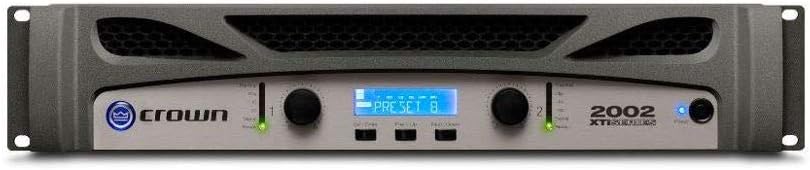
Figure 3.1: Front panel of the Crown XTi2002 amplifier, showing the display, control knobs, and indicators.
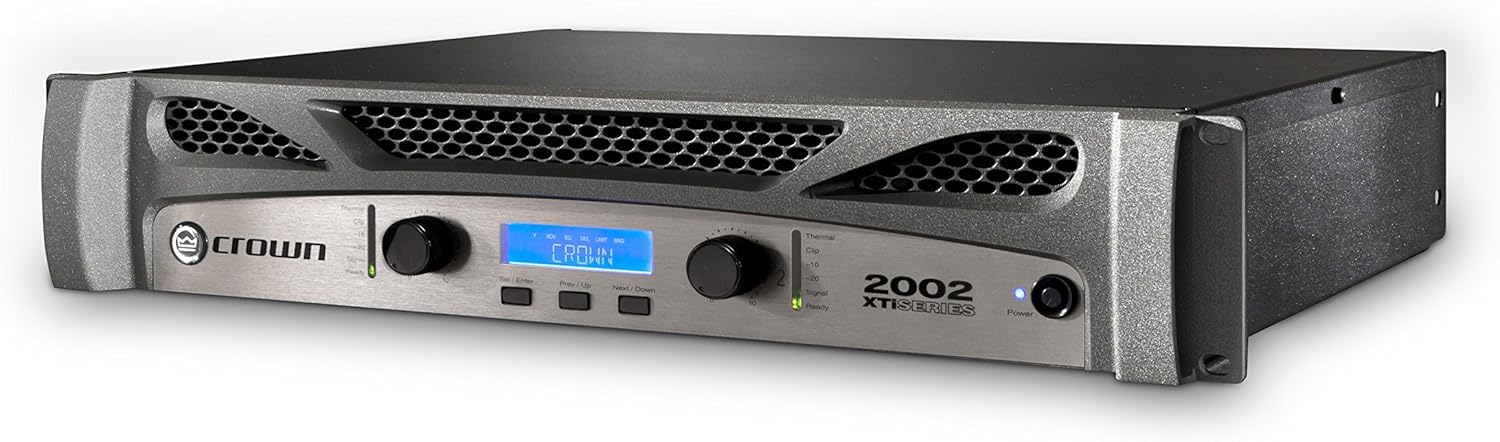
Figura 3.2: Angolato view of the Crown XTi2002 amplifier, highlighting its robust chassis and ventilation.
3.3 Collegamento degli ingressi
The XTi2002 features two XLR input connectors for audio signals. Connect your audio source (e.g., mixer, preamplifier) to these inputs using balanced XLR cables.

Figure 3.3: Rear panel of the Crown XTi2002 amplifier, showing input (XLR), output (Speakon, Binding Post), and power connections.
3.4 Collegamento delle uscite
IL amplifier provides multiple output options:
- Speakon Connectors (x2): For connecting loudspeakers using Speakon cables. These are typically used for high-power connections.
- Binding Post Connectors (x2 pair): For connecting loudspeakers using bare wire or banana plugs. Ensure correct polarity (+/-).
- XLR Link/Out (x2): For daisy-chaining the audio signal to other ampdispositivi o dispositivi.
Ensure that the impedance of your loudspeakers matches the amplifier's capabilities (2Ω, 4Ω, or 8Ω).
3.5 Collegamento di alimentazione
Collegare il cavo di alimentazione in dotazione al amplifier's AC inlet and then to a suitable grounded power outlet. The XTi2002 features a locking power cord clip to ensure a secure connection, preventing accidental disconnections.
4. Funzionamento del Amppiù vivace
4.1 Comandi e indicatori del pannello frontale
The front panel provides access to all essential controls and monitoring features:
- Manopole del livello di ingresso: Regola la sensibilità di ingresso per ciascun canale.
- Schermo LCD: Shows operational status, menu navigation, and parameter settings.
- Pulsanti del menu: Navigare attraverso il amplifier's internal menus for DSP settings, fan modes, and system monitoring.
- Indicatori:
- segnale: Si illumina quando è presente un segnale audio.
- Clip: Illuminates when the output signal is clipping, indicating potential distortion. Reduce input level if this light is consistently on.
- Termico: Si illumina se il amplifier is overheating. The unit may reduce output or shut down to protect itself.
- Pronto: Indica il amplifier is powered on and ready for operation.
- Energia: Indica che l'unità è alimentata.
4.2 Peakx Plus™ Limiters
The Peakx Plus™ Limiters provide advanced protection for your loudspeakers by preventing excessive signal peaks. Through the amplifier's menu, you can control the threshold, attack, and release settings of these limiters to optimize performance and protection for your specific speaker system.
4.3 Enhanced Subharmonic Synth
This feature allows you to enhance the low-frequency content of your audio. You can adjust the frequency, gain, and filter type of the subharmonic synthesis to tailor the bass response to your preferences and system requirements.
4.4 Fan Mode Controls
The XTi2002 offers three user-defined fan modes to manage cooling performance:
- Normale: Standard fan operation for typical use.
- Early: Fans activate sooner and run at higher speeds, suitable for demanding applications or warmer environments.
- Piena velocità: Fans run at maximum speed continuously, providing aggressive cooling for extreme conditions.
Select the appropriate fan mode to ensure optimal thermal performance for your application.
4.5 HiQnet System Architect™ Control Software
The XTi2002 can be controlled and monitored remotely using Crown's HiQnet System Architect™ software. This software provides comprehensive control over all amplifier parameters, including DSP settings, routing, and system monitoring. Refer to the HiQnet System Architect™ documentation for detailed instructions on its use.
4.6 Gestione dei preset
IL amplifier allows for storage of up to 49 user-definable presets. These presets can store various configurations, including DSP settings, limiter parameters, and fan modes, allowing for quick recall of optimized settings for different applications or speaker setups.
5. Manutenzione
5.1 Pulizia
Pulisci regolarmente la parte esterna del amplifier with a soft, dry cloth. Do not use abrasive cleaners, solvents, or waxes. Ensure ventilation grilles are free from dust and debris to maintain proper airflow.
5.2 Manutenzione della ventilazione
Periodically check the front and rear ventilation grilles for dust buildup. Use a soft brush or a vacuum cleaner with a brush attachment to gently remove any accumulated dust. Proper ventilation is crucial for the amplifier's longevity and stable operation.
5.3 Monitoraggio del sistema
The XTi2002 provides software visibility of AC line voltage and power supply temperature. Regularly monitoring these parameters via the front panel display or HiQnet System Architect™ software can help identify potential issues before they lead to performance degradation or damage.
6. Risoluzione Dei Problemi
This section provides solutions to common issues you might encounter with your Crown XTi2002 amplifier. If the problem persists after attempting these steps, contact qualified service personnel.
| Problema | Possibile causa | Soluzione |
|---|---|---|
| Nessun potere | Power cord disconnected; no AC power; ampfusibile dell'alimentatore bruciato. | Check power cord connection and outlet. Verify power at the outlet. If fuse is suspected, contact service. |
| Nessuna uscita audio | Input cables disconnected; output cables disconnected; input level too low; amplifier in modalità protetta. | Check all cable connections. Increase input level. Check for Thermal or Clip indicators. Power cycle the unit. |
| Suono distorto | Input signal too high (clipping); speaker impedance mismatch; damaged speaker. | Reduce input level (check Clip indicator). Verify speaker impedance. Test with a different speaker if possible. |
| Overheating (Thermal light on) | Insufficient ventilation; excessive load; high ambient temperature. | Ensure clear airflow around the unit. Reduce load. Move to a cooler environment. Check fan mode settings. |
7. Specifiche
The following specifications apply to the Crown XTi2002 Power Amplificatore:
| Caratteristica | Specificazione |
|---|---|
| Modello | XTi2002 |
| Canali | 2 |
| Potenza di uscita (per canale) | 1000W at 2Ω, 800W at 4Ω, 475W at 8Ω |
| Connettori di ingresso | 2 x XLR (balanced) |
| Connettori di uscita | 2 x Speakon, 2 x Binding Post pairs, 2 x XLR Link/Out |
| Dimensioni (L x P x A) | 12.25 x 19 x 3.5 pollici (31.1 x 48.3 x 8.9 cm) |
| Peso | 18.48 libbre (8.38 kg) |
| Alimentazione elettrica | 120-240 V CA, 50/60 Hz |
| Materiale | Telaio in alluminio |
| Certificazioni | CE, CSA, FCC, RoHS |
| Colore | Grigio |
| Montaggio | Montabile su rack |
8. Garanzia e supporto
Crown products are designed for reliability and performance. For information regarding the warranty period and terms applicable to your XTi2002 amplifier, please refer to the warranty card included with your product or visit the official Crown websito.
For technical support, service, or further assistance, please contact Crown customer service or an authorized service center. You can also find additional resources, including the full PDF user manual, on the Crown websito o tramite il link fornito: Crown XTi2002 User Manual (PDF).


