1. Prodotto finitoview
Caratteristiche principali
- Extremely powerful
- Dual lens system for optimal wash effect
- Sliding brackets for easy mounting
- PowerCon input and output
- Can be controlled in 1 or 3 sections
Descrizione del prodotto
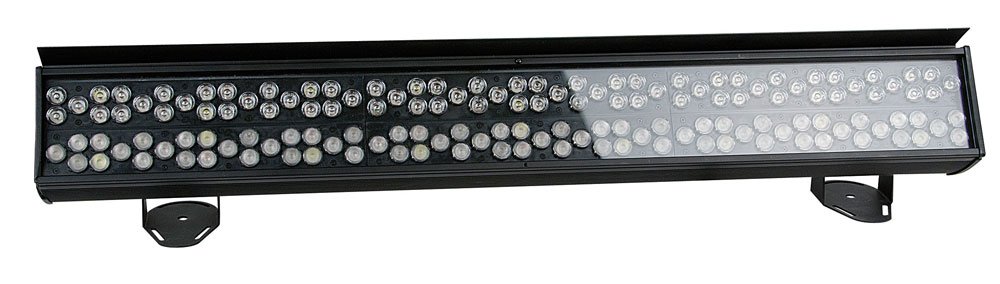
The Spectral CYC-4000 is a powerful lighting tool for all large-scale cyclorama applications. Specially designed with its dual 15° and 30° optical design, it creates an impressive light throw while maintaining smooth and uniform color mixing. This extremely bright cyclorama light combines the RGB color palette with white and orange pastels, offering a rich array of colors to paint with. A custom-built slide-in-glare flag ensures professional lighting considerations are fully adhered to, whether washing curtains and drapes for walls and landscapes.
2. Informazioni sulla sicurezza
Si prega di leggere attentamente tutte le istruzioni di sicurezza prima di utilizzare il dispositivo. La mancata osservanza di queste istruzioni potrebbe causare lesioni o danni al prodotto.
- Assicurarsi che il dispositivo sia adeguatamente messo a terra.
- Non esporre il dispositivo a pioggia o umidità.
- Evitare l'esposizione diretta degli occhi alla sorgente luminosa.
- Assicurare un'adeguata ventilazione attorno all'unità.
- Scollegare l'alimentazione prima della pulizia o della manutenzione.
3. Impostazione
Follow these steps to set up your Spectral CYC-4000:
- Unpack the unit and inspect for any shipping damage.
- Attach the sliding brackets securely to a suitable mounting surface (truss, wall, or floor).
- Ensure the mounting location can support the weight of the fixture.
- Connect the PowerCon input cable to a compatible power source.
- If daisy-chaining multiple units, connect the PowerCon output to the next unit's input.
- Connect DMX control cables if using external control.
4. Istruzioni per l'uso
Operating the Spectral CYC-4000 is straightforward:
- Power on the unit. The display (if present) will illuminate.
- Use the onboard controls or DMX controller to select the desired operating mode (e.g., DMX mode, auto program, static color).
- Adjust color mixing, intensity, and other parameters as needed for your application.
- Utilize the dual 15° and 30° optics to achieve the desired light throw and coverage for cyclorama or wall washing.
- Position the custom-built slide-in-glare flag to control light spill and achieve precise illumination.
5. Manutenzione
Regular maintenance ensures optimal performance and longevity:
- Clean the lenses and exterior casing periodically with a soft, dry cloth.
- Non utilizzare detergenti abrasivi o solventi.
- Check all cables and connections for wear or damage before each use.
- Assicurarsi che le aperture di ventilazione siano libere da polvere e detriti.
- For internal servicing, contact qualified personnel.
6. Risoluzione Dei Problemi
Per i problemi più comuni e le relative soluzioni, fare riferimento alla tabella sottostante:
| Problema | Possibile causa | Soluzione |
|---|---|---|
| Nessun potere | Cavo di alimentazione scollegato; nessuna corrente dalla presa | Check power connections; test outlet |
| Nessun controllo DMX | Indirizzo DMX errato; cavo DMX difettoso; terminatore DMX mancante | Verify DMX address; replace cable; add terminator to last unit |
| La luce tremola | Unstable power supply; DMX signal interference | Ensure stable power; check DMX connections and shielding |
7. Specifiche
Detailed specifications for the Spectral CYC-4000:
| Specificazione | Valore |
|---|---|
| Marca | Mostrare |
| Colore | bianco |
| Disponibilità dei pezzi di ricambio | Informazioni non disponibili sui pezzi di ricambio |
| Aggiornamenti software garantiti fino al | Informazioni non disponibili |
| Numero modello articolo | 8717748269171 |
| ASIN | B005CAMHUO |
| Prima data disponibile su Amazon.fr | 20 ottobre 2011 |
8. Garanzia e supporto
This product comes with a standard manufacturer's warranty. For specific warranty terms and conditions, please refer to the documentation included with your purchase or visit the official Showtec websito.
For technical support, troubleshooting assistance beyond this manual, or spare parts inquiries, please contact Showtec customer service. Contact information can typically be found on the manufacturer's websito o sulla confezione del prodotto.
Conservare la prova d'acquisto per eventuali richieste di garanzia.


