Introduzione
This manual provides detailed instructions for the setup, operation, and maintenance of your Casio DQ-541D-8RDF Digital Alarm Clock. Please read these instructions carefully to ensure proper use and to maximize the lifespan of your device. Keep this manual for future reference.
Prodotto finitoview
The Casio DQ-541D-8RDF is a compact digital alarm clock designed for reliability and ease of use. It features a clear digital display, a beeper alarm, a snooze function, and a backlight for visibility in low light conditions.
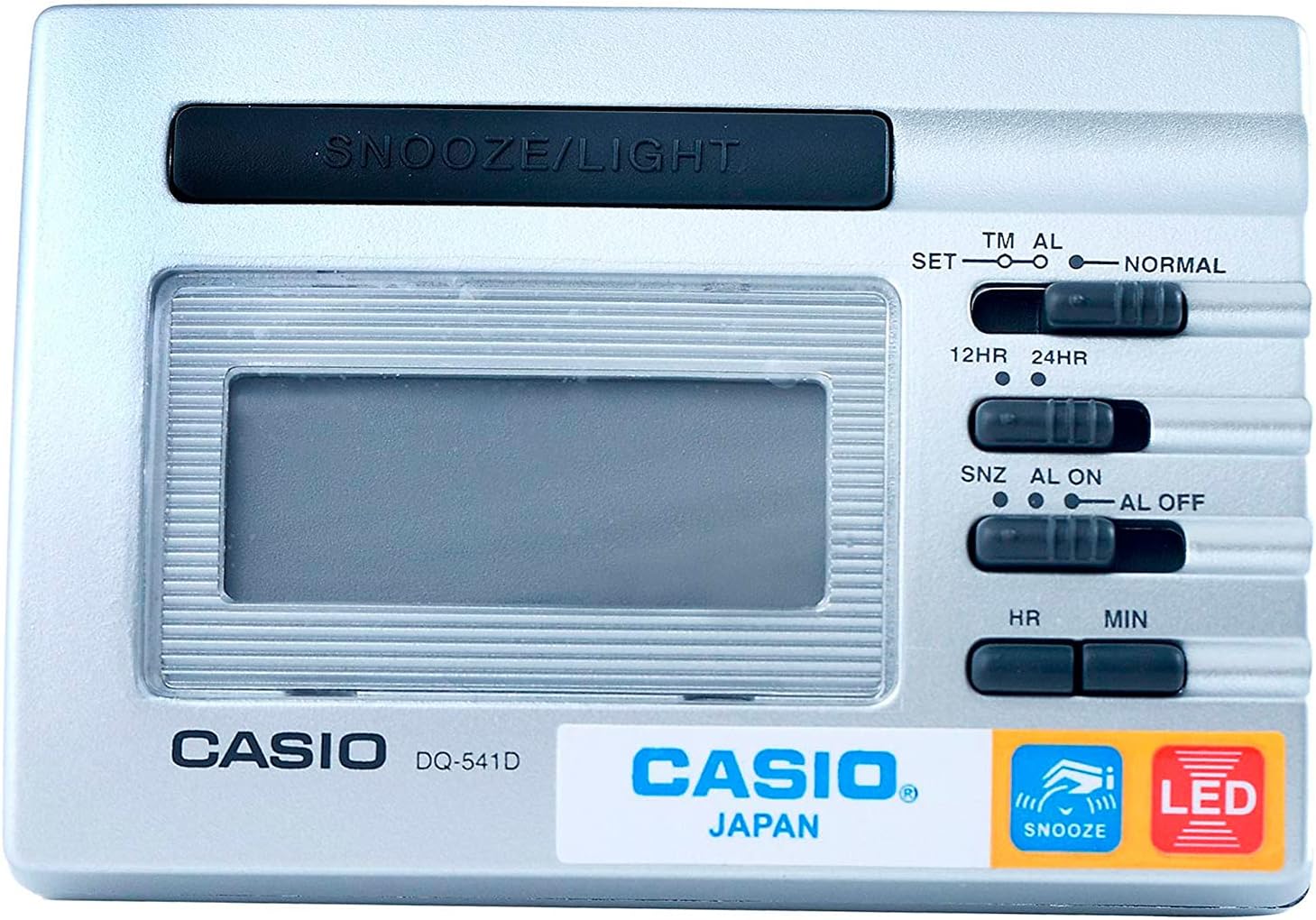
Immagine 1: anteriore View. This image displays the front of the Casio DQ-541D-8RDF digital alarm clock, showing the digital display, the large SNOOZE/LIGHT button at the top, and the control switches on the right side for time setting, alarm setting, and 12/24-hour format selection. The Casio logo and model number are visible below the display.

Immagine 2: Lato View con controlli. This image provides a closer look at the right side of the alarm clock, highlighting the various slide switches and buttons used for configuration. These include switches for setting time (SET, TM AL, NORMAL), selecting 12-hour or 24-hour format (12HR, 24HR), and controlling the alarm (SNZ AL ON, AL ON, AL OFF). Hour (HR) and Minute (MIN) buttons are also visible for adjustments.

Immagine 3: In basso View. This image shows the bottom of the Casio DQ-541D-8RDF alarm clock, featuring the battery compartment cover. An arrow indicates the direction to slide the cover for battery installation or replacement. The "MADE IN CHINA" text is also visible.
Impostare
Installazione della batteria
- Locate the battery compartment on the bottom of the clock (refer to Image 3).
- Per aprire il coperchio del vano batteria, farlo scorrere nella direzione indicata dalla freccia.
- Insert one (1) AAA battery, ensuring the positive (+) and negative (-) terminals are aligned correctly according to the diagram inside the compartment. A fresh AAA battery is included with your purchase.
- Replace the battery compartment cover by sliding it back until it clicks securely into place.
- The display should now show a default time or begin flashing, indicating the clock is powered on and ready for time setting.
Istruzioni per l'uso
Impostazione dell'ora corrente
- Locate the slide switch labeled SET TM AL NORMAL on the right side of the clock (refer to Image 2).
- Slide this switch to the IMPOSTATO position. The hour digits on the display will begin to flash.
- Premere il tasto HR button repeatedly to adjust the hour. Hold the button down for faster adjustment.
- Premere il tasto MINIMO button repeatedly to adjust the minute. Hold the button down for faster adjustment.
- Once the correct time is set, slide the SET TM AL NORMAL tornare al NORMALE position to save the time.
Impostazione dell'ora della sveglia
- Locate the slide switch labeled SET TM AL NORMAL.
- Slide this switch to the AL position. The alarm time will be displayed, and the hour digits will begin to flash.
- Premere il tasto HR ripetutamente il pulsante per regolare l'ora della sveglia.
- Premere il tasto MINIMO ripetutamente il pulsante per regolare i minuti della sveglia.
- Once the desired alarm time is set, slide the SET TM AL NORMAL tornare al NORMALE position to save the alarm time.
Activating/Deactivating the Alarm and Snooze Function
- Locate the slide switch labeled SNZ AL ON AL OFF (vedere Immagine 2).
- To activate the alarm with snooze: Slide the switch to the SNZ AL ON position. An alarm icon will appear on the display, indicating the alarm is active and the snooze function is enabled.
- To activate the alarm without snooze: Slide the switch to the AL ON position. An alarm icon will appear on the display.
- To deactivate the alarm: Slide the switch to the Tutto spento position. The alarm icon will disappear from the display.
Using the Snooze and Light Function
- Quando suona la sveglia, premere il tasto grande SNOOZE / LIGHT button located at the top of the clock.
- Pressing this button will temporarily stop the alarm, and it will sound again after a few minutes (typically 5-8 minutes, depending on the model's pre-set interval).
- To illuminate the display in dark conditions, press the SNOOZE / LIGHT button. The LED backlight will activate for a few seconds.
12-Hour / 24-Hour Timekeeping
- Locate the slide switch labeled 12 ore 24 ore (vedere Immagine 2).
- Fai scorrere l'interruttore su 12 ore position for 12-hour format (with AM/PM indicator).
- Fai scorrere l'interruttore su 24 ore position for 24-hour format.
Manutenzione
- Pulizia: Wipe the clock with a soft, dry cloth. Do not use abrasive cleaners or chemical solvents, as these may damage the casing o display.
- Sostituzione della batteria: When the display becomes dim or the alarm sound weakens, it is time to replace the battery. Follow the "Battery Installation" steps in the Setup section. Always use a fresh AAA battery.
- Magazzinaggio: If you do not plan to use the clock for an extended period, remove the battery to prevent leakage and potential damage to the device.
- Ambiente: Evitare di esporre l'orologio a temperature estreme, alla luce solare diretta, a elevata umidità o a forti campi magnetici.
Risoluzione dei problemi
| Problema | Soluzione |
|---|---|
| Il display è vuoto o poco luminoso. | Check battery installation. Replace with a fresh AAA battery. |
| L'allarme non suona. | Assicurare il SNZ AL ON AL OFF l'interruttore è impostato su AL ON or SNZ AL ON. Verify the alarm time is set correctly. Replace battery if weak. |
| L'ora non è corretta. | Re-set the current time following the "Setting the Current Time" instructions. Check the 12HR/24HR setting. |
| La funzione snooze non funziona. | Assicurare il SNZ AL ON AL OFF l'interruttore è impostato su SNZ AL ON. |
Specifiche
- Numero modello: DQ-541D-8RDF
- Marca: Casio
- Dimensioni: 25 x 3.81 x 25 cm (circa)
- Peso dell'articolo: 140.61 grammi
- Fonte di energia: 1 batteria AAA (inclusa)
- Caratteristiche: LED backlight, Beeper alarm, Snooze function, 12/24-hour timekeeping
Garanzia e supporto
Per informazioni sulla garanzia e sull'assistenza clienti, fare riferimento alla scheda di garanzia inclusa con il prodotto o visitare il sito ufficiale Casio website. Casio provides reliable products, and their support resources can assist with any further inquiries or service needs.
You can often find additional support and product information on the official Casio websito: www.casio.com


