1. Introduzione
This manual provides essential information for the safe and efficient installation, operation, and maintenance of your Antec MT-352 Micro ATX Power Supply. Please read this manual thoroughly before installation and retain it for future reference. The Antec MT-352 is a 350W Micro ATX power supply designed for personal computer systems, offering 88% efficiency and compatibility with 110V AC and 220V AC input voltages.
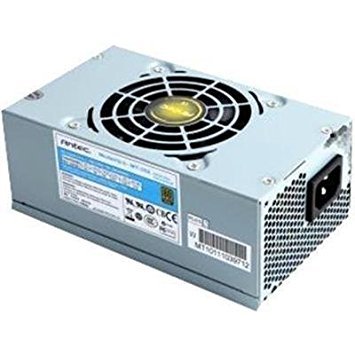
Figure 1: Antec MT-352 Micro ATX Power Supply unit.
2. Informazioni sulla sicurezza
Per evitare lesioni e danni alle apparecchiature, osservare sempre le seguenti precauzioni di sicurezza:
- Rischio elettrico: Non aprire l'alimentatore. Alto volumetages are present inside, even when the system is turned off and unplugged. There are no user-serviceable parts inside.
- Disconnessione dell'alimentazione: Always disconnect the power cord from the wall outlet before installing, removing, or servicing the power supply or any other system components.
- Messa a terra corretta: Ensure your system is properly grounded. Use only the power cord provided with the unit or a suitable replacement that meets local safety standards.
- Ventilazione: Ensure adequate airflow around the power supply. Do not block ventilation openings.
- Umidità e temperatura: Do not operate the power supply in high humidity environments or near water. Avoid extreme temperatures.
- Sovraccarico: Do not overload the power supply beyond its specified wattage.
3. Contenuto della confezione
Verify that all items are present in your Antec MT-352 package:
- Antec MT-352 Micro ATX Power Supply Unit
- Cavo di alimentazione CA
- Viti di montaggio
- Manuale dell'utente (questo documento)
4. Configurazione e installazione
Follow these steps carefully to install your Antec MT-352 power supply:
- Preparazione: Turn off your computer and disconnect the power cord from the wall outlet. Open your computer case. If replacing an existing power supply, disconnect all cables from the old PSU and remove it.
- Montaggio dell'alimentatore: Carefully slide the Antec MT-352 into the power supply bay of your Micro ATX case. Ensure the fan faces the correct direction for optimal airflow (typically facing downwards or towards the rear vent, depending on case design). Secure the power supply to the case using the provided mounting screws. (An image showing the PSU being mounted into a case would be helpful here.)
- Collegamento della scheda madre:
- 20+4 Pin ATX Connector: Connect the main 20+4 pin ATX power connector to the corresponding socket on your motherboard. Ensure both parts of the connector are securely latched. (An image illustrating the 20+4 pin ATX connector connection would be helpful here.)
- 4-Pin ATX 12V (CPU) Connector: Connect the 4-pin ATX 12V connector to the CPU power socket on your motherboard. This is usually located near the CPU socket. (An image showing the 4-pin ATX 12V connector connection would be helpful here.)
- Collegamento di periferiche: Connect the SATA power connectors to your hard drives, SSDs, and optical drives. Use the 4-pin Molex connectors for older peripherals or case fans if needed. Ensure all connections are firm. (An image demonstrating SATA and Molex connections would be helpful here.)
- Gestione dei cavi: Route cables neatly to improve airflow and aesthetics. Use cable ties if necessary.
- Controlli finali: Controlla attentamente tutti i collegamenti per assicurarti che siano ben saldi. Chiudi il case del computer.
5. Funzionamento
After successful installation, follow these steps to operate your system:
- Connetti alimentazione: Plug the AC power cord into the power supply's AC inlet and then into a grounded wall outlet.
- Accensione: Press the power button on your computer case. The system should boot up normally.
- Spegni: To turn off your system, use the operating system's shutdown procedure. For a hard shutdown, press and hold the power button on your case for several seconds. Always ensure the system is fully shut down before disconnecting the power cord.
6. Manutenzione
Una corretta manutenzione garantisce la longevità e le prestazioni ottimali del tuo alimentatore:
- Rimozione della polvere: Periodically clean the power supply's fan and vents to prevent dust buildup, which can impede airflow and cause overheating. Use compressed air to gently blow dust out of the unit. Ensure the system is powered off and unplugged before cleaning.
- Flusso d'aria: Ensure that your computer case has good airflow. Avoid placing the computer in enclosed spaces that restrict ventilation.
- Gestione dei cavi: Maintain tidy cable routing to prevent obstruction of airflow within the case.
7. Risoluzione Dei Problemi
If you encounter issues with your Antec MT-352 power supply, refer to the following common problems and solutions:
| Problema | Possibile causa | Soluzione |
|---|---|---|
| Il sistema non si accende. | Cavo di alimentazione allentato, interruttore dell'alimentatore spento, componente difettoso. | Check AC power cord connection. Ensure PSU switch (if present) is ON. Verify all internal power connectors are secure. Test with a different power outlet. |
| Il sistema si accende ma si spegne immediatamente. | Overload, short circuit, overheating, faulty component. | Disconnect non-essential peripherals to check for overload. Inspect for any loose screws or components causing a short. Ensure adequate ventilation. |
| Rumori insoliti provenienti dall'alimentatore. | Fan obstruction, faulty fan bearing. | Power off and unplug the system. Carefully inspect the fan for obstructions (e.g., loose cables). If noise persists, contact support. |
| Instabilità del sistema o riavvii casuali. | Insufficient power, faulty PSU, other component issues. | Ensure your system's power requirements do not exceed 350W. Check for other faulty components (RAM, GPU). |
If troubleshooting steps do not resolve the issue, contact Antec customer support for further assistance.
8. Specifiche
The following are the technical specifications for the Antec MT-352 Micro ATX Power Supply:
- Modello: MT-352
- Fattore di forma: Micro-ATX
- Uscita Wattage: 350 Watt
- Efficienza: 88%
- Ingresso volumetage: 110V AC - 220V AC (Minimum Input Voltage: 110 Volts, Maximum Input Voltage: 220 Volt)
- Metodo di raffreddamento: Aria
- Tipo di connettore: ATX (20+4 Pin, 4-Pin ATX 12V, SATA, Molex)
- Dispositivi compatibili: Personal computer
- Peso dell'articolo: 3.1 libbra (circa 1.4 kg)
- Produttore: Antec
- ASIN: B0065OD10G
- Data prima disponibilità: 10 novembre 2011
9. Garanzia e supporto
I prodotti Antec sono coperti da garanzia del produttore. Per i termini e le condizioni di garanzia specifici, consultare la scheda di garanzia inclusa con il prodotto o visitare il sito ufficiale Antec. websito. Conservare la prova d'acquisto per eventuali reclami in garanzia.
For technical support, troubleshooting assistance, or warranty inquiries, please contact Antec customer service through their official websito o le informazioni di contatto fornite nella confezione del prodotto.
Nota: nei dati forniti per l'incorporamento non sono stati trovati video ufficiali del prodotto.


