Introduzione
The SeKi Easy Plus remote control is designed for simplicity and ease of use, making it ideal for seniors, children, and individuals who prefer a straightforward control experience. This universal learning remote can replace any infrared remote control, allowing you to consolidate multiple remotes into one. Its large, freely assignable buttons ensure comfortable operation, and all programmed settings are retained even when changing batteries.
Caratteristiche del prodotto
- Universal Learning Function: Capable of learning commands from any existing infrared remote control.
- Replaces Multiple Remotes: Consolidate control for your TV and other IR devices.
- Freely Assignable Keys: Customize button functions to your preference.
- Large, Easy-to-Use Buttons: Designed for enhanced visibility and tactile feedback.
- Conservazione della memoria: Programmed settings are saved even after battery replacement.
- Dispositivi compatibili: Primarily designed for televisions, but can learn from other IR devices.
- Tecnologia di connettività: Infrarossi (IR).
- Numero di pulsanti: 20.
- Portata massima: Fino a 10 metri.
Contenuto della confezione
The SeKi Easy Plus remote control package includes:
- 1x SeKi Easy Plus Universal Learning Remote Control (Silver-Black)
- Manuale dell'utente (questo documento)
Nota: 2x AAA batteries are required for operation and are not included in the package.

Image: SeKi Easy Plus remote control in its retail packaging, showing the silver-black design and large buttons.
Impostare
1. Installazione della batteria
- Locate the battery compartment on the back of the SeKi Easy Plus remote control.
- Far scorrere per aprire il coperchio del vano batterie.
- Inserire due (2) batterie AAA, assicurandosi della corretta polarità (+ e -) come indicato all'interno del vano.
- Chiudere saldamente il coperchio del vano batterie.

Immagine: Posteriore view of the SeKi Easy Plus remote control with the battery cover removed, showing the empty battery slots.

Immagine: Primo piano view of the battery compartment, clearly indicating the requirement for AAA batteries and their correct orientation.
2. Accensione iniziale
After installing the batteries, the remote is ready for programming. There is no separate power-on button; the remote will activate when a button is pressed.
Operating Instructions: Learning Function
The SeKi Easy Plus remote control learns commands directly from your original remote. Follow these steps carefully to program each button:
- Preparare i telecomandi: Place the SeKi Easy Plus remote and your original remote control on a flat surface, facing each other, with their infrared emitters aligned and approximately 1-3 cm apart. Ensure both remotes have fresh batteries.
- Accedi alla modalità di apprendimento: Premere e tenere premuto il tasto TV Power (red button) E AV buttons simultaneously on the SeKi Easy Plus remote for approximately 3 seconds until the red LED indicator light stays on continuously. This indicates the remote is in learning mode.
- Seleziona il pulsante per programmare: On the SeKi Easy Plus remote, press the button you wish to program (e.g., Volume Up '+'). The red LED will start blinking slowly.
- Trasmetti comando: On your original remote control, press and hold the corresponding button (e.g., Volume Up) until the red LED on the SeKi Easy Plus remote blinks rapidly three times and then stays on continuously. This confirms the command has been learned successfully.
- Program More Buttons: Repeat steps 3 and 4 for all other buttons you wish to program (e.g., Volume Down '-', Channel Up '^', Channel Down 'v', Mute, Number buttons, etc.).
- Esci dalla modalità di apprendimento: Una volta programmati tutti i pulsanti desiderati, premere il tasto TV Power (red button) E AV buttons simultaneously again, or wait for approximately 10 seconds without any input. The red LED will turn off, indicating that the remote has exited learning mode and saved the settings.
Note importanti:
- Perform the programming steps promptly. If there is a long pause between button presses during learning mode, the remote may exit learning mode automatically.
- Ensure a clear line of sight between the two remotes during the learning process.
- If a button does not learn correctly, repeat the process for that specific button.

Image: Technical diagram illustrating the dimensions and button layout of the SeKi Easy Plus remote control, highlighting the large button design.

Immagine: Pro lateralefile of the SeKi Easy Plus remote control, showcasing its ergonomic design and slim form factor.
Manutenzione
Sostituzione della batteria
When the remote's performance degrades or the LED indicator light does not respond, it's time to replace the batteries. Follow the battery installation steps in the "Setup" section. The SeKi Easy Plus remote retains its programmed settings even when batteries are removed, so reprogramming is not necessary after replacement.
Pulizia
Per pulire il telecomando, utilizzare un panno morbido e asciutto. Per lo sporco ostinato, utilizzare un panno leggermente dampPulire il panno con acqua o una soluzione detergente delicata. Non utilizzare detergenti abrasivi e non immergere il telecomando in acqua.
Risoluzione dei problemi
- Il telecomando non risponde:
- Check if the batteries are correctly inserted and have sufficient charge. Replace with fresh AAA batteries if necessary.
- Ensure there is a clear line of sight between the remote and the device (TV).
- I pulsanti non funzionano dopo la programmazione:
- The learning process might have failed for specific buttons. Repeat the "Operating Instructions: Learning Function" steps for the affected buttons.
- Ensure the original remote's signal is strong and consistent during programming.
- Learning mode exits prematurely:
- This can happen if there's too long a pause between steps during the learning process. Try to complete each step more quickly.
- Ensure the original remote is transmitting a clear signal when its button is pressed.
- Device not responding to learned commands:
- Verify that the SeKi Easy Plus remote is pointed directly at the device's IR receiver.
- Confirm that the original remote works correctly with the device. If not, the issue might be with the device itself.
Specifiche
| Marca | SeKi |
| Nome del modello | EASY PLUS |
| Numero di modello | 311154 |
| Colore | Argento-Nero |
| Tecnologia di connettività | Infrarossi (IR) |
| Dispositivi compatibili | Television (and other IR-controlled devices) |
| Caratteristiche speciali | Universal, Learning Function, Large Buttons, Senior-Friendly, Freely Programmable, Settings retained during battery change |
| Numero di pulsanti | 20 |
| Portata massima | 10 metri |
| Batterie richieste | 2x AAA (non incluso) |
Garanzia e supporto
The SeKi Easy Plus remote control comes with a Garanzia di 2 anno dalla data di acquisto. Conservare la prova d'acquisto per eventuali reclami in garanzia.
For further assistance, troubleshooting tips, or to view additional product information, please visit the official SeKi websito:
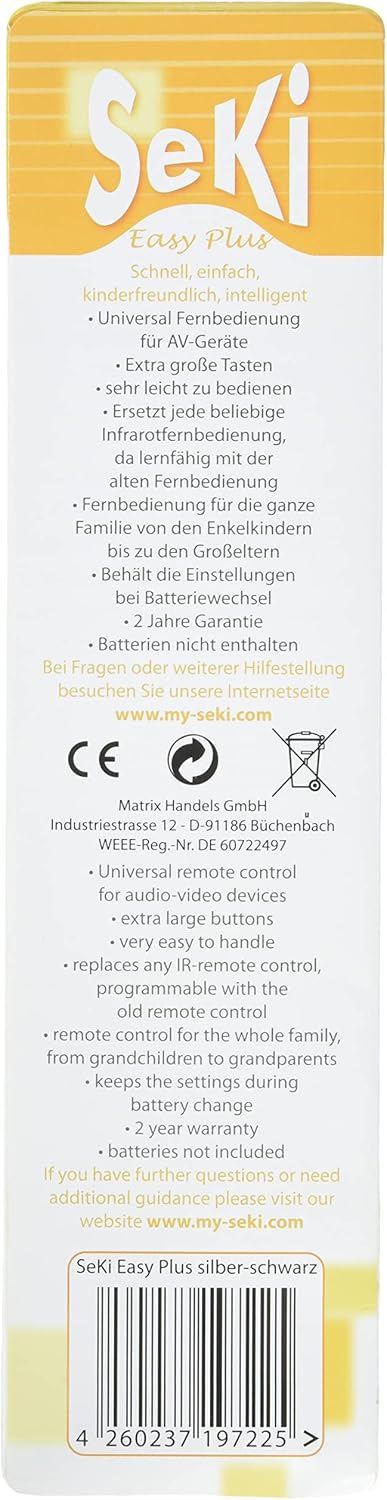
Image: Back of the product packaging, detailing key features, warranty information, and the official support websito.


