1. Introduzione
This manual provides essential instructions for the safe and effective use of your Nikon Coolpix S9300 16.0 MP Digital Camera. Please read this manual thoroughly before using the camera and keep it accessible for future reference.
2. Informazioni sulla sicurezza
To prevent injury or damage to your camera, observe the following safety precautions:
- Non smontare o modificare la fotocamera.
- Tenere la fotocamera lontana dall'acqua e dall'umidità.
- Use only Nikon-approved accessories and power sources.
- Evitare di esporre la fotocamera a temperature estreme o alla luce solare diretta per periodi prolungati.
- Tenere fuori dalla portata dei bambini.
3. Contenuto della confezione
Verifica che tutti gli elementi siano presenti nella confezione della tua fotocamera:
- Nikon Coolpix S9300 Digital Camera
- Batteria ricaricabile agli ioni di litio EN-EL12
- Adattatore di ricarica CA EH-69P
- Cavo USB UC-E6
- Audio Video Cable EG-CP16
- Strap AN-CP19
- ViewCD-ROM NX 2
- Reference Manual CD-ROM
4. Fotocamera finitaview
Familiarize yourself with the main components and controls of your Nikon Coolpix S9300 camera.
Davanti View (Obiettivo esteso)

This image shows the front of the Nikon Coolpix S9300 camera with its 18x optical zoom lens fully extended, ready for capturing images. The flash unit is visible above the lens.
Davanti View (Lente retratta)
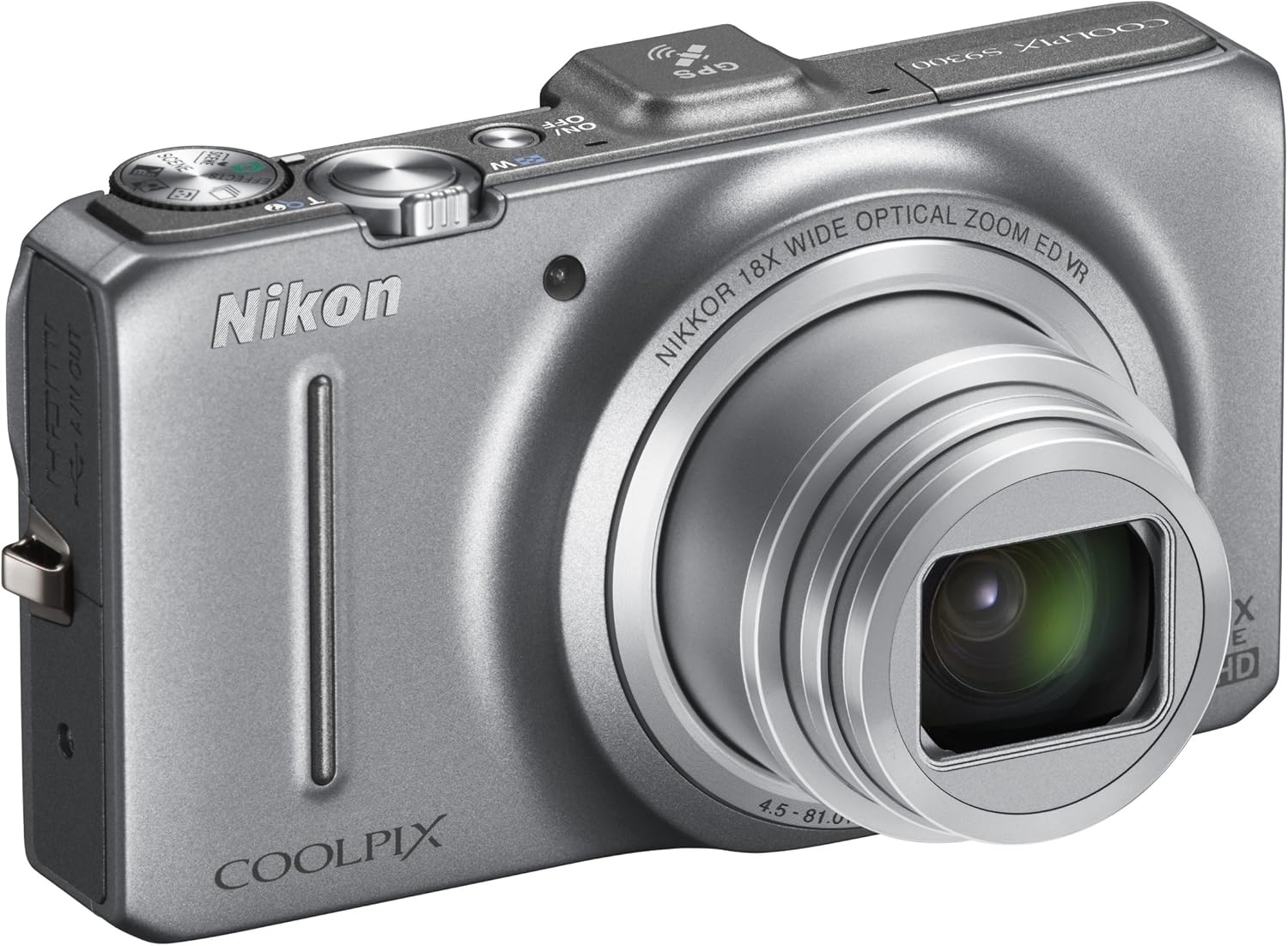
This image displays the Nikon Coolpix S9300 camera from the front, with the lens retracted into the body, indicating it is powered off or in a compact state for portability.
Superiore View

La cima view of the Nikon Coolpix S9300 camera highlights the power button, shutter button with zoom lever, mode dial, and GPS module. The COOLPIX S9300 branding is also visible.
Posteriore View

This image shows the back of the Nikon Coolpix S9300 camera, featuring the 3.0-inch LCD monitor, a four-way multi-selector with 'OK' button, menu button, delete button, and dedicated video recording button.
5. Impostazione
5.1. Inserimento della batteria e della scheda di memoria
- Aprire il coperchio del vano batteria nella parte inferiore della fotocamera.
- Insert the battery with the correct orientation, ensuring the positive and negative terminals align.
- Insert a compatible SD/SDHC/SDXC memory card into the card slot until it clicks into place.
- Chiudere bene il coperchio del vano batteria.
5.2. Carica della batteria
Connect the camera to the Charging AC Adapter EH-69P using the supplied USB cable. The charge lamp si illuminerà durante la carica e si spegnerà al termine.
5.3. Accensione iniziale
Press the power button to turn on the camera. Follow the on-screen instructions to set the language, date, and time.
6. Utilizzo della fotocamera
6.1. Fotografia di base
- Accendi la fotocamera.
- Select your desired shooting mode using the mode dial (e.g., Auto, Scene, Effects).
- Inquadra il tuo scatto utilizzando il monitor LCD.
- Premere a metà il pulsante di scatto per mettere a fuoco, quindi premerlo completamente per scattare la foto.
6.2. Funzione Zoom
Use the zoom lever around the shutter button to zoom in (T) or zoom out (W) to adjust your focal length. The camera features an 18x optical zoom-NIKKOR ED glass lens.
6.3. Registrazione video
Press the dedicated movie-record button to start recording Full HD (1080p) movies with stereo sound. Press it again to stop recording.
6.4. Funzionalità GPS
The built-in GPS provides location data for your photos and can log your movements. Enable GPS in the camera settings to geotag le tue immagini e i tuoi video.
7. Integrazione dei media
7.1. Video ufficiale del prodotto
Questo video fornisce un overview of the Nikon Coolpix S9300 16.0 MP Digital Camera, showcasinle sue caratteristiche e capacità.
8. Manutenzione
8.1. Pulizia della fotocamera
- Per pulire il corpo della fotocamera, utilizzare un panno morbido e privo di lanugine.
- Per quanto riguarda l'obiettivo, utilizzare una spazzola per lenti o un soffiatore per rimuovere la polvere, quindi pulire delicatamente con un panno per la pulizia delle lenti.
- Do not use organic solvents like alcohol or thinner.
8.2. Conservazione
When not in use for extended periods, remove the battery and store the camera in a cool, dry place away from direct sunlight and chemicals.
9. Risoluzione Dei Problemi
9.1. La fotocamera non si accende
- Assicurarsi che la batteria sia completamente carica e inserita correttamente.
- Controllare che i terminali della batteria siano puliti.
9.2. Le immagini sono sfocate
- Check focus settings (Autofocus Mode, AF Area Mode).
- Ensure sufficient lighting or use the flash if necessary.
- Hold the camera steady or use a tripod, especially when using high zoom or in low light.
9.3. La batteria si scarica rapidamente
- Ridurre la luminosità dello schermo LCD.
- Disattivare il GPS quando non serve.
- Limitare lo scatto continuo o la registrazione video.
10. Specifiche
| Caratteristica | Dettaglio |
|---|---|
| Sensore di immagine | 1/2.3 in. CMOS Sensor |
| Pixel effettivi | 16.0 milioni |
| Lente | 18x Optical Zoom, NIKKOR ED glass lens |
| Lunghezza focale dell'obiettivo | 4.5-81.0mm (equivalent to 25-450mm in 35mm format) |
| Riduzione delle vibrazioni | Lens-shift VR |
| Monitor | 3.0-inch diagonal TFT LCD with Anti-reflection coating (approx. 921K dots) |
| File Formati | Still - JPEG, Audio - WAV, Movie - MOV (H.264/MPEG-4 AVC) |
| GPS | Built-in with logging, POI, and Electronic compass |
| Dimensioni (L x A x P) | 4.29 x 2.44 x 1.22 pollici (circa) |
| Peso | 7.5 ounces (approx., with battery and memory card) |
| Fonte di alimentazione | One Rechargeable Li-ion Battery EN-EL12 |
11. Garanzia e supporto
For warranty information, please refer to the warranty card included in your product package. For technical support, visit the official Nikon websito o contattare il servizio clienti Nikon.
Risorse online e FAQ sono disponibili su Nikon USA.


