Introduzione
This manual provides comprehensive instructions for the setup, operation, maintenance, and troubleshooting of your DISH DISH211 4-Device Universal Remote. Designed for ease of use, this remote supports DISH TV receivers and can control up to four different devices, including TVs and other entertainment systems. Its ability to learn commands from original remotes makes it a versatile replacement.
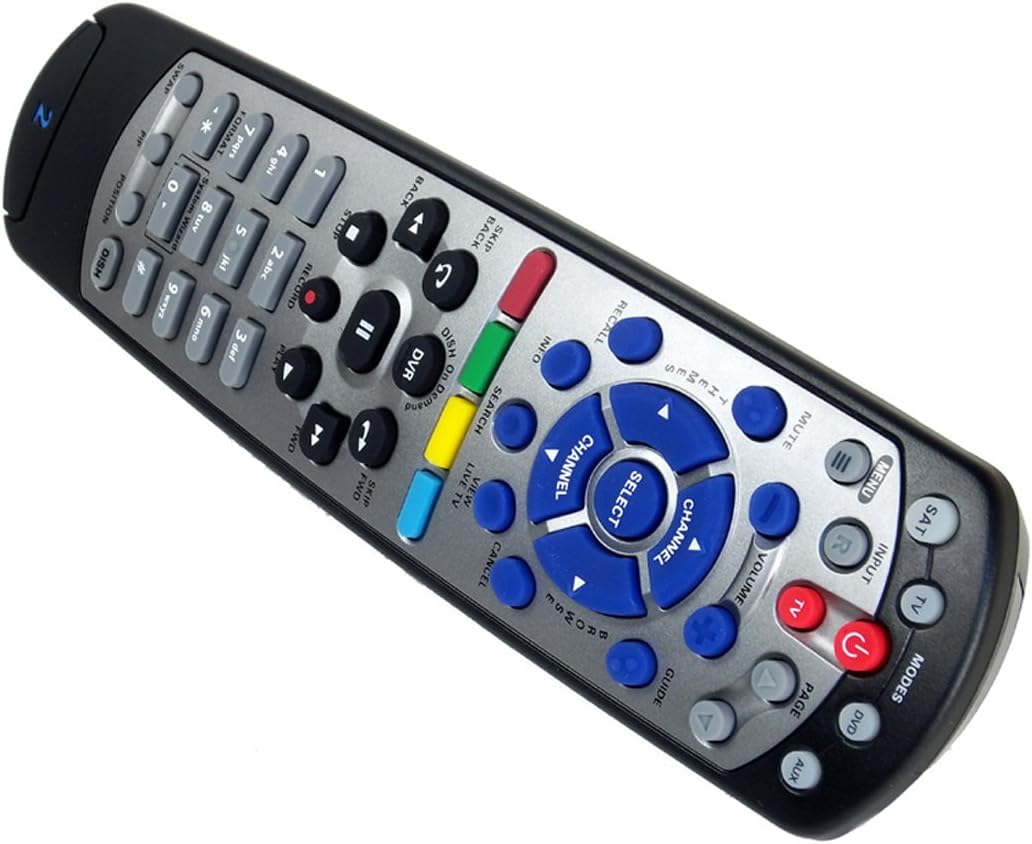
Figure 1: The DISH DISH211 4-Device Universal Remote, showcasinil suo design ergonomico e la disposizione dei pulsanti.
Impostare
1. Installazione della batteria
The DISH211 remote requires two (2) AA batteries for operation. To install:
- Individua il vano batteria sul retro del telecomando.
- Far scorrere il coperchio della batteria verso il basso e sollevarlo per aprirlo.
- Inserire due batterie AA, assicurandosi che i terminali positivo (+) e negativo (-) siano allineati con gli indicatori all'interno del vano.
- Riposizionare il coperchio della batteria facendolo scorrere verso l'alto finché non scatta in posizione.
2. Device Pairing and Programming
The DISH211 remote can be programmed to control your DISH receiver and other devices. It supports both Infrared (IR) and Ultra High Frequency (UHF) communication, depending on your receiver model.

Figure 2: Cover of the official DISH Remote User Guide, which provides detailed programming instructions.
For DISH Receiver Pairing (UHF/IR):
Some DISH receivers may require setting the remote's address and communication type (UHF or IR). A small switch near the battery compartment may allow selection between UHF and IR modes. Ensure this switch is set correctly for your receiver type.
To address the remote to your receiver:
- Premere il tasto Informazioni di sistema button on the front of your receiver to access the system information screen.
- Premere e tenere premuto il tasto SAB button on the remote until all mode lights illuminate.
- Enter a number between 1-15 on the remote keypad. This number corresponds to the TV-2 UHF address displayed on your receiver's screen.
- Premere il tasto # (pound) button once.
- Premere il tasto Documentazione pulsante tre volte.
- Selezionare Fatto on the system info screen and test the remote's functionality.
For Other Devices (TV, DVD, AUX):
The remote has a large code library and can learn commands from your original remotes. Refer to the official DISH remote user guide (often included with the product or available online) for specific programming codes and learning instructions for various brands and device types.

Figure 3: The back of the DISH remote packaging, indicating compatible DISH receiver models for both IR and IR/UHF configurations.
Istruzioni per l'uso
The DISH211 remote is designed for intuitive control of your entertainment system. It features backlit active MODE keys for visibility in low light conditions and dedicated DVR controls.
1. Selezione della modalità
Press the desired mode button (e.g., SAB for DISH receiver, TV for television, DVD for DVD player, AUSILIARIO for auxiliary device) at the top of the remote to select the device you wish to control. The selected mode button will illuminate.
2. Controlli di base
- Energia: Premere il tasto ENERGIA pulsante per accendere o spegnere il dispositivo selezionato.
- Volume: Utilizzare il VOLUME SU/GIÙ buttons to adjust the audio level of your television.
- Canale: Utilizzare il CANALE SU/GI buttons to change channels on your DISH receiver or television.
- Disattiva audio: Premere il tasto MUTE pulsante per disattivare l'audio.
- Ingresso: Premere il tasto INGRESSO button to cycle through video inputs on your television.
3. DVR Controls
The remote includes dedicated buttons for DVR functionality:
- Documentazione: Avvia la registrazione del programma corrente.
- Riproduci/Pausa: Starts or pauses playback of recorded content or live TV.
- Stop: Interrompe la riproduzione.
- Riavvolgimento/Avanzamento veloce: Controls playback speed and direction.
- Skip Forward (DISH Skip Forward): Allows quick skipping through commercials or segments.
- Salta indietro: Skips backward in recorded content.

Figura 4: primo piano view of the DISH DISH211 remote, highlighting the central navigation and DVR control buttons.
Manutenzione
1. Sostituzione della batteria
When the remote's performance degrades or buttons become unresponsive, it is likely time to replace the batteries. Follow the battery installation steps outlined in the Setup section.
2. Pulizia
Per pulire il telecomando, strofinare delicatamente la superficie con un panno morbido e asciutto. Per lo sporco ostinato, strofinare leggermenteampen the cloth with water or a mild, non-abrasive cleaner. Avoid using excessive liquid or harsh chemicals, as these can damage the remote's electronics or finish.
Risoluzione dei problemi
Il telecomando non risponde
- Controllare le batterie: Assicurarsi che le batterie siano installate correttamente e abbiano una carica sufficiente. Sostituirle se necessario.
- Linea di vista (IR): If using IR mode, ensure there is a clear line of sight between the remote and the device's IR receiver. Obstructions can block the signal.
- Selezione della modalità: Verify that the correct mode button (e.g., SAT, TV) is selected for the device you are trying to control.
- Remote Address/UHF-IR Switch: For DISH receivers, confirm the remote's address is correctly set and the UHF/IR switch (if present) matches your receiver's configuration. Incorrect settings can prevent communication.
Funzionalità intermittente
- Interferenza: Other electronic devices or strong light sources (like plasma TV IR interference) can sometimes interfere with IR signals. Try operating the remote from a different angle or location.
- DVR Directory Update: If experiencing lag or unresponsiveness with DVR functions, ensure your DVR's directory is updated. Consult your DISH receiver's manual for instructions on updating its software or directory.
Pulsanti non funzionanti
- Pulisci remoto: Dirt or debris under buttons can cause them to stick or become unresponsive. Clean the remote as described in the Maintenance section.
- Riprogrammare: If specific buttons for a device are not working, the remote may need to be reprogrammed for that device.
Specifiche
| Caratteristica | Dettaglio |
|---|---|
| Numero di modello | DISH211 |
| Marca | PIATTO |
| Dimensioni del prodotto | 1.75 x 4.81 x 11.38 pollici |
| Peso dell'articolo | 9.6 once |
| Batterie richieste | 2 batterie AA |
| Numero massimo di dispositivi supportati | 4 |
| Dispositivi compatibili | Television, DISH TV receivers (TV1 and TV2 locations) |
| Tecnologia di connettività | Infrared (IR), Ultra High Frequency (UHF) |
| Caratteristiche speciali | Backlit keys, Universal compatibility, Learning capability |
Garanzia e supporto
Informazioni sulla garanzia
The DISH DISH211 Universal Remote typically comes with a Garanzia limitata di 90 giorni. Please refer to the documentation enclosed with your product for specific terms, conditions, and details regarding warranty claims.
Assistenza clienti
For further assistance with programming, troubleshooting, or general inquiries, it is recommended to consult the official DISH Network support resources. This may include their website, online user guides, or customer service contact information. The manufacturer of this product is Audiovox Accessories Corporation.


