Introduzione
This manual provides instructions for the setup, operation, maintenance, and troubleshooting of your ASUS VG23AH 23-inch 3D IPS LED Monitor. The VG23AH monitor features a 23-inch Full HD 1080p IPS panel with 3D capabilities, designed to deliver high-quality visuals and an immersive viewing experience. It includes ASUS All-in 3D Technology for converting 2D content to 3D via a dedicated button.
Impostare
1. Disimballaggio del monitor
Carefully remove the monitor and all components from the packaging. Ensure all items listed in the packing contents are present. Retain the packaging for future transport or service needs.
2. Assemblaggio del supporto
- Posizionare il pannello del monitor rivolto verso il basso su una superficie morbida e pulita per evitare graffi.
- Fissare la base del supporto al collo del supporto. Fissarla con la vite in dotazione.
- Align the assembled stand with the mounting holes on the back of the monitor panel. Insert and tighten the screws to secure the stand to the monitor.

Immagine: Frontale view of the ASUS VG23AH monitor with its stand assembled.
3. Cavi di collegamento
Connect the necessary cables to the monitor and your computer or other devices. The monitor supports dual HDMI 1.4, single-link DVI, and D-sub inputs.
- Cavo di alimentazione: Collegare il cavo di alimentazione all'ingresso di alimentazione del monitor e quindi a una presa di corrente.
- Cavo video: Scegli uno dei seguenti collegamenti:
- HDMI: Connect an HDMI cable from your device to one of the HDMI ports on the monitor.
- Ingresso DVI: Connect a DVI cable from your device to the DVI port on the monitor.
- D-sub (VGA): Connect a D-sub cable from your device to the D-sub port on the monitor.
- Cavo audio (facoltativo): If using D-sub or DVI for video and wish to use the monitor's speakers, connect an audio cable from your device's audio output to the monitor's audio input. HDMI connections transmit audio digitally.

Immagine: Posteriore view of the ASUS VG23AH monitor, highlighting the power, HDMI, DVI, D-sub, and audio input ports.
4. Accensione iniziale
After connecting all cables, press the power button on the monitor. Ensure your connected device is also powered on. The monitor should automatically detect the input signal. If not, use the OSD (On-Screen Display) menu to manually select the input source.
Funzionamento del monitor
1. Menu OSD (On-Screen Display).
The OSD menu allows you to adjust various monitor settings. Use the buttons located on the front or bottom bezel of the monitor to navigate the menu.
- Pulsante Menu: Apre il menu OSD.
- Pulsanti di navigazione: Utilizzato per spostarsi tra le opzioni del menu e regolare i valori.
- Pulsante Seleziona/Invio: Conferma una selezione o accede a un sottomenu.
- Pulsante di uscita: Esce dal menu o dall'OSD corrente.
2. Display Modes and 3D Functionality
The VG23AH supports both 2D and 3D display modes. The monitor utilizes passive 3D technology.
- Modalità 2D: Standard display for everyday computing, gaming, and video viewing.
- Modalità 3D: Per viewing stereoscopic 3D content.
- Conversione da 2D a 3D: The monitor features a dedicated 3D button on the front bezel. Pressing this button instantly converts 2D content to simulated 3D. The effectiveness of this conversion may vary depending on the source content.
- Occhiali 3D: Passive 3D glasses are required to experience the 3D effect.
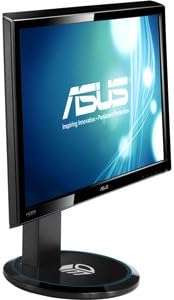
Immagine: Lato view of the ASUS VG23AH monitor, illustrating its design and the location of control buttons on the bezel.
3. Caratteristiche audio
The monitor includes built-in 3W stereo speakers. Audio can be received via HDMI (digital) or through the 3.5mm audio input jack (analog).
Manutenzione
1. Pulizia del monitor
- Prima di procedere alla pulizia, spegnere sempre il monitor e scollegare il cavo di alimentazione.
- Utilizzare un panno morbido e privo di lanugine leggermente dampcon acqua o con un detergente per schermi delicato e non abrasivo.
- Non spruzzare il detergente direttamente sullo schermo. Applicalo prima sul panno.
- Evitare l'uso di prodotti chimici aggressivi, solventi o materiali abrasivi, poiché possono danneggiare lo schermo o laasing.
2. Assistenza generale
- Tenere il monitor lontano dalla luce solare diretta, da calore eccessivo e dall'umidità.
- Assicurare un'adeguata ventilazione attorno al monitor per evitare il surriscaldamento.
- Evitare di posizionare oggetti pesanti sul monitor o sui suoi cavi.
- If moving the monitor, disassemble the stand and pack it in its original packaging for protection.
Risoluzione dei problemi
Se riscontri problemi con il monitor, fai riferimento ai seguenti problemi comuni e alle relative soluzioni:
| Problema | Possibile soluzione |
|---|---|
| Nessuna immagine sullo schermo |
|
| L'immagine è sfocata o distorta |
|
| 3D effect is not working or appears incorrect |
|
| Nessun audio dagli altoparlanti |
|
Specifiche
Key technical specifications for the ASUS VG23AH monitor:
| Caratteristica | Specificazione |
|---|---|
| Dimensioni dello schermo | 23 pollici |
| Tipo di pannello | LED IPS |
| Risoluzione nativa | 1920 x 1080 (Full HD 1080p) |
| Proporzioni | 1.33:1 |
| Viewangolo di ing | Ultra-ampio 178° |
| 3D Tecnologia | Passive 3D, ASUS All-in 3D Technology |
| Connettività | Dual HDMI 1.4, Single-link DVI, D-sub |
| Altoparlanti incorporati | Altoparlanti stereo da 3 W. |
| Dimensioni del prodotto (LxWxH) | 24.61 x 9.14 x 19.02 pollici |
| Peso dell'articolo | 13 libbre |
| Produttore | ASUS Computer International Direct |
Informazioni sulla garanzia
ASUS products are manufactured to the highest quality standards. For detailed warranty terms and conditions, please refer to the warranty card included with your product or visit the official ASUS support websito. Conservare la prova d'acquisto per l'assistenza in garanzia.
Supporto
Per ulteriore assistenza, supporto tecnico o richieste di assistenza, visitare il supporto ufficiale ASUS website or contact ASUS customer service. You can find contact information and frequently asked questions on the ASUS support portal.
Supporto ASUS Websito: www.asus.com/support/


