Introduzione
The HP H220 Host Bus Adapter (HBA) is a factory-integrated component designed to provide high-performance connectivity for SAS (Serial Attached SCSI) and SATA (Serial Advanced Technology Attachment) storage devices. This adapter facilitates the connection of internal or external storage drives to a server or workstation, enabling data transfer and storage management. It is compatible with various operating systems, including Windows and Linux.
Informazioni sulla sicurezza
- Always power off and unplug the computer system before installing or removing any internal components.
- Wear an anti-static wrist strap and work on an anti-static mat to prevent electrostatic discharge (ESD) damage to the HBA and other components.
- Handle the HBA by its edges; avoid touching the gold connectors or integrated circuits.
- Ensure proper ventilation within the computer chassis to prevent overheating.
- Do not attempt to modify or repair the HBA. Refer servicing to qualified personnel.
Contenuto della confezione
Verificare che tutti i componenti siano presenti prima di procedere con l'installazione:
- HP H220 Host Bus Adapter card
- a basso profilofile staffa (può essere preinstallata o inclusa separatamente)

Image: The HP H220 Host Bus Adapter card shown with both a standard-height bracket and a separate low-profile bracket, illustrating the physical components included.
Configurazione e installazione
- Preparare il sistema: Power down the computer system and disconnect all power cables. Open the computer chassis to access the internal components.
- Select a PCIe Slot: Locate an available PCI Express (PCIe) expansion slot on your motherboard. The H220 HBA requires a PCIe x8 slot for optimal performance, though it may function in a PCIe x16 slot.
- Install the HBA:
- Remove the metal slot cover from the chosen PCIe slot on the computer chassis.
- Carefully align the HBA's PCIe connector with the slot on the motherboard.
- Apply even pressure to both ends of the card until it is fully seated in the slot. Ensure the retention clip (if present) engages.
- Secure the HBA to the chassis with a screw or retention mechanism.

Immagine: dall'alto verso il basso view of the HP H220 Host Bus Adapter, highlighting the PCIe connector and the two Mini-SAS ports, alongside a separate low-profile staffa.
- Collegare i dispositivi di archiviazione:
- Connect Mini-SAS to SATA/SAS breakout cables (not included) to the two Mini-SAS ports on the HBA.
- Connect the other end of the breakout cables to your SAS or SATA storage drives. Ensure proper cable routing to avoid obstructing airflow.
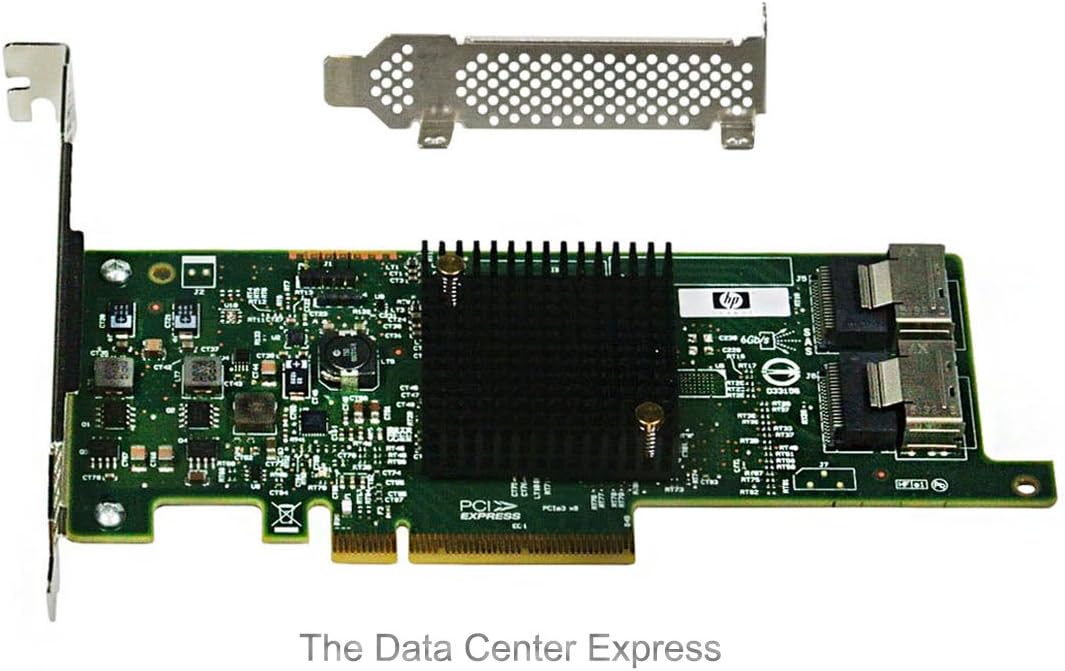
Immagine: Un angolo view of the HP H220 Host Bus Adapter, showing the heatsink, PCIe interface, and the two Mini-SAS connectors for attaching storage devices.
- Close Chassis and Power On: Close the computer chassis, reconnect all power cables, and power on the system.
- Installazione del driver:
- Upon first boot, the operating system (Windows or Linux) may automatically detect and install generic drivers.
- For optimal performance and compatibility, download the latest drivers from the official Hewlett Packard Enterprise (HPE) support websito per il tuo sistema operativo specifico. Cercare "HP H220 HBA drivers".
Istruzioni per l'uso
Once installed and drivers are loaded, the HP H220 HBA functions as a pass-through controller, presenting connected SAS and SATA drives directly to the operating system. This allows the operating system or software RAID solutions (e.g., ZFS, mdadm) to manage the drives.
- Configurazione BIOS/UEFI: In most cases, the HBA will be detected automatically. If necessary, consult your system's BIOS/UEFI settings to ensure the PCIe slot is enabled and configured correctly.
- Riconoscimento del sistema operativo: Verify that the operating system recognizes the HBA and all connected drives. In Windows, check Device Manager under "Storage controllers". In Linux, use commands like
lsscsio controllare/dev/sd*voci. - Gestione della memoria: Use your operating system's native disk management tools or third-party software to initialize, partition, and format the connected drives.
Manutenzione
- Rimozione della polvere: Periodically inspect the HBA and surrounding components for dust accumulation. Use compressed air to gently clean the heatsink and PCB to ensure proper cooling.
- Aggiornamenti del firmware: Check the HPE support website for any available firmware updates for the H220 HBA. Firmware updates can improve stability, performance, and compatibility. Follow the provided instructions carefully when performing firmware updates.
- Integrità del cavo: Ensure all Mini-SAS cables are securely connected and free from damage. Loose or damaged cables can lead to data corruption or connectivity issues.
Risoluzione dei problemi
| Problema | Possibile causa | Soluzione |
|---|---|---|
| HBA not detected by system. | Card not fully seated; faulty PCIe slot; insufficient power; BIOS/UEFI setting. |
|
| Connected drives not recognized. | Incorrect or missing drivers; faulty cables; drive issues; HBA not functioning. |
|
| Instabilità o arresti anomali del sistema. | Driver conflict; overheating; faulty HBA. |
|
Specifiche
| Caratteristica | Dettaglio |
|---|---|
| Marca | Azienda |
| Numero di modello | 650933-B21 |
| Interfaccia Hardware | PCI Express (PCIe), SAS |
| Dispositivi compatibili | Desktop Computer, Server |
| Supporto del sistema operativo | Finestre, Linux |
| Dimensioni del prodotto (LxWxH) | 6.61 x 2.7 x 0.63 pollici |
| Peso dell'articolo | 6.4 once (circa 0.4 libbre) |
| Produttore | HP ISS |
| Data prima disponibilità | 4 agosto 2012 |
Informazioni sulla garanzia
This HP H220 Host Bus Adapter is covered by the standard manufacturer's warranty provided by Hewlett Packard Enterprise (HPE). The specific terms and duration of the warranty may vary by region and point of purchase. Please retain your proof of purchase for warranty claims. For detailed warranty information, refer to the official HPE websito o contattare il fornitore.
Supporto
For technical assistance, driver downloads, firmware updates, or further information regarding the HP H220 Host Bus Adapter, please visit the official Hewlett Packard Enterprise (HPE) support websito:
Supporto HPE Websito: https://www.hpe.com/support
When contacting support, please have your product model number (650933-B21) and any relevant system information readily available.


