Introduzione
This manual provides instructions for the proper setup, operation, and maintenance of your Zalman NC3500 Laptop Cooling Pad. Please read this manual thoroughly before use to ensure optimal performance and longevity of the product.
The Zalman NC3500 is designed to enhance laptop performance by providing efficient cooling and includes an integrated USB hub for expanded connectivity.
Caratteristiche del prodotto
Sistema di raffreddamento efficiente
The NC3500 features a large 220mm fan and an aesthetically prepared vent hole structure to deliver powerful and ultra-quiet cooling performance for your laptop.

Immagine: Primo piano view of the cooling pad's surface, showing the vent holes and the fan grille, emphasizing its quiet and powerful cooling capabilities.
Hub USB integrato
Expand your connectivity with the integrated USB hub, featuring four USB 2.0 ports for connecting various peripheral devices.

Immagine: Lato view of the cooling pad, highlighting the four USB 2.0 ports available for connecting external devices.
Turbo Cooling Function
Activate the one-touch Turbo Booster button for quick and enhanced cooling performance when your laptop requires additional heat dissipation.

Image: Detail of the cooling pad's side, showing the 'Turbo Booster' button and a graphic indicating increased cooling performance when activated.
Adjustable Fan Control
Easily adjust the fan speed to balance between cooling performance and noise levels using the integrated volume knob.

Immagine: Lato view of the cooling pad, focusing on the fan speed adjustment knob for controlling noise and cooling.
Design ergonomico
The cooling pad features a sleek, ergonomic design with a comfortable angle for typing, compatible with laptops ranging from 12 to 17 inches.
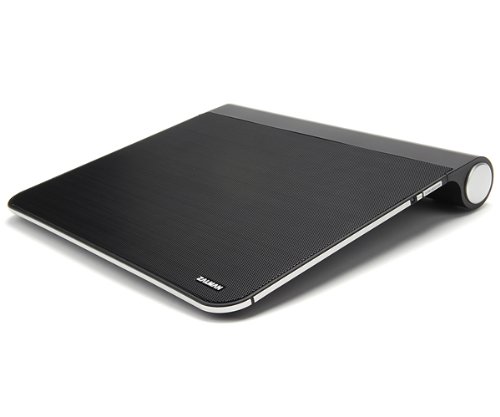
Immagine: Un angolo view of the Zalman NC3500 cooling pad, highlighting its overall design and form factor.
Contenuto della confezione
Prima di procedere con l'installazione, verificare che tutti i componenti siano presenti nella confezione.
- Zalman NC3500 Laptop Cooling Pad Unit
- Manuale dell'utente (questo documento)
- Y-Type USB Power Cable

Image: The three main components included in the package: the NC3500 cooling pad, the user manual, and the Y-type USB power cable.
Istruzioni di installazione
Posizionamento: Place the Zalman NC3500 cooling pad on a stable, flat surface. Ensure there is adequate space around the pad for proper airflow.
Connetti alimentazione: Connect the Y-Type USB Power Cable to the designated USB power input port on the cooling pad. Then, connect the other end of the Y-Type USB cable to two available USB ports on your laptop. This provides power for the cooling fan and the integrated USB hub.
Posizione Laptop: Carefully place your laptop onto the cooling pad, ensuring it is centered and stable. The cooling pad is compatible with laptops from 12 to 17 inches.

Immagine: Frontale view of the cooling pad, illustrating the location of the USB ports for power and peripheral connections.
Operating the Cooling Pad
Accensione/spegnimento: Once connected to your laptop's USB ports, the cooling fan will automatically power on. To turn off the fan, disconnect the USB power cable from your laptop.
Regola la velocità della ventola: Use the fan control knob located on the side of the cooling pad to adjust the fan speed. Rotate the knob to increase or decrease the fan's RPM, thereby controlling cooling performance and noise level.
Activate Turbo Cooling: For maximum cooling, press the "Turbo Booster" button. This will temporarily increase the fan speed to its highest setting for rapid heat dissipation.
Utilizzo dell'hub USB: Connect your USB peripheral devices (e.g., mouse, keyboard, external hard drive) to the available USB ports on the cooling pad.
Manutenzione
To ensure optimal performance and longevity of your Zalman NC3500 cooling pad, regular maintenance is recommended.
Pulizia: Periodically clean the fan and vent areas to prevent dust accumulation. Use a soft, dry cloth or a can of compressed air to remove dust from the fan blades and the mesh surface. Ensure the device is disconnected from power before cleaning.
Evitare ostacoli: Do not place the cooling pad on soft surfaces (e.g., blankets, carpets) that may block the airflow vents.
Risoluzione dei problemi
La ventola non gira
Controllare la connessione USB: Ensure the Y-Type USB Power Cable is securely connected to both the cooling pad and two functional USB ports on your laptop.
Testare le porte USB: Try connecting the cooling pad to different USB ports on your laptop to rule out a faulty port.
Potenza ausiliaria: If your laptop's USB ports do not provide sufficient power, an auxiliary power adapter (sold separately) may be required. Connect it to the DC IN 5V port on the cooling pad.
Raffreddamento insufficiente
Regola la velocità della ventola: Aumentare la velocità della ventola utilizzando la manopola di controllo.
Attiva la modalità Turbo: Press the Turbo Booster button for maximum cooling.
Prese d'aria trasparenti: Ensure the cooling pad's vents and your laptop's vents are not obstructed by dust or other objects.
Rumore insolito
Controllare eventuali ostruzioni: Inspect the fan area for any foreign objects that might be causing the noise.
Clean Fan: Dust accumulation can sometimes cause imbalance and noise. Clean the fan blades as described in the Maintenance section.
Reduce Fan Speed: Lowering the fan speed may reduce noise, though it will also reduce cooling performance.
Specifiche del prodotto

Image: A detailed table outlining the technical specifications of the Zalman NC3500 cooling pad.
| Caratteristica | Dettaglio |
|---|---|
| Dimensioni compatibili del notebook | 12" - 17" |
| Dimensioni (L x P x A) | 363 x 404 x 56 mm (14.3 x 15.9 x 2.2 pollici) |
| Peso | 1.2 kg (2.7 libbre) |
| Materiale | Plastica, Acciaio |
| Fan Type / Quantity | Actual Fan / 1 EA |
| Dimensioni della ventola | 220 millimetri |
| Tipo di cuscinetto | Cuscinetto a manicotto |
| Giri al minuto della ventola | 620 - 720 rpm ± 10% |
| Livello di rumore | 17 - 23.5 dBA |
| Controllo della ventola | Manopola del volume, On/Off |
| Porte USB | 5EA (4 x USB 2.0 Ports / 1 USB Power Unit) |
| Auxiliary Power Adaptor | Supported (Sold Separately) |
| Ingresso DC | 5V |
| Turbo Button Function | Increases fan speed to 800 rpm |
Garanzia e supporto
Per informazioni sulla garanzia e supporto tecnico, fare riferimento al sito ufficiale Zalman webo contattare il rivenditore locale. Conservare la prova d'acquisto per eventuali reclami in garanzia.


