1. Introduzione
This manual provides essential instructions for the safe and effective use of your Olympus E-PM2 Mirrorless Digital Camera. The E-PM2 is equipped with a 16 MP Live MOS sensor and a TruePic VI Image Processor, designed to deliver high-quality images in a compact form factor. Please read this manual thoroughly before using your camera.
Caratteristiche principali:
- 16MP CMOS Micro Four Thirds sensor for detailed images.
- 8 frames per second continuous shooting for capturing fast action.
- 35-area contrast detect AF with touch focus for precise and quick focusing.
- ISO sensitivity range of 100-25,600 for versatile low-light performance.
- 1080 HD video recording capability.
- 3.0 inch touchscreen LCD with 460,000 dots for intuitive control.
- In-body sensor-shift image stabilization to reduce blur.
- RAW and RAW + JPEG shooting options.
- Compatible with SD/SDHC/SDXC memory cards.
2. Componenti della fotocamera
Familiarize yourself with the main parts of your Olympus E-PM2 camera.

Figura 2.1: Davanti view of the Olympus E-PM2 camera with the 14-42mm lens attached. This image shows the lens, grip, and overall compact design of the camera body.
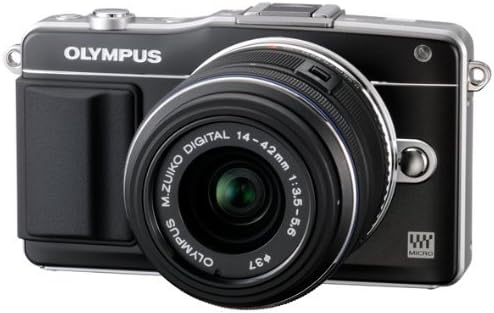
Figura 2.2: Top-down view of the Olympus E-PM2 camera. This perspective highlights the shutter button, mode dial (if present, or equivalent controls), and accessory port.
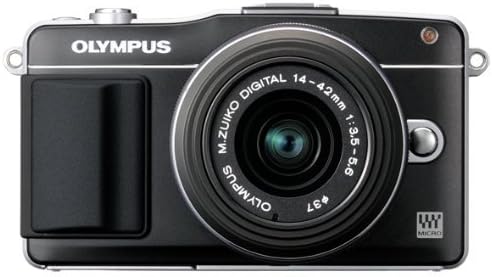
Figura 2.3: Posteriore view of the Olympus E-PM2 camera, showing the 3.0-inch touchscreen LCD and control buttons. This is where you will interact with the camera's menu and review immagini.
3. Impostazione
3.1. Collegamento dell'obiettivo
- Rimuovere il tappo del corpo macchina dalla fotocamera e il tappo posteriore dell'obiettivo.
- Align the mounting marks (usually a white dot) on the lens with the corresponding mark on the camera body.
- Ruotare l'obiettivo in senso orario finché non scatta in posizione.
3.2. Inserimento della batteria
The Olympus E-PM2 uses a rechargeable battery. Although batteries are not included with all packages, ensure you have a compatible battery charged before use.
- Aprire il coperchio del vano batteria situato nella parte inferiore della fotocamera.
- Insert the charged battery with the correct orientation, ensuring the contacts align.
- Chiudere saldamente il coperchio del vano batterie.
3.3. Inserimento di una scheda di memoria
La fotocamera supporta schede di memoria SD, SDHC e SDXC.
- Open the memory card slot cover, typically located on the side or bottom of the camera.
- Inserire la scheda di memoria con l'etichetta rivolta nella direzione corretta finché non scatta in posizione.
- Chiudere bene il coperchio dello slot della scheda di memoria.
3.4. Impostazioni iniziali
Upon first power-on, you may be prompted to set the date, time, and language. Follow the on-screen instructions using the touchscreen or control buttons.
4. Utilizzo della fotocamera
4.1. Accensione/spegnimento
Press the power button to turn the camera on or off. The LCD screen will illuminate when the camera is on.
4.2. Modalità fotografiche di base
The E-PM2 offers various shooting modes to suit different situations:
- iAuto (Intelligent Auto): La fotocamera rileva automaticamente la scena e applica le impostazioni ottimali.
- Programma AE (P): The camera sets both aperture and shutter speed for optimal exposure, but you can shift the combination.
- Priorità di apertura (A): Imposta l'apertura e la fotocamera imposta automaticamente la velocità dell'otturatore. Ideale per controllare la profondità di campo.
- Priorità otturatore (S): Imposta la velocità dell'otturatore e la fotocamera imposta automaticamente l'apertura. Ideale per controllare l'effetto mosso.
- Manuale (M): Puoi controllare sia l'apertura che la velocità dell'otturatore.
- Modalità scena: Select from various pre-set scene modes (e.g., Portrait, Landscape, Night Scene) for optimized results in specific situations.
4.3. Messa a fuoco
The E-PM2 features a FAST (Frequency Acceleration Sensor Technology) AF system with 35 focus points.
- Messa a fuoco automatica: Press the shutter button halfway down to activate autofocus. The camera will focus on the subject within the selected AF area.
- Messa a fuoco tattile: Tap on the desired area of the touchscreen LCD to focus on that point. You can also configure the camera to take a picture immediately after touching to focus.
- Messa a fuoco manuale: Rotate the focus ring on the lens while observing the LCD screen to achieve sharp focus.
4.4. Controllo dell'esposizione
Adjusting exposure ensures your photos are neither too bright nor too dark.
- Sensibilità ISO: Adjust the ISO setting (100-25,600) to control the camera's sensitivity to light. Higher ISO values are useful in low light but may introduce noise.
- Compensazione dell'esposizione: Use the exposure compensation function to manually adjust the brightness of your image.
- Modalità di misurazione: The camera offers Multi, Center-weighted, and Spot metering modes to measure light effectively.
4.5. Stabilizzazione dell'immagine
The E-PM2 incorporates sensor-shift image stabilization to minimize blur caused by camera shake, especially in low light or with longer focal lengths.
4.6. Scatto continuo
For capturing fast-moving subjects, use the continuous shooting mode, which allows you to take up to 8 frames per second.
4.7. Utilizzo del Flash
An attachable flash is included with the camera. Connect it to the accessory port when additional illumination is required. The flash offers various modes, including Auto and Red-eye Reduction.
4.8. Art Filters
The E-PM2 features 12 in-camera Art Filters (e.g., Pop Art, Soft Focus, Diorama) to add creative effects to your photos and videos. These can be applied in all shooting modes.
4.9. Live Guide
The Live Guide system allows you to preview effects like brightness, color saturation, and background blur on the LCD before capturing the image. Access it via the dedicated button or menu.
4.10. Registrazione video
To record video, switch to movie mode. The E-PM2 supports Full 1080i HD video recording with stereo sound in .MOV or .AVI formats. Art Filters can also be applied to videos.
4.1 video: generale finitaview of camera features and operation. This video demonstrates various aspects of the camera's functionality.
4.2 video: Short demonstration of camera usage. This video provides a brief look at the camera in action.
5. Manutenzione
5.1. Dust Reduction System
The E-PM2 features a Supersonic Wave Filter that vibrates silently each time the camera is turned on, dislodging dust from the sensor to ensure spot-free images.
5.2. Pulizia della fotocamera e dell'obiettivo
- Corpo macchina fotografica: Utilizzare un panno morbido e asciutto per pulire il corpo della fotocamera. Per lo sporco ostinato, leggermente dampLavare il panno con acqua. Evitare l'uso di solventi organici.
- Lente: Use a lens blower brush to remove dust. For smudges, use a specialized lens cleaning solution and a microfiber cloth. Never touch the lens surface with your fingers.
- Schermo LCD: Pulire delicatamente con un panno morbido e asciutto. Evitare di premere troppo forte.
5.3. Cura della batteria
- Always use genuine Olympus batteries and chargers.
- Conservare le batterie in un luogo fresco e asciutto quando non vengono utilizzate.
- Evitare di esporre le batterie a temperature estreme.
5.4. Conservazione
When storing the camera for extended periods, remove the battery and memory card. Store the camera in a dry, well-ventilated area, preferably in a camera bag to protect it from dust and impact.
6. Risoluzione Dei Problemi
If you encounter issues with your Olympus E-PM2, refer to the following common problems and solutions:
6.1. La fotocamera non si accende
- Assicurarsi che la batteria sia completamente carica e inserita correttamente.
- Controllare che i contatti della batteria siano puliti.
- Se disponibile, provare a utilizzare una batteria carica diversa.
6.2. Immagini sfocate
- Controllare che l'obiettivo sia correttamente fissato e pulito.
- Assicurarsi che la fotocamera sia correttamente a fuoco sul soggetto.
- Increase shutter speed or use a tripod in low light conditions to prevent camera shake.
- Verify that image stabilization is enabled if shooting handheld.
6.3. Autofocus Not Working
- Ensure the lens is set to autofocus (AF) mode.
- Check for sufficient light on the subject; the AF illuminator may assist in dark conditions.
- Ensure there is enough contrast in the subject for the autofocus system to lock on.
6.4. Errore della scheda di memoria
- Assicurarsi che la scheda di memoria sia inserita correttamente.
- Check if the memory card is locked (write-protected).
- Prova a formattare la scheda (questa operazione cancellerà tutti i dati, quindi esegui prima un backup).
- Use a different memory card to rule out card malfunction.
7. Specifiche
Detailed technical specifications for the Olympus E-PM2 Mirrorless Digital Camera.
| Caratteristica | Specificazione |
|---|---|
| Nome del modello | Olympus E-PM2 |
| Tipo di sensore | 16 MP CMOS Micro Four Thirds |
| Stabilizzazione dell'immagine | Spostamento del sensore |
| Supporti compatibili | Micro Quattro Terzi |
| Lens Type (Included) | Standard Zoom (14-42mm) |
| Lunghezza focale massima | 84 millimetri |
| Lunghezza focale minima | 14 millimetri |
| Apertura massima | 3.5 anni |
| Sensibilità ISO | 100-25,600 (Expanded ISO Minimum 200, Expanded ISO Maximum 1600 listed in some specs) |
| Velocità dell'otturatore | Da 1/4000 a 60 secondi |
| Scatto continuo | 8 fotogrammi al secondo |
| Punti di messa a fuoco automatica | 35 |
| Display | 3.0 Inch LCD Touch Screen (460,000 dots) |
| Risoluzione video | Risoluzione Full HD 1080p |
| Supportato File Formati | RAW, JPEG, RAW+JPEG, MPO(3D still) |
| Slot per scheda di memoria | Scheda SD |
| Connettività | HDMI (Type C Mini), USB 2.0, EyeFi (Wireless Technology) |
| Peso dell'articolo | 0.59 libbre |
8. Garanzia e supporto
For detailed warranty information, product registration, and technical support, please refer to the official Olympus website or contact Olympus customer service. Keep your proof of purchase for warranty claims.
The Olympus E-PM2 is identified by Model Number V206021BU000 e UPC 050332184336.


