1. Introduzione
The Olympus E-PL5 is a compact mirrorless digital camera designed for both photography enthusiasts and casual users. It features a 16MP Live MOS sensor, a TruePic VI image processor, and a versatile 14-42mm lens, offering high-quality imaging in a portable form factor. This manual provides essential information for setting up, operating, and maintaining your camera.
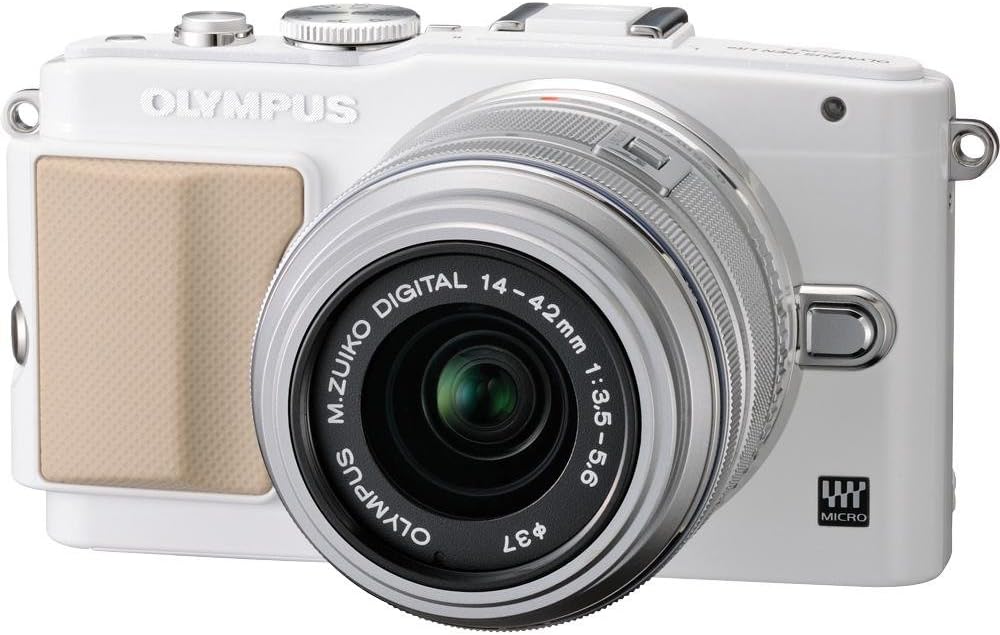
Figura 1: Fronte view of the Olympus E-PL5 Mirrorless Digital Camera with the 14-42mm lens attached.
2. Impostazione
2.1 Installazione della batteria e della scheda di memoria
- Aprire il coperchio della batteria/scheda di memoria situato nella parte inferiore della fotocamera.
- Insert the battery with the correct orientation until it clicks into place.
- Insert an SD/SDHC/SDXC memory card into the slot until it clicks. Ensure the card is facing the correct direction.
- Chiudere bene il coperchio.
2.2 Montaggio dell'obiettivo
- Rimuovere il tappo del corpo macchina dalla fotocamera e il tappo posteriore dell'obiettivo.
- Align the white dot on the lens with the white dot on the camera body.
- Montare l'obiettivo ruotandolo in senso orario finché non scatta in posizione.
- Rimuovere il copriobiettivo anteriore.

Figura 2: Fronte view of the camera, illustrating the lens attachment point.
3. Funzionamento
3.1 Modalità di scatto di base
Turn the mode dial to select your desired shooting mode:
- i-Auto: Intelligent Auto mode for automatic scene detection.
- P (Programma automatico): La fotocamera imposta l'apertura e la velocità dell'otturatore per un'esposizione ottimale.
- A (Priorità di apertura): You control the aperture, camera sets shutter speed.
- S (Priorità otturatore): You control the shutter speed, camera sets aperture.
- M (Manuale): Controllo manuale completo su apertura e velocità dell'otturatore.
- SCN (Modalità scena): Modalità preimpostate per situazioni specifiche (ad esempio, Ritratto, Paesaggio).
- ART (Art Filters): Apply creative effects to your photos.
3.2 Using the Touch LCD Screen
The 3.0-inch flip self-portrait touch LCD screen allows for intuitive control:
- Otturatore touch: Tocca lo schermo per mettere a fuoco e scattare una foto.
- Touch AF: Tap to set the autofocus point.
- Live Guide System: Adjust settings like brightness, color, and background blur by touching on-screen sliders and previeweffetti.
- The screen can be tilted for various shooting angles, including self-portraits.

Figura 3: Posteriore view of the Olympus E-PL5, showing the LCD screen in use.

Figura 4: lato view of the Olympus E-PL5 with its tilting LCD screen extended.
3.3 Registrazione video
The E-PL5 supports Full 1080i HD video recording with Art Filter Movie and Effects. To record a video:
- Set the mode dial to the movie recording mode (usually indicated by a film camera icon).
- Press the dedicated movie record button to start and stop recording.
- Utilize the Art Filters for creative video effects.
Video 1: This video showcases the Olympus E-PL5 camera being used in a 72-hour filmmaking challenge, demonstrating its capabilities for video production in various environments.
4. Manutenzione
4.1 Pulizia della fotocamera
- Corpo macchina fotografica: Pulire il corpo della fotocamera con un panno morbido e asciutto. Per lo sporco ostinato, utilizzare un panno leggermente imbevuto di acqua.ampcon acqua. Evitare prodotti chimici aggressivi.
- Lente: Use a lens brush or blower to remove dust. For smudges, use a specialized lens cleaning solution and a microfiber cloth. Never touch the lens surface with your fingers.
- Schermo LCD: Pulisci delicatamente lo schermo con un panno morbido e privo di lanugine. Evita di premere troppo forte.
4.2 Conservazione
When not in use, store the camera in a cool, dry place away from direct sunlight and extreme temperatures. Remove the battery if storing for extended periods to prevent leakage.
5. Risoluzione Dei Problemi
5.1 Problemi comuni e soluzioni
- La fotocamera non si accende: Assicurarsi che la batteria sia completamente carica e inserita correttamente. Verificare che i contatti della batteria siano puliti.
- Le immagini sono sfocate: Check if the lens is clean and properly attached. Ensure the autofocus is working correctly or try manual focus. Verify that the shutter speed is appropriate for the lighting conditions to prevent camera shake.
- LCD screen is blank or unresponsive: Press the DISPLAY button to cycle through display modes. If the screen is unresponsive to touch, try restarting the camera. Ensure the screen is not physically damaged.
- Errore della scheda di memoria: Assicurati che la scheda di memoria sia inserita correttamente e non sia piena. Prova a formattarla (questa operazione cancellerà tutti i dati, quindi esegui prima un backup). Se il problema persiste, prova con una scheda di memoria diversa.
- Il flash non si attiva: Check if the flash is enabled in the camera settings and if the shooting mode allows flash. Ensure the external flash (if used) is properly mounted and powered.
6. Specifiche
| Caratteristica | Dettaglio |
|---|---|
| Nome del modello | Olympus E-PL5 |
| Risoluzione del sensore fotografico | 16 MP |
| Tipo di sensore | MOSC |
| Supporti compatibili | Micro Quattro Terzi |
| Stabilizzazione dell'immagine | Spostamento del sensore |
| Tipo di lente | Zoom (14-42mm) |
| Apertura massima | 3.5 anni |
| Dimensioni dello schermo | 3 pollici |
| Tipo di visualizzazione | LCD, Tilting, Touch Screen |
| Risoluzione video | Full HD 1080i |
| Supportato File Formato | RAW, JPEG, RAW+JPEG, MPO(3D still) |
| Tipo di memoria flash | Scheda SD |
| Tecnologia di connettività | HDMI, USB, Wireless |
| Peso dell'articolo | 0.72 libbre |
7. Garanzia e supporto
For detailed warranty information and customer support, please refer to the official Olympus webo contattare direttamente il servizio clienti. Conservare la prova d'acquisto per eventuali reclami in garanzia.
Online resources, FAQs, and software updates may also be available on the Olympus support pages.