1. Introduzione
This manual provides detailed instructions for the installation, operation, and troubleshooting of the Broadcom DW1501 BCM94313HMG2L WLAN 802.11n Half Mini PCI-E Card. This wireless network card is designed to provide 802.11n Wi-Fi connectivity for compatible laptop systems.
2. Informazioni sulla sicurezza
- Always power off your computer and disconnect it from the power source before installing or removing any internal components.
- Prima di maneggiare la scheda, scaricare l'elettricità statica dal corpo toccando un oggetto metallico collegato a terra.
- Maneggiare la scheda tenendola per i bordi per evitare di toccare i componenti sensibili.
- Keep the card away from moisture and extreme temperatures.
- This card is not compatible with certain laptop models, specifically IBM/Lenovo/Thinkpad and HP versions. Verify compatibility before installation.
3. Contenuto della confezione
Ensure the following item is included in your package:
- Broadcom DW1501 BCM94313HMG2L WLAN 802.11n Half Mini PCI-E Card
Se qualche articolo risulta mancante o danneggiato, contatta il tuo fornitore.
4. Installazione
4.1 Lista di controllo pre-installazione
- Verify your laptop has a compatible Half Mini PCI-E slot.
- Ensure your laptop is not an IBM/Lenovo/Thinkpad or HP model, as this card is not compatible with these systems.
- Gather necessary tools, such as a small Phillips head screwdriver.
4.2 Installazione fisica
- Spegni: Shut down your laptop completely and disconnect the power adapter and battery.
- Pannello d'accesso: Locate and open the access panel on the bottom of your laptop that covers the Mini PCI-E slot. Refer to your laptop's service manual for specific instructions.
- Rimuovi la vecchia carta (se applicabile): If an existing wireless card is present, carefully disconnect any antenna cables and remove the screw securing the card. Gently slide the card out of its slot.
- Inserisci nuova carta: Align the Broadcom DW1501 card with the Half Mini PCI-E slot. Gently push the card into the slot at an angle until it is fully seated.
- Carta sicura: Press the card down and secure it with the screw removed earlier.
- Collegare le antenne: Carefully connect the antenna cables to the corresponding connectors on the new card. Typically, the main antenna connects to 'MAIN' or '1' and the auxiliary antenna to 'AUX' or '2'.
- Chiudi pannello: Replace the access panel and secure it.
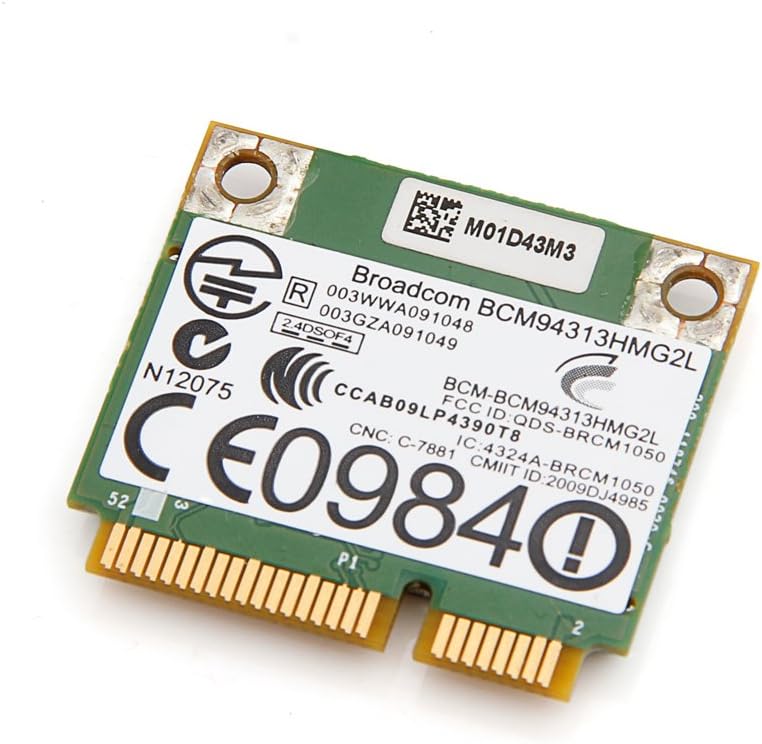
Immagine 1: In alto view of the Broadcom DW1501 BCM94313HMG2L WLAN Half Mini PCI-E Card, showing the Broadcom branding and regulatory markings. This side typically faces upwards during installation.
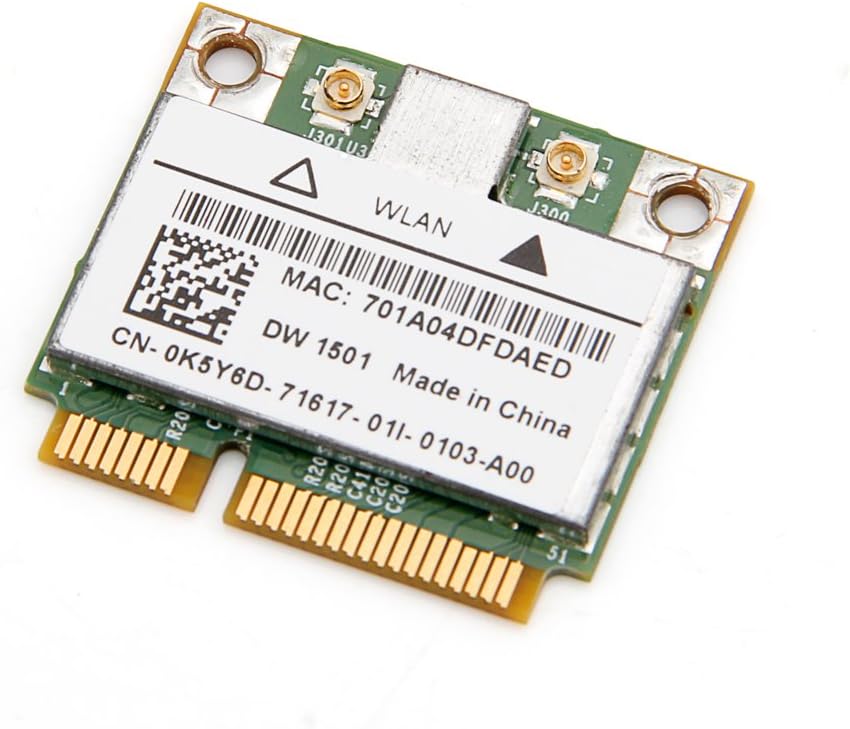
Immagine 2: In basso view of the Broadcom DW1501 BCM94313HMG2L WLAN Half Mini PCI-E Card, displaying the MAC address and model number. This side typically faces downwards during installation.
4.3 Installazione del driver
- Accensione: Reconnect the battery and power adapter, then power on your laptop.
- Rilevamento del sistema operativo: Il sistema operativo potrebbe rilevare automaticamente il nuovo hardware e tentare di installare driver generici.
- Install Specific Drivers: For optimal performance, download the latest drivers for the Broadcom DW1501 BCM94313HMG2L from your laptop manufacturer's support website or Broadcom's official websito.
- Seguire le istruzioni sullo schermo: Run the downloaded driver installer and follow the prompts to complete the installation.
- Ricomincia: Restart your computer after driver installation is complete.
5. Istruzioni per l'uso
Once the card is installed and drivers are successfully loaded, your laptop should detect available wireless networks.
- Accedi alle impostazioni di rete: Navigate to your operating system's network settings (e.g., Wi-Fi settings in Windows, Network Preferences in macOS).
- Abilita Wi-Fi: Ensure that Wi-Fi is enabled.
- Seleziona rete: Apparirà un elenco delle reti wireless disponibili. Seleziona la rete desiderata.
- Inserisci la password: Se la rete è protetta, immettere la password Wi-Fi (chiave di sicurezza) quando richiesto.
- Collegare: Click 'Connect' to establish a wireless connection.
6. Manutenzione
The Broadcom DW1501 BCM94313HMG2L card requires minimal maintenance.
- Keep your laptop's internal components clean by periodically removing dust with compressed air.
- Ensure your wireless drivers are up to date for optimal performance and security.
- Avoid exposing your laptop to environments with excessive heat or moisture.
7. Risoluzione Dei Problemi
7.1 Card Not Detected
- Controllare l'installazione fisica: Power off the laptop and re-verify that the card is properly seated in the Mini PCI-E slot and secured with the screw.
- Collegamenti dell'antenna: Ensure antenna cables are securely attached to the card.
- Installazione del driver: Confirm that the correct drivers for the Broadcom DW1501 BCM94313HMG2L are installed. Check Device Manager (Windows) or System Information (macOS) for any error indicators.
- Compatibilità: Reconfirm that your laptop model is not an IBM/Lenovo/Thinkpad or HP version, as these are incompatible.
7.2 Impossibile connettersi al Wi-Fi
- Wi-Fi abilitato: Ensure Wi-Fi is enabled in your operating system settings and any physical Wi-Fi switch on your laptop is in the 'on' position.
- Password corretta: Controlla attentamente di aver inserito la password Wi-Fi corretta.
- Problemi con il router: Riavvia il router e il modem wireless.
- Aggiornamento driver: Update or reinstall the wireless card drivers.
- Diagnostica di rete: Use your operating system's built-in network diagnostic tools.
7.3 Velocità di connessione lenta
- Potenza del segnale: Avvicinati al router wireless per migliorare la potenza del segnale.
- Interferenza: Minimize interference from other electronic devices or crowded Wi-Fi channels.
- Aggiornamento driver: Assicurati di aver installato i driver più recenti.
- Impostazioni del router: Check your router's settings for optimal 802.11n performance.
8. Specifiche
| Nome del prodotto | Broadcom DW1501 BCM94313HMG2L WLAN 802.11n Half WiFi Mini PCI-E Card |
| Numero di modello | 8541551410 |
| standard wireless | 802.11n |
| Interfaccia | Half Mini PCI-E |
| Interfaccia Hardware | PCI |
| Dispositivi compatibili | Laptop (excluding IBM/Lenovo/Thinkpad and HP versions) |
| Protocollo di collegamento dati | Bluetooth (Note: While listed, primary function is WLAN) |
| Dimensioni del prodotto | 3.3 x 2 x 0.1 pollici |
| Peso dell'articolo | 0.32 once (9.07 g) |
| Produttore | Broadcom |
| Codice UPC | 612148456344 |
9. Garanzia e supporto
For warranty information and technical support, please refer to the documentation provided by your seller or contact Broadcom directly through their official website. Specific warranty terms may vary depending on your region and point of purchase.


