Introduzione
Thank you for choosing the Beetel M53 CLI Corded Phone. This manual provides detailed instructions for setting up, operating, and maintaining your new telephone. Please read this manual carefully before use to ensure proper functionality and to maximize your experience with the product.
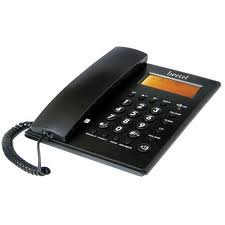
Figure 1: Beetel M53 CLI Corded Phone. This image displays the main unit of the Beetel M53 corded phone, showcasingrazie al suo design compatto e alla tastiera.
Impostare
Follow these steps to set up your Beetel M53 CLI Corded Phone:
- Collegare il portatile: Plug one end of the coiled cord into the handset and the other end into the jack labeled RICEVITORE sul lato della base del telefono.
- Collegare il cavo di linea: Collegare un'estremità del cavo della linea telefonica alla presa contrassegnata LINEA on the back of the phone base. Plug the other end into your telephone wall jack.
- Collegamento elettrico: The phone is powered via the telephone line. No external power adapter is required for basic operation.
- Visualizzazione iniziale: Upon successful connection, the 12-digit green/orange backlit LCD will display the current time and date.

Figure 2: Connection Diagram. This diagram illustrates how to connect the handset and the telephone line cord to the Beetel M53 phone base.
Istruzioni per l'uso
Effettuare e ricevere chiamate
- Per effettuare una chiamata: Sollevare il ricevitore o premere il tasto ORATORE button. Dial the desired telephone number.
- Per ricevere una chiamata: Quando il telefono squilla, sollevare la cornetta o premere il tasto ORATORE pulsante.
- Per terminare una chiamata: Riposizionare il ricevitore sulla base o premere il tasto ORATORE di nuovo il pulsante se si utilizza il vivavoce.
Caller ID (CLI) Features
The Beetel M53 supports FSK/DTMF compatible caller ID and Centrex enabled CLIP (Calling Line Identification Presentation).
- Visualizzazione delle chiamate in arrivo: The 12-digit LCD will display the incoming number, new call indicator, total calls, and repeat calls.
- Incoming Memory: The phone stores up to 80 incoming call records.
- Outgoing Memory: Il telefono memorizza fino a 24 registri delle chiamate in uscita.
- Checking Calls: Utilizzare il SU/GIÙ navigation buttons to scroll through incoming and outgoing call records.
- Erasing Calls: Mentre viewper registrare una chiamata, premere il tasto ELIMINARE pulsante per cancellarlo.
- Richiama: Mentre viewing an incoming call record, press the RICHIAMA pulsante per comporre il numero.
LCD Display and Clock
- The 12-digit green/orange backlit LCD provides clear visibility of numbers, time, and date.
- The real-time clock displays the year, date, and month.
- To set the time and date, refer to the specific instructions in the full manual (if available, otherwise this feature is typically automatic or set via network).
Speakerphone Facility
Per utilizzare il vivavoce, premere il tasto ORATORE button during a call or before dialing. Press it again to end the call or switch back to the handset.
Calcolatrice di base
The phone includes a basic calculator function. To access it, press the CALC button (if present, or refer to specific key mapping). Use the numeric keypad for input and the designated function keys for operations.

Figure 3: LCD Display. This image shows the 12-digit LCD of the Beetel M53, illustrating how caller ID information and the real-time clock are displayed.
Manutenzione
- Pulizia: Pulisci il telefono con un panno morbido eamp panno. Non usare detergenti abrasivi o solventi.
- Evitare i liquidi: Tenere il telefono lontano dall'acqua e da altri liquidi.
- Temperatura: Evitare di esporre il telefono a temperature estreme o alla luce solare diretta.
- Magazzinaggio: Se si conserva il telefono per un periodo prolungato, scollegarlo dalla linea telefonica.
Risoluzione dei problemi
| Problema | Possibile soluzione |
|---|---|
| Nessun tono di linea | Check if the telephone line cord is securely connected to both the phone and the wall jack. Test with another phone if available. |
| ID chiamante non visualizzato | Ensure you have subscribed to Caller ID service from your telephone service provider. Verify the phone is connected correctly. |
| Il display è vuoto o scuro | Check line connection. The display is line-powered. If the issue persists, contact customer support. |
| Non riesco a sentire il chiamante / Il chiamante non riesce a sentirmi | Adjust volume. Check handset cord connection. If using speakerphone, ensure microphone is not obstructed. |
Specifiche
| Caratteristica | Descrizione |
|---|---|
| Marca | Beetel |
| Modello | Numero di modello: M53 |
| Tipo di telefono | filo |
| Materiale | Plastica |
| Fonte di alimentazione | Elettrico con cavo (alimentazione di rete) |
| Tipo di sistema di risposta | Digitale |
| ID chiamante | Yes (FSK/DTMF compatible, Centrex enabled CLIP) |
| Memoria delle chiamate in arrivo | 80 registrazioni |
| Memoria delle chiamate in uscita | 24 registrazioni |
| Schermo LCD | 12-digit, Green/Orange Backlit |
| Orologio | Real time clock with year, date, and month display |
| Caratteristiche aggiuntive | Speakerphone, Basic Calculator |
Garanzia e supporto
Your Beetel M53 CLI Corded Phone comes with a standard manufacturer's warranty. Please retain your purchase receipt for warranty claims. For technical support, service, or warranty inquiries, please contact Beetel customer service through their official websito o le informazioni di contatto fornite con la documentazione di acquisto.
Per ulteriore assistenza, visitare il sito Beetel Store on Amazon.


