Introduzione
The OmniMount OS120FM is a full motion TV mount designed for televisions ranging from 42 to 70 inches, supporting a maximum weight of 120 lbs. This mount provides extensive flexibility, allowing you to tilt, pan, and extend your television for optimal viewing angles. Its robust design ensures secure and stable positioning, while integrated features like Lift n' Lock and cable management simplify installation and maintain a clean aesthetic.
Informazioni sulla sicurezza
Please read all instructions carefully before installation. If you have any doubts about your ability to safely install this mount, consult a qualified professional. Improper installation can result in serious injury or damage to your equipment.
- Capacità di peso: Non superare la capacità di peso massima di 120 libbre (54.4 kg).
- Dimensioni dello schermo: Questo supporto è progettato per TV da 42 a 70 pollici.
- Struttura della parete: Ensure the mounting surface can safely support the combined weight of the mount and your television. Mount only to wood studs, solid concrete, or concrete block.
- Utensili: Use appropriate tools and follow all safety precautions when drilling and handling heavy objects.
- Assistenza: It is highly recommended to have at least two people for installation, especially when lifting the television.
Contenuto della confezione
Verificare che tutti i componenti siano presenti prima di iniziare l'installazione.
- OmniMount OS120FM Full Motion TV Mount assembly
- Mounting hardware kit (various screws, washers, spacers for TV and wall attachment)
- Modello di installazione
Note: Specific hardware may vary. Refer to the included hardware bag for a complete list.
Configurazione e installazione
Strumenti necessari
- Trapano elettrico
- Matita
- Cacciavite con testa Phillips
- Chiave a tubo
- Nastro di misurazione
- Level (high-quality recommended)
- 7/32 inch (5.5 mm) drill bit for wood studs
- 3/8 inch (9.5 mm) drill bit for concrete/masonry
- Stud Finder (per l'installazione di montanti in legno)
Fase 1: Fissare le staffe TV al televisore
Carefully place your television face down on a soft, clean surface. Identify the VESA mounting holes on the back of your TV. Attach the vertical mounting brackets and any necessary extender supports to the TV using the provided screws, washers, and spacers. Ensure the brackets are securely fastened and centered.
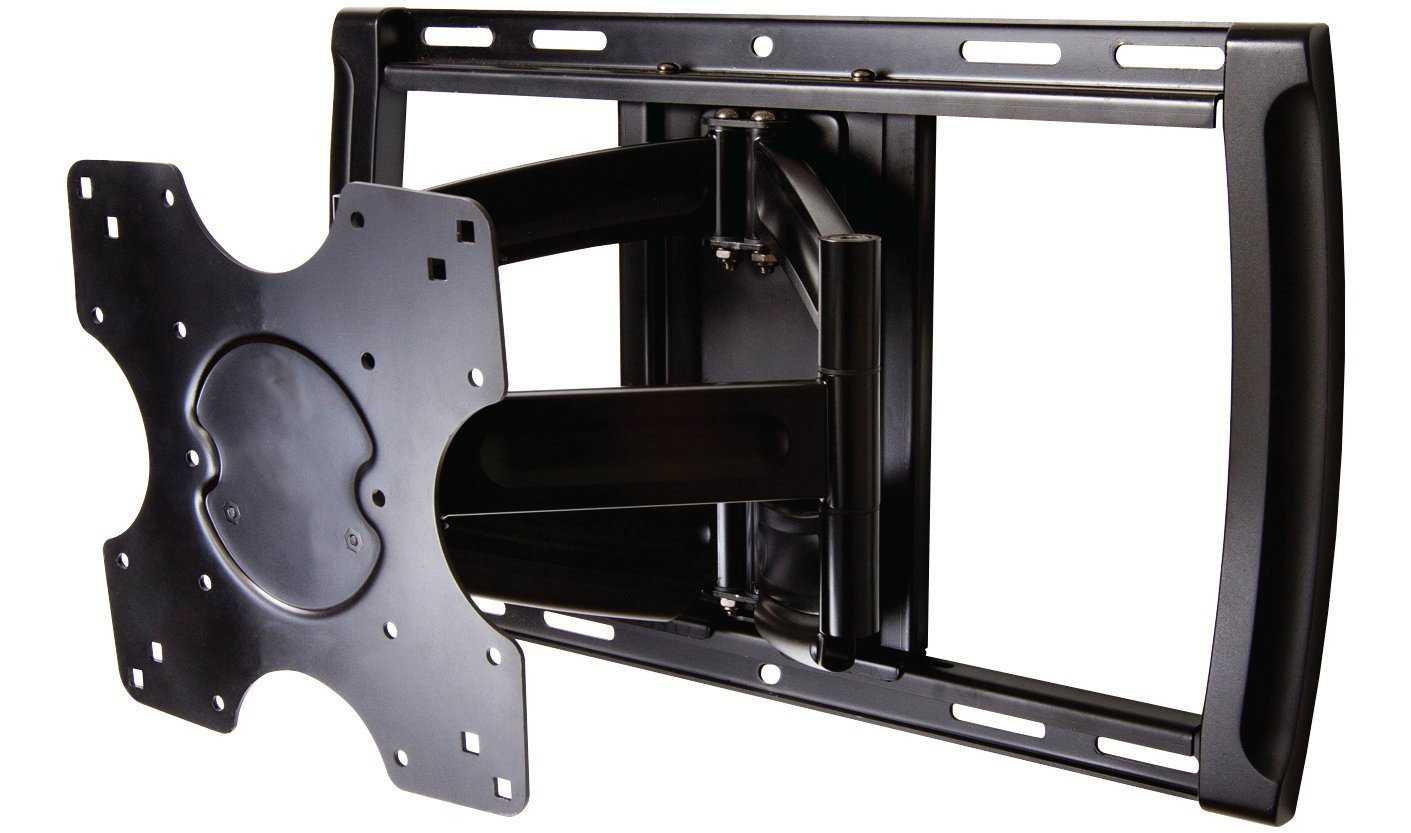
Step 2: Prepare the Wall and Mount Wall Plate
- Determinare la posizione di montaggio: Carefully measure and mark the desired height and horizontal position for your TV. Consider viewing angles and furniture placement.
- Locate Studs (for wood stud installation): Use a stud finder to locate the center of two adjacent wood studs. Mark these locations. For concrete walls, skip stud finding.
- Posizione piastra a muro: Hold the wall plate against the wall at your marked location. Use a level to ensure it is perfectly horizontal. Mark the pilot hole locations through the wall plate.
- Praticare i fori pilota:
- Per borchie in legno, drill pilot holes using a 7/32 inch (5.5 mm) drill bit.
- Per solid concrete or concrete block, drill pilot holes using a 3/8 inch (9.5 mm) drill bit. Insert concrete anchors (if provided) into these holes.
- Piastra di sicurezza a muro: Attach the wall plate to the wall using the provided lag bolts and washers. Tighten the bolts firmly with a socket wrench. Ensure the wall plate is securely fixed and level.
Step 3: Mount Television to Wall Plate
With assistance, carefully lift the television and align the brackets on the back of the TV with the mounting arms on the wall plate. The mount features a 'Lift n' Lock' mechanism for easy attachment. Once the TV is securely hooked onto the mount, it should be able to swivel freely on its horizontal axis.
Step 4: Level and Secure Television
Use a level on top of the television to ensure it is perfectly horizontal. Locate the two small leveling screws on the TV brackets. Tighten these screws firmly to lock the TV in its level position. This final adjustment ensures your TV remains level even after articulation.
Fase 5: Gestione dei cavi
Utilize the integrated cable management channels on the mount's arms to route your TV cables. This helps to conceal wires and maintain a neat appearance. For in-wall cable routing, consider professional installation or a dedicated in-wall cable management kit.
Istruzioni per l'uso
The OmniMount OS120FM allows for flexible positioning of your television:
- Estensione: Gently pull the television away from the wall to extend the articulating arm.
- Ritrattazione: Gently push the television towards the wall to retract the articulating arm.
- Pan: Swivel the television left or right to adjust the horizontal viewangolo di ing.
- Inclinazione: Adjust the vertical tilt of the screen to reduce glare or optimize viewing from different heights. The mount is designed to hold the desired position fluidly.
Always move the TV smoothly and avoid sudden, forceful movements. Ensure no cables are snagged or pinched during adjustments.
Manutenzione
- Pulizia: Pulire il supporto con un panno morbido e asciutto. Evitare detergenti abrasivi o solventi.
- Controlli periodici: Periodically check all screws and bolts to ensure they remain tight and secure. Over time, vibrations or frequent adjustments may cause fasteners to loosen.
- Lubrificazione: The mount is designed for maintenance-free operation. Do not apply lubricants unless specifically instructed by the manufacturer.
Risoluzione dei problemi
- La TV non è in piano: Ensure the two small leveling screws on the TV brackets are tightened properly after adjusting the TV to a level position.
- Mount feels too stiff or too loose: While the mount is designed for fluid movement, if you experience excessive stiffness or looseness, check all pivot points for proper assembly and ensure no components are overtightened or undertightened. Refer to the original installation guide for specific torque recommendations if available.
- Cables are visible or disorganized: Re-route cables through the integrated cable management channels on the mount arms. Use zip ties if necessary to secure them neatly.
- Mount appears unstable: Immediately remove the TV from the mount. Re-check all wall mounting bolts and TV bracket screws for tightness. Ensure the wall structure is adequate and that the mount is installed into studs or concrete as per instructions. Do not re-mount the TV until stability is confirmed.
Specifiche
| Marca | OmniMount |
| Modello | OS120FM |
| Tipo di montaggio | Padella |
| Tipo di movimento | Articolazione (movimento completo) |
| Materiale | Metallo |
| Colore | Nero |
| Dispositivi compatibili | Televisione |
| Minimum Supported Screen Size | 42 pollici |
| Maximum Supported Screen Size | 70 pollici |
| Maximum Supported TV Weight | 120 libbre (54.4 kg) |
| Item Weight (Mount) | 18 libbre (8.16 kg) |
Garanzia e supporto
Garanzia: The product warranty is provided "as listed." Please refer to the product packaging or the official OmniMount websito per informazioni dettagliate e termini di garanzia.
Assistenza clienti: For technical assistance, missing parts, or further inquiries, please visit the official OmniMount websito o contattare il servizio clienti. Le informazioni di contatto sono in genere reperibili sul sito web del produttore. websito o confezione del prodotto.


