1. Introduzione
This manual provides comprehensive instructions for the proper use and maintenance of your Horizon SF-400D Digital Precision Scale. Please read this manual thoroughly before operating the device to ensure accurate measurements and prolong its lifespan.
The Horizon SF-400D is a versatile digital precision scale designed for various weighing applications, including jewelry, coins, herbs, spices, and medication. It offers high accuracy and multiple weighing modes, along with a convenient counting function.

Figura 1: Horizon SF-400D Digital Precision Scale. This image shows the overall design of the scale, featuring a black body, a stainless steel weighing platform, and a blue backlit LCD display with control buttons.
2. Precauzioni di sicurezza
- Non sovraccaricare la bilancia oltre la sua capacità massima di 500 g.
- Evitare di esporre la bilancia a temperature estreme, umidità o luce solare diretta.
- Tenere la bilancia lontana da forti campi elettromagnetici.
- Pulire la bilancia con un morbido, damp panno. Non utilizzare detergenti abrasivi né immergere l'unità in acqua.
- Ensure the scale is placed on a stable, level surface during operation to ensure accuracy.
3. Componenti del prodotto
Familiarize yourself with the main parts of your SF-400D scale:
- Piattaforma di pesatura: Superficie in acciaio inox per appoggiare gli oggetti.
- Schermo LCD: Backlit screen showing weight, units, and other indicators.
- Pulsante ON/OFF: Accende o spegne la bilancia.
- Pulsante MODE: Changes weighing units (g, oz, ct, dwt, gn, T).
- Pulsante TARA: Resets the display to zero, useful for weighing items in a container.
- Pulsante PCS: Attiva la funzione di conteggio dei pezzi.
- Pulsante CAL: Used for calibration.
- Gambe regolabili: Located on the bottom for leveling the scale.
- Livella a bolla: Integrated on the scale to assist with leveling.
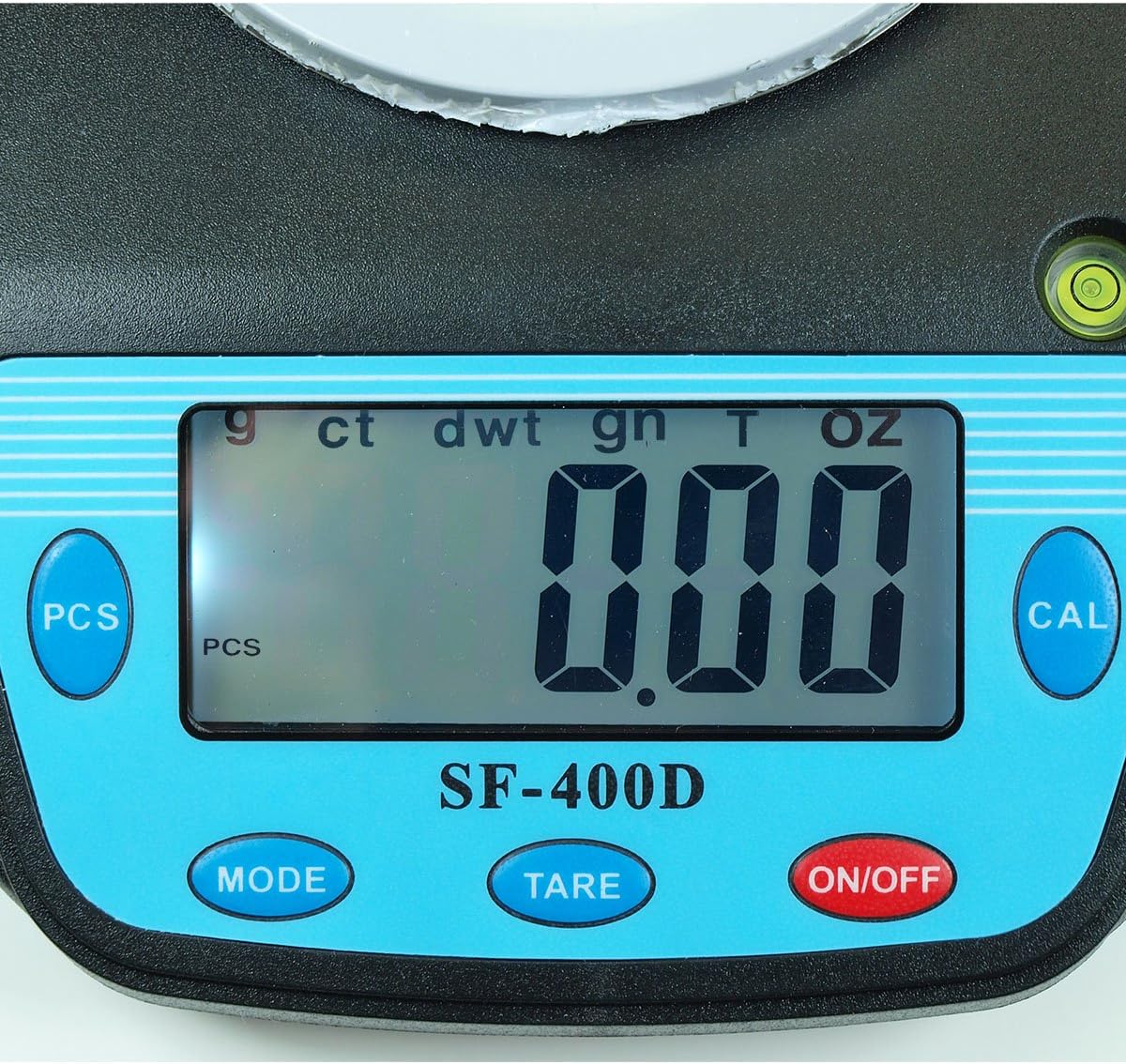
Figura 2: Close-up of the SF-400D display and control buttons. This image highlights the LCD screen, showing various unit indicators (g, ct, dwt, gn, T, oz), and the function buttons: PCS, MODE, TARE, ON/OFF, and CAL.

Figura 3: Underside of the SF-400D scale showing adjustable legs. Green arrows indicate the location of the four adjustable feet, which are used to level the scale for accurate measurements.
4. Impostazione
4.1. Alimentazione
The SF-400D scale operates on two AA batteries (included) or an optional AC power adapter (not included).
- Aprire il coperchio del vano batterie sul lato inferiore della bilancia.
- Inserire due batterie AA, assicurandosi della corretta polarità (+/-).
- Chiudere il vano batterie.
- Alternatively, connect a compatible AC power adapter (6V, amperage not specified in product details, consult manufacturer if needed) to the power port.
4.2. Posizionamento e livellamento
For optimal accuracy, the scale must be placed on a stable, flat, and level surface.
- Place the scale on your desired weighing surface.
- Observe the integrated bubble level.
- Adjust the four adjustable legs on the bottom of the scale by rotating them until the bubble is centered within the level indicator.
5. Istruzioni per l'uso
5.1. Pesatura di base
- Premere il tasto ACCESO/SPENTO button to turn on the scale. The display will show "88888" and then "0.00" (or "0.0" depending on the unit).
- If the display does not show zero, press the TARA pulsante per azzerare la bilancia.
- Premere il tasto MODALITÀ button to select your desired weighing unit (g, oz, ct, dwt, gn, T).
- Gently place the item(s) to be weighed on the center of the stainless steel platform.
- Leggere il peso stabile visualizzato sullo schermo LCD.
- Per spegnere la bilancia, tenere premuto il tasto ACCESO/SPENTO button for a few seconds. The scale also features an auto shut-off function to conserve battery power.
5.2. Funzione Tara
The Tare function allows you to subtract the weight of a container, so only the contents are weighed.
- Posizionare un contenitore vuoto sulla piattaforma di pesatura.
- Wait for the display to stabilize and show the container's weight.
- Premere il tasto TARA pulsante. Il display verrà reimpostato su "0.00" (o "0.0").
- Aggiungere gli articoli che si desidera pesare nel contenitore. Il display mostrerà ora solo il peso netto degli articoli.
- Per cancellare la tara, rimuovere tutti gli articoli dalla piattaforma e premere TARA again if the display does not return to zero automatically.
5.3. Piece Counting Function (PCS)
This function is useful for counting multiple identical items.
- Turn on the scale and ensure it is zeroed.
- Premere il tasto PZ button. The display will show "PCS" and a sample size (e.g., "25", "50", "75", "100").
- Premere il tasto MODALITÀ button to cycle through the available sample sizes (25, 50, 75, 100 pieces). Select the sample size that matches the number of items you will place on the scale for sampling.
- Posiziona il numero esatto di sample items (e.g., 25 pieces) onto the weighing platform according to your selected samptaglia le.
- Premere il tasto PZ nuovamente il pulsante per confermare la sample. The display will now show the number of pieces.
- Ora puoi aggiungere altri articoli dello stesso tipo e la bilancia visualizzerà il conteggio totale.
- Per uscire dalla modalità di conteggio, premere il tasto MODALITÀ pulsante.
5.4. Calibrazione
Calibration ensures the accuracy of your scale. It is recommended to calibrate the scale periodically or if you suspect inaccurate readings. You will need a known calibration weight (e.g., 500g) for this process.

Figura 4: SF-400D display showing "CAL" during calibration mode. This image illustrates the scale's screen indicating it is in calibration mode, prompting the user to place a calibration weight.
- Ensure the scale is on a stable, level surface and turned off.
- Premere e tenere premuto il tasto CAL pulsante, quindi premere il ACCESO/SPENTO button simultaneously. Release both buttons when the display shows "CAL".
- The display will then show a flashing weight value (e.g., "500.00g"). This is the required calibration weight.
- Place the exact calibration weight (e.g., 500g) onto the center of the weighing platform.
- Wait for the display to stabilize and show "PASS" or return to normal weighing mode. This indicates successful calibration.
- Remove the calibration weight. The scale is now calibrated and ready for use.
- If "FAIL" or an error message appears, repeat the calibration process.
6. Manutenzione
6.1. Pulizia
- Pulire la superficie della bilancia con un panno morbido e leggermenteamp stoffa.
- Non utilizzare prodotti chimici aggressivi, detergenti abrasivi o immergere la bilancia in acqua.
- Assicurarsi che la bilancia sia completamente asciutta prima di riporla o di utilizzarla nuovamente.
6.2. Conservazione
- Conservare la bilancia in un luogo fresco e asciutto, lontano dalla luce solare diretta e da temperature estreme.
- Se si conserva il prodotto per un periodo prolungato, rimuovere le batterie per evitare perdite.
7. Risoluzione Dei Problemi
| Problema | Possibile causa | Soluzione |
|---|---|---|
| La bilancia non si accende. | Low or dead batteries; incorrect battery installation; no power from AC adapter. | Replace batteries; check battery polarity; ensure AC adapter is properly connected and functional. |
| Letture imprecise. | Scale not level; unstable surface; needs calibration; overloaded; strong air currents or vibrations. | Ensure scale is level using adjustable legs and bubble level; place on stable surface; perform calibration; do not exceed 500g capacity; operate in a stable environment. |
| "O_Ld" or "EEEE" displayed. | La scala è sovraccarica. | Remove excess weight immediately. Do not exceed 500g capacity. |
| Il display mostra "UNST". | Unstable environment or surface. | Move the scale to a more stable location, away from vibrations or drafts. |
| Counting function not working correctly. | Es. errataample size selected; sample items not identical in weight. | Garantire la sample size matches the number of items placed for sampling; use identical items for accurate counting. |
8. Specifiche
| Caratteristica | Dettaglio |
|---|---|
| Modello | SF-400D |
| Capacità | 500 grams (g) / 17.5 ounces (oz) |
| Accuracy (Readability) | 0.01 grams (g) / 0.0005 ounces (oz) |
| Modalità di pesatura | g (grams), oz (ounces), ct (carats), dwt (pennyweights), gn (grains), T (troy ounces), pcs (pieces) |
| Materiale della piattaforma | Acciaio inossidabile |
| Platform Diameter | 4.2 pollici |
| Display | LCD con retroilluminazione |
| Energia | 2 x AA batteries (included) or 6V AC adapter (not included) |
| Dimensioni (L x P x A) | 8.25" x 6.0" x 1.75" |
| Caratteristiche | Tare function, Piece Counting, Auto Shut-Off, Backlit Display, Adjustable Legs, Bubble Level |
9. Garanzia e supporto
For warranty information or technical support, please refer to the documentation included with your purchase or contact the retailer. Specific warranty terms may vary by region and retailer.
Per richieste generali o per esplorare altri prodotti, puoi visitare il Horizon Store on Amazon.