1. Introduzione
This manual provides instructions for the setup, operation, and maintenance of your La Crosse Technology WT140 Weather Station. This device is designed to monitor indoor and outdoor temperatures, as well as indoor humidity, to help you stay informed about your environment.
Caratteristiche principali
- Visualizzazione della temperatura interna ed esterna
- Visualizzazione dell'umidità interna
- Min/Max Temperature and Humidity Recording
- 1.5m Wired Outdoor Temperature Probe
- Comfort Level Indicator (Happy/Sad Face)
- Indicatore di batteria scarica
- Versatile Placement: Tabletop or Wall-Mountable
2. Contenuto della confezione
Si prega di verificare che tutti gli articoli siano presenti e in buone condizioni:
- 1 x La Crosse Technology WT140 Weather Station Unit
- 1 x Wired Outdoor Temperature Probe (1.5m cable)
- Batterie (incluse)
- Manuale dell'utente (questo documento)
3. Impostazione
3.1 Installazione della batteria
- Locate the battery compartment on the back of the weather station unit.
- Aprire il coperchio del vano batterie.
- Insert the included batteries, observing the correct polarity (+ and - markings).
- Chiudere saldamente il coperchio del vano batterie.
Note: The device uses a small battery type, which may require replacement annually. Refer to the specifications for battery type.
3.2 Posizionamento del sensore
- Unità principale: Place the main weather station unit indoors on a flat surface or mount it on a wall using the integrated hanging hole. Ensure it is not in direct sunlight or near heat sources, which could affect indoor temperature readings. Avoid placing it directly against a wall if possible, as this can affect internal temperature readings.
- Outdoor Probe: Extend the 1.5-meter wired probe outdoors. Position the probe in a shaded area, protected from direct rain and sunlight, for accurate outdoor temperature measurements. Ensure the cable is not pinched or damaged.
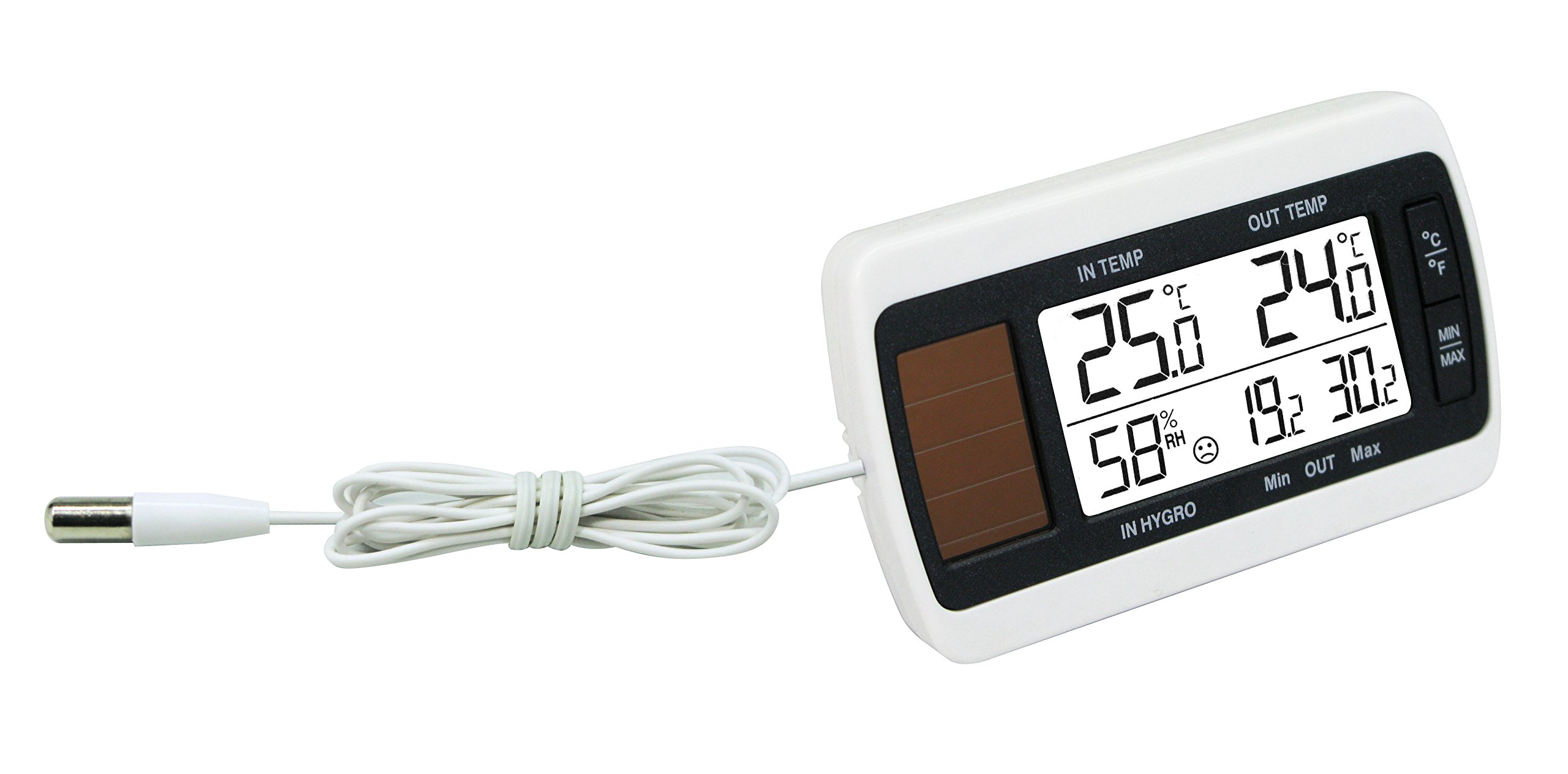
Image: La Crosse Technology WT140 Weather Station showing the main unit and the wired outdoor temperature probe.
4. Istruzioni per l'uso
4.1 Fine displayview
Il display mostra le seguenti informazioni:
- Indoor Temperature (°C)
- Outdoor Temperature (°C)
- Indoor Humidity (% RH)
- Min/Max recorded values for temperature and humidity
- Comfort Indicator (Happy/Sad Face)
- Indicatore di batteria scarica
4.2 Viewing Valori Min/Max
The weather station automatically records the minimum and maximum indoor/outdoor temperatures and indoor humidity. To view questi valori:
- Press the "MIN/MAX" button (if available on your model).
- Subsequent presses will cycle through minimum, maximum, and current readings.
- To reset the Min/Max values, press and hold the "MIN/MAX" button for a few seconds.
4.3 Indicatore di comfort
The comfort indicator displays a happy or sad face to visually represent the indoor comfort level based on temperature and humidity.
- Faccina felice: Indicates comfortable indoor conditions.
- Faccina triste: Indicates uncomfortable indoor conditions (e.g., too dry, too humid, too hot, or too cold).
5. Manutenzione
5.1 Pulizia
Clean the weather station and probe with a soft, damp panno. Non utilizzare detergenti abrasivi o solventi, poiché potrebbero danneggiare l'unità.
5.2 Sostituzione della batteria
When the low battery indicator appears on the display, replace the batteries promptly. Refer to the "Battery Installation" section for instructions. Dispose of old batteries responsibly according to local regulations.
5.3 Cura della sonda
Periodically check the outdoor probe and its cable for any signs of damage or wear. Ensure the probe remains in a protected location to prolong its lifespan and accuracy.
6. Risoluzione Dei Problemi
- Nessun display / schermo vuoto
- Controllare la polarità della batteria.
- Sostituisci le batterie con altre nuove.
- Inaccurate Indoor Temperature
- Ensure the main unit is not in direct sunlight, near heat sources, or directly against a wall.
- Allow the unit to stabilize for 15-30 minutes after placement.
- Inaccurate Outdoor Temperature
- Verify the outdoor probe is correctly positioned in a shaded, protected area.
- Check the probe cable for damage or kinks.
- Display Freezes or Malfunctions
- Remove batteries, wait 1 minute, then reinsert them to perform a soft reset.
- If a reset button is available (often a small hole requiring a paperclip), press it briefly.
7. Specifiche
| Caratteristica | Dettaglio |
|---|---|
| Modello | WT140 |
| Intervallo di temperatura interna | da 0°C a +50°C (da 32°F a 122°F) |
| Intervallo di temperatura esterna | da -29°C a +59.9°C (da -20.2°F a 139.8°F) |
| Risoluzione della temperatura | 0.1°C |
| Intervallo di umidità interna | 19% al 96% di umidità relativa |
| Lunghezza del cavo della sonda | 1.5 metri |
| Dimensioni (unità principale) | 8.3 x 1.4 x 5.2 cm (3.27 x 0.55 x 2.05 pollici) |
| Peso | 600 grammi (circa) |
| Fonte di alimentazione | Batteries (type not specified, typically AAA or similar small battery) |
8. Garanzia e supporto
For warranty information or technical support, please refer to the documentation included with your purchase or visit the official La Crosse Technology websito. Conserva la ricevuta d'acquisto come prova d'acquisto.


