1. Introduzione
This manual provides essential instructions for the safe and efficient use of your Kyocera EBVK-2650 Engine Blower Vacuum. Please read this manual thoroughly before operating the machine and keep it for future reference. The EBVK-2650 is designed for blowing and vacuuming leaves and light debris in outdoor environments.
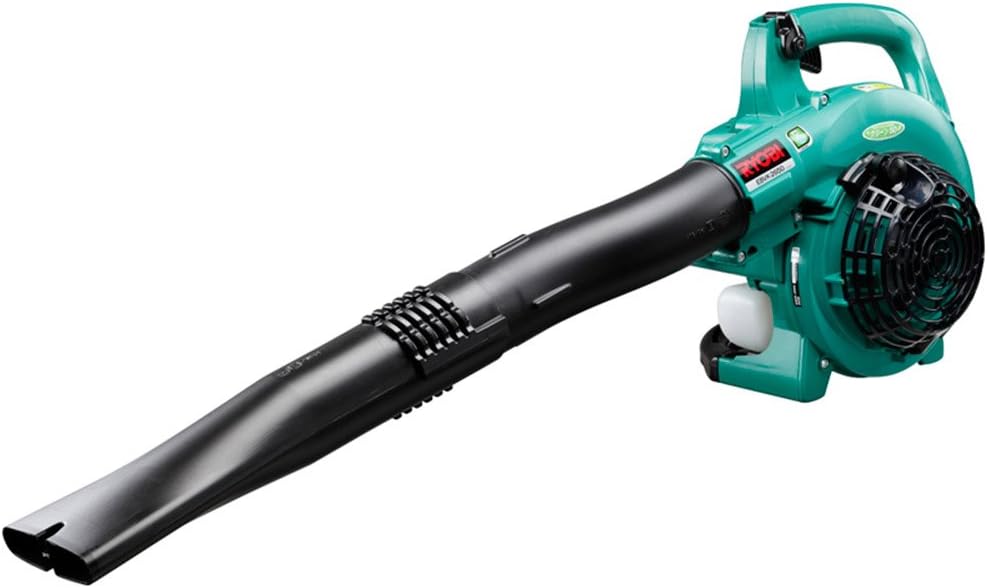
Image 1.1: The Kyocera EBVK-2650 Engine Blower Vacuum in its primary blower configuration. This image shows the main unit with the straight nozzle attached, ready for blowing leaves and debris.
2. Informazioni sulla sicurezza
Dare sempre priorità alla sicurezza quando si utilizzano utensili elettrici. Il mancato rispetto di queste istruzioni può causare gravi lesioni o danni materiali.
2.1 Norme generali di sicurezza
- Leggere e comprendere tutte le istruzioni prima di utilizzare la macchina.
- Indossare dispositivi di protezione individuale (DPI) adeguati, tra cui protezioni per gli occhi, protezioni per l'udito, guanti e calzature robuste.
- Do not operate the machine in wet conditions or in the presence of flammable liquids or gases.
- Tenere i bambini, gli astanti e gli animali domestici a una distanza di sicurezza (almeno 15 metri/50 piedi) dall'area operativa.
- Inspect the machine for loose parts, damage, or wear before each use. Do not operate a damaged machine.
- Ensure proper ventilation when operating the engine, as exhaust fumes contain carbon monoxide.
- Non puntare mai l'ugello del soffiatore verso persone o animali.
- Turn off the engine and allow it to cool before refueling, cleaning, or performing maintenance.
- Store the machine in a dry, secure location, out of reach of children.
2.2 Sicurezza del carburante
- Use only the recommended fuel mixture: unleaded gasoline and 2-cycle engine oil at a 50:1 ratio.
- Mix fuel in a well-ventilated area, away from sparks or open flames.
- Do not smoke while mixing or refueling.
- Asciugare immediatamente il carburante versato.
- Conservare il carburante in un contenitore approvato in un luogo fresco e asciutto.
3. Contenuto della confezione e componenti
Verificare che tutti i componenti siano presenti e integri al momento del disimballaggio.
3.1 Accessori inclusi
- Main Unit (Engine Blower Vacuum)
- Ugello dritto
- Ugello curvo
- Tubo di aspirazione
- Ugello a ventaglio
- Sacchetto per la polvere
- Socket Wrench (13x19mm)
- Manuale di istruzioni
3.2 Componenti chiave oltreview
Familiarize yourself with the main parts of the EBVK-2650.

Image 3.1: The Kyocera EBVK-2650 configured for vacuuming. This view shows the suction pipe and the dust bag attached, ready to collect leaves and debris.
- Unità motore: The core power source.
- Serbatoio carburante: For mixed fuel.
- Maniglia di avviamento: For manual engine start.
- Leva dell'acceleratore: Controlla la velocità del motore.
- Interruttore di arresto: To turn off the engine.
- Copertura del filtro dell'aria: Protegge il filtro dell'aria.
- Candela: For ignition.
- Blower/Vacuum Port: Where nozzles or suction pipe attach.
- Dust Bag Connection: For attaching the collection bag in vacuum mode.
4. Installazione e assemblaggio
4.1 Assemblaggio per la modalità soffiante
- Assicurarsi che il motore sia spento e freddo.
- Attach the desired nozzle (straight or curved) to the blower port. Twist until securely locked.
- Confirm all connections are tight before use.

Immagine 4.1: Un primo piano view of the Kyocera EBVK-2650 in operation, demonstrating the blower function. The user is holding the unit, directing the airflow.
4.2 Assembling for Vacuum/Mulching Mode
- Assicurarsi che il motore sia spento e freddo.
- Remove any blower nozzles from the blower port.
- Attach the suction pipe to the intake port. Secure it firmly.
- Connect the dust bag to the exhaust port. Ensure the bag is properly sealed to prevent debris leakage.
- Confirm all connections are tight before use.

Image 4.2: The Kyocera EBVK-2650 being used in vacuum mode. The suction pipe is directed towards leaves, and the dust bag is visible, collecting the mulched debris.
4.3 Fuel Preparation and Filling
The EBVK-2650 uses a 2-cycle engine. It requires a specific mixture of unleaded gasoline and 2-cycle engine oil.
- Fuel Ratio: Unleaded Gasoline : 2-Cycle Engine Oil = 50:1
- Use high-quality 2-cycle engine oil specifically designed for air-cooled engines.
- Mix the fuel in a separate, approved fuel container. Shake well before filling.
- Open the fuel tank cap slowly to release pressure.
- Fill the fuel tank (capacity 0.47 L) carefully, avoiding overfilling.
- Chiudere bene il tappo del serbatoio del carburante.
5. Istruzioni per l'uso
5.1 Avviamento del motore
- Posizionare la macchina su una superficie piana e stabile.
- Assicurarsi che l'interruttore di arresto sia in posizione "ON".
- Innestare la leva dello starter (in caso di avviamento a freddo).
- Premere più volte la pompetta di innesco finché il carburante non diventa visibile.
- Pull the starter handle firmly and smoothly until the engine starts. Do not pull the rope to its full extension.
- Una volta avviato il motore, disinnestare gradualmente lo starter.
- Lasciare riscaldare il motore per qualche istante prima di accelerare a tutto gas.

Image 5.1: A user demonstrating the engine starting procedure for the Kyocera EBVK-2650. The starter handle is being pulled to ignite the engine.
5.2 Funzionamento del ventilatore
- Hold the machine firmly with both hands.
- Dirigere l'ugello verso i detriti che si desidera spostare.
- Gradually increase the throttle to achieve the desired airflow.
- Raccogliere le foglie e i detriti in mucchi con un movimento ampio.

Image 5.2: A user operating the Kyocera EBVK-2650 in blower mode, clearing leaves from a path. The machine is held comfortably, directing the airflow.
5.3 Vacuum/Mulching Operation
- Ensure the machine is correctly assembled for vacuum mode with the dust bag attached.
- Hold the machine firmly, guiding the suction pipe over the leaves.
- Move slowly and steadily to allow the machine to pick up and mulch debris.
- Monitor the dust bag and empty it when it becomes full to maintain optimal performance.
- Note: Mulching performance varies based on leaf type, size, and moisture content. Avoid vacuuming wet leaves or large, hard objects.

Image 5.3: A user operating the Kyocera EBVK-2650 in vacuum mode, actively collecting leaves from a paved area. The dust bag is visible, indicating collection.
5.4 Arresto del motore
- Release the throttle lever to allow the engine to idle.
- Move the stop switch to the "OFF" position.
- Allow the machine to cool down before storage or maintenance.
6. Manutenzione
Regular maintenance ensures optimal performance and extends the lifespan of your EBVK-2650. Always ensure the engine is off and cool before performing any maintenance.
6.1 Pulizia del filtro dell'aria
- Rimuovere il coperchio del filtro dell'aria.
- Carefully remove the air filter element.
- Clean the filter by tapping it gently or using compressed air. If heavily soiled, wash with warm, soapy water, rinse thoroughly, and allow to dry completely before reinstallation.
- Sostituire il coperchio del filtro dell'aria.
6.2 Spark Plug Inspection and Replacement
- Rimuovere il cappuccio della candela.
- Use the provided socket wrench to remove the spark plug (NGK BPM8Y).
- Inspect the spark plug for wear, carbon buildup, or damage. Clean if necessary.
- Check the electrode gap and adjust if needed.
- Replace with a new spark plug of the recommended type if worn or damaged.
- Reinstall the spark plug and cap securely.
6.3 Filtro carburante
The fuel filter is located inside the fuel tank. Inspect it periodically for debris. If clogged, replace it. This procedure may require professional assistance.
6.4 Regolazione del carburatore
Carburetor adjustments should ideally be performed by a qualified service technician. Incorrect adjustments can lead to engine damage or poor performance.
6.5 Conservazione
- For long-term storage, drain all fuel from the tank and run the engine until it stops to clear the carburetor.
- Pulire l'esterno della macchina.
- Store in a dry, dust-free location, away from direct sunlight and extreme temperatures.
7. Risoluzione Dei Problemi
Questa sezione affronta i problemi più comuni che potresti riscontrare. Per problemi non elencati qui, contatta l'assistenza clienti.
| Problema | Possibile causa | Soluzione |
|---|---|---|
| Il motore non si avvia |
|
|
| Il motore funziona, ma non ha potenza |
|
|
| Vibrazione eccessiva |
|
|
8. Specifiche
| Caratteristica | Dettaglio |
|---|---|
| Marca | Marca: Kyocera |
| Numero di modello | EBVK-2650 |
| Tipo di motore | Air-cooled 2-cycle single cylinder gasoline engine |
| Spostamento | 25.4 ml |
| Average Air Volume | 8.7 m³/min |
| Volume d'aria massimo | 67.5 m³/min |
| Metodo di accensione | Electronic ignition (Flywheel magnet) |
| Candela | Motore NGK BPM8Y |
| Tipo di carburatore | Tipo di diaframma |
| Carburante | Mixed fuel (Unleaded gasoline: 2-cycle engine oil = 50:1) |
| Capacità del serbatoio del carburante | 0.47 L |
| Dimensions (L x W x H, excluding nozzle) | Dimensioni: 330 x 270 x 345 mm |
| Weight (excluding nozzle, fuel) | 4.2 kg |
| Accessori inclusi | Straight nozzle, Curved nozzle, Suction pipe, Fan nozzle, Dust bag, Socket wrench (13x19mm) |
| Uso consigliato | Dust cleaning, Leaf cleaning |
Note: Product specifications are subject to change without notice for improvement. The listed weight of 8.1 kg in some product descriptions likely includes packaging and all accessories, while 4.2 kg refers to the bare unit.
9. Garanzia e supporto
For warranty information, service, or technical support, please refer to the warranty card included with your product or visit the official Kyocera websito. Conservare la prova d'acquisto per eventuali reclami in garanzia.
Kyocera Customer Support: Please visit the official Kyocera website or contact your local dealer for assistance.


