1. Introduzione
Thank you for choosing the Antec HCG-850M 850W Power Supply. This manual provides essential information for the safe and efficient installation, operation, and maintenance of your power supply unit. Please read this manual thoroughly before installation and retain it for future reference.
2. Informazioni sulla sicurezza
Per evitare lesioni o danni al sistema, osservare sempre le seguenti precauzioni di sicurezza:
- Non fare aprire l'alimentatore casing. Alto volumetagsono presenti all'interno, anche quando l'unità è scollegata.
- Non fare insert any objects into the power supply's ventilation openings.
- Assicurarsi che l'alimentatore sia installato in un'area ben ventilata.
- Use only the modular cables provided with this power supply. Using incompatible cables can cause damage.
- Disconnect the AC power cord from the wall outlet before installing or removing the power supply.
- This product is designed for use in personal computers only.
3. Contenuto della confezione
Verifica che tutti gli articoli siano presenti nel tuo pacco:
- Antec HCG-850M 850W Power Supply
- Modular Cable Set (PCI-E, SATA, Peripheral, CPU)
- Cavo di alimentazione CA
- Viti di montaggio
- Manuale dell'utente (questo documento)
4. Prodotto finitoview
The Antec HCG-850M is an 850-watt, 80 PLUS Bronze certified, semi-modular power supply designed for high-performance personal computers. It features a quiet 135mm fan for efficient cooling and robust protection circuits to ensure stable power delivery.
4.1 Caratteristiche principali
- 850 Watts Continuous Power
- 80 PLUS Bronze Certified Efficiency
- Semi-Modular Cable Management
- Ventola silenziosa da 135 mm
- Fattore di forma ATX
- Multiple Protection Circuits (OCP, OVP, UVP, SCP, OPP, OTP)
4.2 Unità di alimentazione
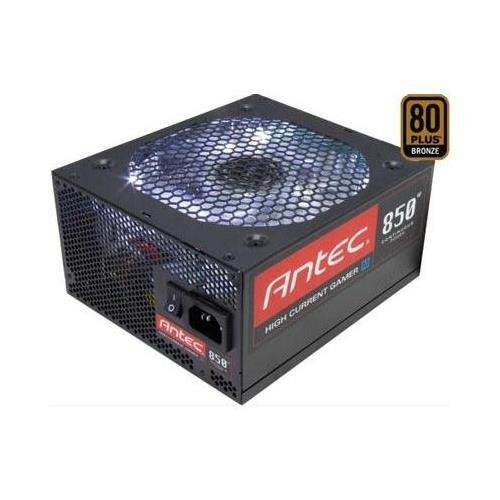
Immagine 1: anteriore view of the Antec HCG-850M 850W Power Supply, showing the fan grille and modular cable connectors. This unit provides stable power to your computer components.
5. Configurazione e installazione
Follow these steps to install your Antec HCG-850M power supply:
- Prepara il tuo sistema: Assicurati che il computer sia completamente spento e scollegato dalla presa a muro. Apri il case del computer.
- Rimuovere il vecchio alimentatore (se applicabile): Scollega tutti i cavi dal vecchio alimentatore. Svita e rimuovi il vecchio alimentatore dal case.
- Montare il nuovo alimentatore: Carefully place the Antec HCG-850M into the power supply bay of your computer case. Secure it with the provided mounting screws. Ensure the fan is oriented correctly for optimal airflow (typically facing down if there's a bottom vent, or up if not).
- Collegare i cavi essenziali:
- Connect the 24-pin ATX motherboard power cable.
- Connect the 4+4-pin or 8-pin EPS/CPU power cable to your motherboard.
- Collegare i cavi modulari: Attach the necessary modular cables for your components (e.g., PCI-E for graphics cards, SATA for hard drives/SSDs, Peripheral for fans/accessories). Connect them securely to both the power supply and the respective components.
- Gestione dei cavi: Disporre i cavi in modo ordinato per migliorare il flusso d'aria e l'estetica.
- Chiudere la custodia e accendere: Close your computer case. Connect the AC power cord to the power supply and then to a wall outlet. Flip the power switch on the PSU to the 'ON' position. Power on your computer.
6. Istruzioni per l'uso
Once installed, the Antec HCG-850M operates automatically. Here are some general operating guidelines:
- Accensione/spegnimento: Use your computer's power button to turn the system on or off. The switch on the power supply itself should generally remain in the 'ON' position during normal operation.
- Stabilità del sistema: Ensure your system is stable. If you experience unexpected shutdowns or reboots, refer to the troubleshooting section.
- Ventilazione: Maintain good airflow around your computer case to prevent overheating of components, including the power supply.
7. Manutenzione
Una corretta manutenzione può prolungare la durata del tuo alimentatore:
- Pulizia della polvere: Periodically clean dust from the power supply's fan grille and the interior of your computer case using compressed air. Scollegare sempre il cavo di alimentazione CA prima della pulizia.
- Controllo del cavo: Occasionally check that all power cables are securely connected to the power supply and components.
- Ambiente: Operate the power supply in a clean, dry environment with stable temperatures.
8. Risoluzione Dei Problemi
Se riscontri problemi con l'alimentatore, prova a seguire questi passaggi:
8.1 No Power to System
- Ensure the AC power cord is securely plugged into both the wall outlet and the power supply.
- Check that the power supply's ON/OFF switch is in the 'ON' position.
- Verify all internal power cables (24-pin ATX, CPU, PCI-E) are correctly and firmly connected.
- Provare la presa a muro con un altro dispositivo per assicurarsi che sia alimentata.
- If possible, test the power supply in another known working system or with a PSU tester.
8.2 System Instability or Random Shutdowns
- Assicurarsi che i requisiti di alimentazione del sistema non superino la capacità di 850 W dell'alimentatore.
- Check for overheating components. Ensure proper case ventilation and clean any dust buildup.
- Verify all power connections are secure. Loose connections can cause intermittent power delivery.
- If the issue persists, it may indicate a fault with the power supply or another component. Consider professional diagnosis.
9. Specifiche
| Caratteristica | Dettaglio |
|---|---|
| Numero di modello | HCG-850M |
| Uscita Wattage | 850 Watt |
| Certificazione di efficienza | 80 PLUS Bronze |
| Fattore di forma | ATX |
| Metodo di raffreddamento | Air (135mm Fan) |
| Tipo modulare | Semi-Modulare |
| Dispositivi compatibili | Personal computer |
| Peso dell'articolo | 9 libbre (circa 4.08 kg) |
| ASIN | B00ESAI3M0 |
10. Garanzia e supporto
I prodotti Antec sono coperti da garanzia del produttore. Per i termini e le condizioni di garanzia specifici, consultare la scheda di garanzia inclusa con il prodotto o visitare il sito ufficiale Antec. website. For technical support or customer service, please contact Antec directly through their official support channels.
Antec ufficiale Websito: www.antec.com


