Introduzione
Welcome to the user manual for your Alcatel Sigma 260 DECT Cordless Phone. This guide provides detailed instructions on how to set up, operate, maintain, and troubleshoot your new phone. Please read this manual carefully to ensure optimal performance and longevity of your device.
The Alcatel Sigma 260 is a reliable DECT cordless phone featuring a 50-entry phonebook, hands-free function, and caller ID, designed for clear communication and ease of use.
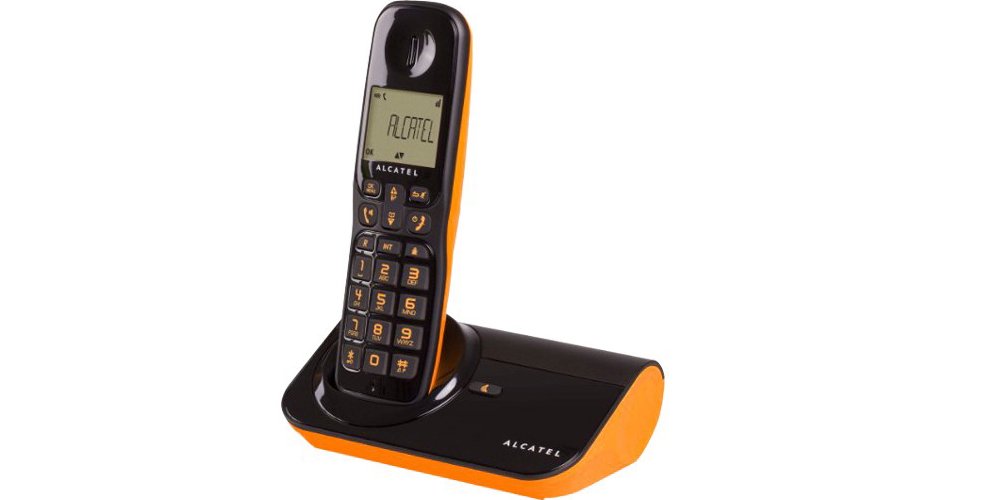
Figura 1: Alcatel Sigma 260 DECT Cordless Phone Handset and Base Station.
1. Impostazione
Follow these steps to set up your Alcatel Sigma 260 phone.
1.1 Disimballaggio e contenuto della confezione
Disimballare con cura tutti gli articoli e assicurarsi di avere i seguenti componenti:
- Alcatel Sigma 260 Handset
- Alcatel Sigma 260 Base Station
- Adattatore di alimentazione per stazione base
- Cavo della linea telefonica
- Rechargeable AAA Batteries (typically 2x)
- Manuale dell'utente (questo documento)
1.2 Installazione della batteria
- Individuare il coperchio del vano batteria sul retro del telefono.
- Per aprire il vano, far scorrere o sollevare il coperchio.
- Insert the rechargeable AAA batteries, observing the correct polarity (+ and -) as indicated inside the compartment.
- Richiudere il coperchio del vano batteria, assicurandosi che scatti saldamente in posizione.
Importante: Only use the supplied rechargeable batteries or equivalent approved replacements. Non-rechargeable batteries may damage the device.
1.3 Collegamento della stazione base
- Connect one end of the telephone line cord to the TEL socket on the base station.
- Collegare l'altra estremità del cavo della linea telefonica alla presa telefonica a muro.
- Plug the power adapter into the DC IN socket on the base station.
- Collegare l'alimentatore a una presa elettrica adeguata.
- Posizionare il telefono sulla base per caricare le batterie. La carica iniziale richiede almeno 12-15 ore.
Nota: Position the base station away from other electrical appliances to avoid interference.
1.4 Handset Registration (for additional handsets or re-registration)
Your primary handset is usually pre-registered. If you have additional handsets (up to 4 connectable handsets are supported) or need to re-register a handset, follow these general steps:
- On the base station, press and hold the registration button (often marked with a signal icon or "PAGE") for approximately 5 seconds until an indicator light on the base starts flashing.
- On the handset, access the menu, navigate to "Registration" or "Register Handset" (refer to the handset display for exact menu options).
- Enter the system PIN (default is usually 0000 or 1234).
- The handset will search for the base station and register. A confirmation message will appear on the handset display once successful.
Mancia: If registration fails, ensure the handset is close to the base station and try again.
2. Utilizzo del telefono
This section covers the basic functions of your Alcatel Sigma 260.
2.1 Effettuare chiamate
- Chiamata diretta: Sollevare il ricevitore o premere il tasto PARLARE button. Enter the phone number using the keypad. The call will connect automatically.
- Dall'elenco telefonico: Premere il tasto RUBRICA TELEFONICA button (or navigate via menu). Use the arrow keys to scroll through entries. Press PARLARE per comporre il numero selezionato.
- Ricomposizione: Premere il tasto RICOMPOSIZIONE pulsante per view a list of recently dialed numbers. Use arrow keys to select, then press PARLARE.
2.2 Ricezione delle chiamate
- Quando squilla il telefono, premere il tasto PARLARE pulsante per rispondere alla chiamata.
- Per terminare una chiamata, premere il FINE pulsante o riposizionare il ricevitore sulla stazione base.
2.3 Rubrica (50 voci)
Il telefono può memorizzare fino a 50 nomi e numeri.
- Aggiungere un contatto: Access the menu, select "Phonebook", then "Add New Entry". Enter the name and number using the keypad. Save the entry.
- Editing a Contact: Access the phonebook, select the contact, then "Edit". Make changes and save.
- Deleting a Contact: Access the phonebook, select the contact, then "Delete". Confirm deletion.
2.4 Funzione vivavoce
Per attivare il vivavoce durante una chiamata, premere il tasto ORATORE button (often marked with a speaker icon). Press it again to switch back to handset mode.
2.5 ID chiamante
If you subscribe to Caller ID service from your telephone provider, the caller's number (and name, if available in your phonebook or provided by the service) will be displayed on the handset screen before you answer the call.
3. Manutenzione
Proper care ensures the longevity of your Alcatel Sigma 260.
3.1 Pulizia
Pulire il ricevitore e la stazione base con un panno morbido e asciutto.amp cloth. Do not use abrasive cleaners, solvents, or strong chemicals, as these can damage the surfaces. Ensure no liquid enters the device openings.
3.2 Cura della batteria
- Riporre sempre il portatile nella stazione base quando non lo si utilizza per assicurarsi che rimanga carico.
- Se il telefono non verrà utilizzato per un periodo prolungato, rimuovere le batterie per evitare perdite.
- Replace batteries when their performance significantly degrades. Use only approved rechargeable AAA batteries.
4. Risoluzione Dei Problemi
Se riscontri problemi con il tuo telefono, prova le seguenti soluzioni prima di rivolgerti a un professionista.
| Problema | Possibile causa/soluzione |
|---|---|
| Nessun tono di linea |
|
| Non è possibile effettuare o ricevere chiamate |
|
| Scarsa qualità del suono / Statico |
|
| Il portatile non si carica |
|
| Il display è vuoto o illeggibile |
|
5. Specifiche tecniche
Below are the key technical specifications for the Alcatel Sigma 260 DECT Cordless Phone:
| Marca | Alcatel |
| Numero di modello | Sigma 260 |
| Tipo di telefono | Telefono cordless DECT |
| Fonte di alimentazione | Battery Powered (Rechargeable AAA) |
| Tipo di tastiera | Tastiera singola |
| ID chiamante | SÌ |
| Capacità della rubrica | Voci 50 |
| Funzione vivavoce | SÌ |
| Connectable Handsets | Fino a 4 |
| Tipo di visualizzazione | Alfanumerico |
| Segreteria telefonica | NO |
6. Garanzia e supporto
For information regarding warranty terms and conditions, please refer to the warranty card included with your product or contact your retailer. Specific warranty details are not provided in this manual.
For technical support or inquiries, you may contact the seller directly via email:
E-mail: tecnotorba.amazon@gmail.com
Please provide your product model (Alcatel Sigma 260) and a detailed description of your issue when contacting support.


