1. Introduzione
1.1 Prodotto finitoview
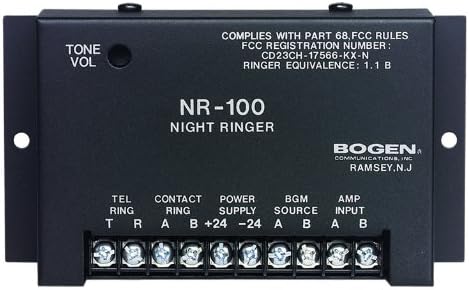
The Bogen BG-NR100 Night Ringer is an essential component for integrating telephone ringing into a paging or public address system. It is engineered to detect incoming telephone ring signals or external contact closures and generate a loud, clear electronic ringer tone. Its compact design and low current draw make it an efficient and reliable solution for various commercial and industrial applications.
1.2 Caratteristiche principali
- Responds to 90V ring signals or external contact closures.
- Produces a clear dual-frequency electronic ringer tone.
- Easily connects to any standard paging system.
- Automatically mutes background music while ringing.
- Features a 0-level ringer volume control for adjustable output.
- Compact size for convenient installation.
- Low current draw for energy efficiency.
2. Informazioni sulla sicurezza
Please read all safety instructions carefully before installing or operating the Bogen BG-NR100 Night Ringer. Failure to follow these instructions may result in electric shock, fire, or other hazards.
2.1 Precauzioni generali di sicurezza
- Non esporre questo dispositivo a pioggia o umidità.
- Non ostruire le aperture di ventilazione.
- Non installare vicino a fonti di calore come radiatori, bocchette di riscaldamento, stufe o altri apparecchi che producono calore.
- Utilizzare solo accessori/componenti specificati dal produttore.
- Affidare tutti gli interventi di assistenza a personale qualificato.
2.2 Sicurezza elettrica
- Garantire l'alimentazione voltage corrisponde ai requisiti specificati per il dispositivo.
- Scollegare l'alimentazione prima di effettuare qualsiasi collegamento o manutenzione.
- Avoid touching exposed wires or terminals when the unit is powered.
- Una corretta messa a terra è essenziale per un funzionamento sicuro.
3. Impostazione
3.1 Disimballaggio
Carefully remove the Night Ringer from its packaging. Inspect the unit for any signs of damage that may have occurred during shipping. If damage is found, contact your supplier immediately.
3.2 Montaggio
The BG-NR100 is designed for surface mounting. Use appropriate screws (not supplied) to secure the unit to a wall or other stable surface using the mounting tabs on either side of the enclosure. Ensure the mounting location allows for adequate ventilation and access to connections.
3.3 Collegamenti di cablaggio
All connections are made via the screw terminal block located on the front of the unit. Ensure power is disconnected before making any wiring connections.
| Etichetta terminale | Descrizione | Funzione |
|---|---|---|
| TEL RING (T, R) | Telephone Ring Input | Connect to the tip (T) and ring (R) lines of a standard 90V telephone ring signal source. |
| CONTACT RING (A, B) | External Contact Closure Input | Connect to a dry contact closure (e.g., from a relay or switch) to trigger the ringer. |
| POWER SUPPLY (+24, -24) | Potenza in ingresso | Connect to a regulated 24V DC power supply. Observe polarity (+24V to +24, -24V to -24). |
| BGM SOURCE (A, B) | Ingresso musica di sottofondo | Connect the background music source here. The unit will mute this input during a ring event. |
| AMP INPUT (A, B) | Amplifier Input / Output to Paging System | Connect this output to the input of your paging amplifier or public address system. This carries the ringer tone and the muted BGM. |
4. Operativo
4.1 Funzionamento di base
Once properly connected and powered, the BG-NR100 will automatically detect an incoming 90V telephone ring signal or a closure on the Contact Ring terminals. Upon detection, the unit will generate a dual-frequency electronic ringer tone and simultaneously mute any background music connected to the BGM Source input. The ringer tone will be sent to the Amp Input terminals for connection to your paging system.
4.2 Controllo del volume
The ringer volume can be adjusted using the TONE VOL knob located on the top left of the unit. Rotate the knob clockwise to increase the volume and counter-clockwise to decrease it. Adjust the volume to a suitable level for your environment.
5. Manutenzione
5.1 Pulizia
To clean the unit, wipe the exterior with a soft, dry cloth. Do not use liquid cleaners or aerosol cleaners. Ensure the unit is powered off and disconnected from all sources before cleaning.
5.2 Cura generale
The BG-NR100 is designed for reliable operation and requires minimal maintenance. Ensure it is installed in a location free from excessive dust, moisture, and extreme temperatures. Periodically check all wiring connections to ensure they are secure.
6. Risoluzione Dei Problemi
If you experience issues with your Bogen BG-NR100 Night Ringer, refer to the following table for common problems and solutions.
| Problema | Possibile causa | Soluzione |
|---|---|---|
| No ringer tone output. | Nessuna alimentazione all'unità. | Check power supply connections and ensure 24V DC is present. |
| Incorrect or no input signal (TEL RING or CONTACT RING). | Verify 90V ring signal on TEL RING or proper contact closure on CONTACT RING. | |
| Manopola del volume impostata troppo bassa. | Adjust the TONE VOL knob clockwise. | |
| Ringer tone is distorted or weak. | Improper connection to paging amppiù vivace. | Garantire AMP INPUT is correctly connected to the amplifier input. Check ampimpostazioni del lifier. |
| Background music does not mute. | BGM SOURCE not connected correctly. | Verify BGM SOURCE connections. Ensure the music source is routed through the Night Ringer. |
If the problem persists after attempting these solutions, please contact Bogen technical support or a qualified service technician.
7. Specifiche
Technical specifications for the Bogen BG-NR100 Night Ringer:
| Attributo | Valore |
|---|---|
| Produttore | ARCO |
| Marca | Arco |
| Numero di modello | BG-NR100 |
| Peso dell'articolo | 1 libbra |
| Dimensioni del prodotto | 1 x 5 x 3 pollici |
| FCC Registration Number | CD23CH-17566-KX-N |
| Equivalenza della suoneria | 1.1 B |
| Data prima disponibilità | 27 novembre 2013 |
8. Garanzia e supporto
8.1 Informazioni sulla garanzia
For specific warranty terms and conditions, please refer to the warranty card included with your product or visit the official Bogen website. Bogen Communications, Inc. typically provides a limited warranty against defects in materials and workmanship for a specified period from the date of purchase.
8.2 Supporto tecnico
If you require technical assistance or have questions regarding the installation or operation of your BG-NR100 Night Ringer, please contact Bogen technical support. Contact information can usually be found on the Bogen websito o nella confezione del prodotto.


