1. Introduzione
This manual provides essential instructions for the proper installation, operation, and maintenance of the Walkera HiFa-Z-18 FPV Airplane Servo Connection Line. Please read this manual thoroughly before use to ensure correct application and to prevent damage to the product or associated equipment. This connection line is designed for specific FPV airplane servo applications.
2. Prodotto finitoview
The Walkera HiFa-Z-18 is a specialized servo connection line used in FPV (First Person View) airplane systems. It facilitates the electrical connection between a servo and its control unit, ensuring reliable signal transmission for flight control surfaces or other actuated components.
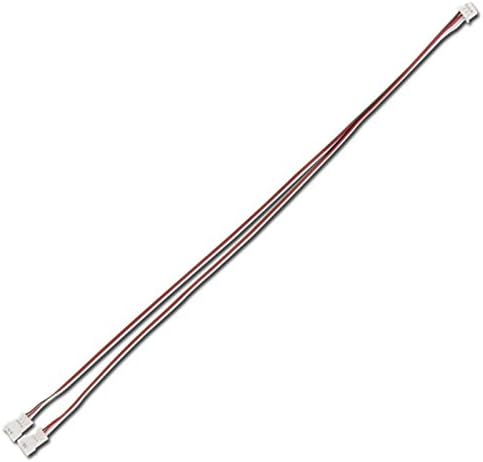
Figure 1: Walkera HiFa-Z-18 FPV Airplane Servo Connection Line. This image displays the connection line, which consists of two thin wires, typically one red and one white, connected to a small white plastic connector at each end. The wires are bundled together, forming a single cable designed for servo signal and power transmission.
Le caratteristiche principali includono:
- Costruzione durevole: Designed for the demanding environment of FPV aircraft.
- Connettori standard: Equipped with connectors compatible with most standard FPV servo systems.
- Trasmissione affidabile del segnale: Ensures consistent and accurate servo response.
3. Configurazione e installazione
Follow these steps to properly install the HiFa-Z-18 servo connection line:
- Identificare i componenti: Locate the servo requiring connection and the corresponding port on your FPV flight controller or receiver.
- Connettori Orient: Ensure the connectors on the HiFa-Z-18 line are correctly oriented before insertion. Most servo connectors are polarized to prevent incorrect connection. The signal wire (often white or yellow) should align with the signal pin, the positive power wire (red) with the positive pin, and the ground wire (black or brown) with the ground pin.
- Connect Servo: Gently push one end of the HiFa-Z-18 line into the servo's port until it is fully seated. Do not force the connection.
- Connect Flight Controller/Receiver: Connect the other end of the HiFa-Z-18 line to the appropriate servo channel port on your FPV flight controller or receiver. Refer to your flight controller/receiver manual for specific port assignments.
- Connessioni sicure: Once connected, ensure all connections are secure and will not vibrate loose during flight. Cable ties or heat shrink tubing may be used for added security and neatness.
Attenzione: Incorrect wiring can lead to component damage or system malfunction. Always double-check connections before powering on your FPV system.
4. Principi operativi
The HiFa-Z-18 servo connection line acts as a conduit for Pulse Width Modulation (PWM) signals and power between your FPV system's control unit and the servo. When the flight controller sends a command, the signal travels through this line to the servo, instructing it to move to a specific position. The line also supplies the necessary power to the servo.
- Integrità del segnale: The quality of the connection line is crucial for maintaining signal integrity, especially in environments with electromagnetic interference.
- Potenza erogata: Adequate gauge wires ensure stable power delivery to the servo, preventing brownouts or erratic behavior.
5. Manutenzione
Regular inspection and proper care will extend the lifespan and ensure the reliability of your HiFa-Z-18 servo connection line.
- Ispezione visiva: Periodically check the wires for any signs of fraying, cuts, or insulation damage. Inspect the connectors for bent pins, corrosion, or cracks.
- Pulizia: Keep connectors free from dirt, dust, and moisture. A soft, dry brush or compressed air can be used for cleaning.
- Scarico della trazione: Ensure the wires are not under excessive tension or sharp bends, especially near the connectors, as this can lead to internal wire breakage.
- Magazzinaggio: Store the connection line in a dry, cool place away from direct sunlight and extreme temperatures when not in use.
- Sostituzione: If any damage is observed, replace the connection line immediately to prevent potential system failures.
6. Risoluzione Dei Problemi
If you experience issues with your servo system, consider the following troubleshooting steps related to the connection line:
- Servo non risponde:
- Check if the connection line is securely plugged into both the servo and the flight controller/receiver.
- Verify that the connectors are oriented correctly (signal, power, ground).
- Inspect the line for visible damage (cuts, fraying).
- Test with a known working servo or connection line if available.
- Movimento irregolare del servo:
- Ensure the connection line is not running too close to high-current wires or other sources of electromagnetic interference.
- Check for loose connections at either end of the line.
- Inspect for subtle damage to the wire insulation or internal conductors.
- Funzionamento intermittente:
- This often indicates a loose connection or a partially broken wire. Wiggle the wire gently near the connectors while the system is powered (with caution) to see if the issue appears or disappears.
- Replace the line if intermittent issues persist after checking connections.
7. Specifiche
| Caratteristica | Dettaglio |
|---|---|
| Numero di modello | HiFa-Z-18 |
| Tipo | FPV Airplane Servo Connection Line |
| Produttore | Camminatore |
| Connettori | Standard servo connectors (e.g., JR/Futaba compatible) |
| Applicazione | FPV aircraft servo signal and power transmission |
| ASIN | B00H949B4Q |
8. Garanzia e supporto
This product is typically covered by a limited manufacturer's warranty against defects in materials and workmanship. For specific warranty terms, duration, and support inquiries, please refer to the documentation provided with your purchase or contact the retailer or manufacturer directly. Keep your proof of purchase for warranty claims.


