1. Introduzione
This manual provides instructions for the installation, operation, and maintenance of your Cisco SG100-24-NA 24-Port Gigabit Switch. This unmanaged switch is designed to provide high-performance network connectivity for small to medium-sized businesses, offering ease of use and simple setup without complex configuration.
Please read this manual thoroughly before using the device to ensure proper setup and to maximize its performance and longevity.
2. Prodotto finitoview
2.1 Caratteristiche principali
- 24 porte Gigabit Ethernet: Fornisce connessioni cablate ad alta velocità per più dispositivi.
- 2 Combo Mini-GBIC Ports: Offers flexible uplink options using fiber optic or copper connections.
- Switch non gestito: Plug-and-play operation requires no software configuration.
- Alte prestazioni: Supports a switching capacity of 48 Gbps and a forwarding capacity of 35.7 mpps for efficient data transfer.
- Efficienza energetica: Designed for optimal power consumption.
- Design compatto: Suitable for desktop or rack-mount installations.
2.2 Contenuto della confezione
The Cisco SG100-24-NA package typically includes:
- Cisco SG100-24-NA 24-Port Gigabit Switch
- Cavo di alimentazione
- Mounting Kit (for rack-mount, if applicable)
- Guida rapida
Note: Contents may vary slightly depending on the region and specific product bundle.
2.3 Descrizione fisica
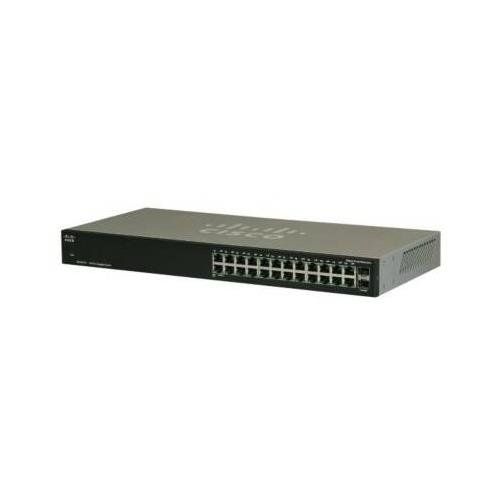
Figura 1: Fronte View of the Cisco SG100-24-NA Switch. This image shows the front panel of the switch, featuring 24 RJ-45 Gigabit Ethernet ports and status indicator LEDs for each port. The Cisco logo is visible on the left.

Figura 2: Posteriore View of the Cisco SG100-24-NA Switch. This image displays the rear panel, including the power input connector and product label with serial number and regulatory information.

Figura 3: lato View of the Cisco SG100-24-NA Switch. This image illustrates the side panel, highlighting the ventilation grilles designed for heat dissipation to ensure optimal performance.
3. Istruzioni per l'installazione
Follow these steps to set up your Cisco SG100-24-NA Gigabit Switch:
3.1 Preparazione del sito
- Posizione: Place the switch on a flat, stable surface or mount it in a standard 19-inch equipment rack. Ensure adequate ventilation around the device.
- Energia: Connect the switch to a grounded power outlet. Ensure the power source meets the switch's electrical requirements.
- Ambiente: Avoid placing the switch near heat sources, in direct sunlight, or in areas with excessive dust or moisture.
3.2 Collegamento dello switch
- Connetti alimentazione: Plug the provided power cord into the power input on the rear panel of the switch and then into a suitable electrical outlet.
- Connetti dispositivi di rete: Use standard Ethernet cables (Cat5e or higher) to connect your network devices (computers, servers, access points, routers) to any of the 24 RJ-45 Gigabit Ethernet ports on the front panel.
- Connect Uplink (Optional): If using the Mini-GBIC ports for fiber or copper uplinks, insert the appropriate SFP module (not included) into one of the combo Mini-GBIC slots and connect the corresponding cable.
- Verifica connessioni: Once devices are connected, check the LED indicators on the front panel. A solid green LED typically indicates a valid link, and a blinking LED indicates network activity.
The Cisco SG100-24-NA is an unmanaged switch, meaning it operates automatically without requiring any software configuration. Once powered on and connected, it will begin forwarding network traffic.
4. Istruzioni per l'uso
The Cisco SG100-24-NA is designed for simple, plug-and-play operation. No user configuration is required for basic functionality.
4.1 Accensione/spegnimento
- Accensione: Connect the power cord to the switch and a power outlet. The switch will power on automatically.
- Spegni: Disconnect the power cord from the switch or the power outlet.
Note: There is no dedicated power button on this model.
4.2 Indicatori LED
Each RJ-45 port has an associated LED indicator:
- Verde pieno: Indicates a valid network link at Gigabit (1000 Mbps) speed.
- Ambra Solida: Indicates a valid network link at 10/100 Mbps speed.
- Blinking Green/Amber: Indica l'attività di rete (trasmissione/ricezione dati) su quella porta.
- Spento: No link detected or port is inactive.
A system LED (usually on the far left) indicates the overall status of the switch. Refer to the Quick Start Guide for specific system LED behavior.
5. Manutenzione
The Cisco SG100-24-NA switch requires minimal maintenance to ensure optimal performance and longevity.
5.1 Pulizia
- Periodically clean the exterior of the switch with a soft, dry, lint-free cloth.
- Non utilizzare detergenti liquidi o spray, poiché potrebbero danneggiare il dispositivo.
- Assicurarsi che le aperture di ventilazione siano libere da polvere e ostruzioni.
5.2 Considerazioni ambientali
- Operate the switch within its specified temperature and humidity ranges (refer to specifications).
- Garantire un flusso d'aria adeguato per evitare il surriscaldamento.
6. Risoluzione Dei Problemi
If you encounter issues with your Cisco SG100-24-NA switch, refer to the following common troubleshooting steps:
6.1 Nessun potere
- Assicurarsi che il cavo di alimentazione sia collegato saldamente sia all'interruttore sia a una presa elettrica funzionante.
- Verificare che la presa di corrente funzioni collegandovi un altro dispositivo.
- Check the system LED on the switch; if it's off, there might be a power issue.
6.2 Nessuna spia di collegamento sulla porta
- Assicurarsi che il cavo Ethernet sia collegato saldamente sia alla porta dello switch sia al dispositivo collegato.
- Provare un cavo Ethernet diverso per escludere che si tratti di un cavo difettoso.
- Collegare il dispositivo a una porta diversa dello switch.
- Verificare che il dispositivo collegato sia acceso e funzioni correttamente.
6.3 Slow Network Connection
- Assicurarsi che tutti i dispositivi e i cavi collegati supportino Gigabit Ethernet per una velocità ottimale.
- Verificare la presenza di traffico di rete eccessivo o di applicazioni che richiedono molta larghezza di banda.
- Verify that the link light for the port is solid green (Gigabit speed) and not amber (10/100 Mbps).
- Riavviare lo switch e i dispositivi collegati.
7. Specifiche
| Modello | SG100-24-NA |
| Porti | 24 x 10/100/1000 Mbps RJ-45, 2 x Combo Mini-GBIC (shared with 2 RJ-45 ports) |
| Capacità di commutazione | 48 Gbps |
| Capacità di inoltro | 35.7 mps |
| Supporto Jumbo Frame | 9216 byte |
| Dimensioni tabella indirizzi MAC | 8000 voci |
| Dimensioni (L x P x A) | Circa 21.75 x 12.25 x 4 pollici (dimensioni della confezione) |
| Peso | Circa 6.74 libbre |
| Energia | 100-240V AC, 50-60 Hz, internal universal power supply |
| Temperatura di esercizio | Da 0° a 40°C (da 32° a 104°F) |
| Temperatura di conservazione | da -20° a 70°C (da -4° a 158°F) |
| Umidità di esercizio | dal 10% al 90% senza condensa |
Note: Specifications are subject to change without notice. For the most current information, please refer to the official Cisco product page or documentation.
8. Garanzia e supporto
8.1 Garanzia del prodotto
Cisco products typically come with a limited hardware warranty. The exact terms and duration of the warranty may vary by region and product. Please refer to the warranty information included with your product packaging or visit the official Cisco website for detailed warranty statements.
8.2 Supporto tecnico
For technical assistance, product documentation, software downloads, and community forums, please visit the official Cisco Support website. You may need your product's serial number for support inquiries.
Supporto Cisco Websito: https://www.cisco.com/c/en/us/support/index.html


