Introduzione
Thank you for choosing the SoundBot SB510 HD Water Resistant Bluetooth Shower Speaker. This manual provides essential information for setting up, operating, and maintaining your speaker to ensure optimal performance and longevity. Designed for convenience and durability, this speaker allows you to enjoy your favorite audio content in various environments, including the shower, without concern for water exposure.
Le caratteristiche principali includono:
- Design resistente all'acqua: Built to withstand steam, splashes, and humidity, ideal for bathroom use.
- Chiamate in vivavoce: Integrated microphone and control buttons for answering and ending calls.
- Portatile e leggero: Compact design for easy transport and use on the go.
- Tempo di riproduzione esteso: Fino a 6 ore di riproduzione audio continua con una singola carica.
- Connessione Bluetooth stabile: Reliable streaming up to 33 feet from your device.
- Comandi facili da usare: Tactile buttons designed for operation even with wet hands.

The SoundBot SB510 HD speaker, showcasing il suo design resistente all'acqua.
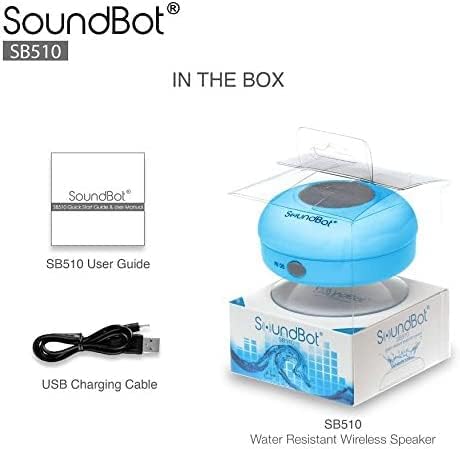
Cosa c'è nella scatola
Your SoundBot SB510 HD package includes the following items:
- 1 x SoundBot SB510 Water Resistant Bluetooth Shower Speaker
- 1 x Manuale d'uso
- 1 cavo di ricarica USB

Included components: speaker, USB charging cable, and user guide.
Impostare
Caricamento dell'altoparlante
Before first use, fully charge your SoundBot SB510 HD speaker. A full charge takes approximately 3 hours and provides up to 6 hours of playtime.
- Locate the charging port on the side of the speaker, usually protected by a rubber flap.
- Collegare l'estremità piccola del cavo di ricarica USB in dotazione alla porta di ricarica dell'altoparlante.
- Collegare l'estremità più grande del cavo USB a una fonte di alimentazione USB (ad esempio, una porta USB del computer, un adattatore da parete USB).
- La spia LED si illuminerà durante la ricarica e si spegnerà o cambierà colore quando la carica sarà completa.

The speaker connected to its USB charging cable.
Accoppiamento Bluetooth
Pair your speaker with your Bluetooth-enabled device (smartphone, tablet, laptop) to begin wireless audio streaming.
- Assicurarsi che l'altoparlante sia carico e spento.
- Tieni premuto il pulsante di accensione (⏻) on the speaker until the LED indicator light begins to flash rapidly, indicating it is in pairing mode.
- Attiva il Bluetooth sul tuo dispositivo e cerca i dispositivi disponibili.
- Select "SB510" from the list of found devices.
- Once successfully paired, the LED indicator light on the speaker will stop flashing and remain solid blue. You will also hear an audible confirmation.
- L'altoparlante ha una portata wireless fino a 33 piedi (10 metri).
The speaker's control panel, used for initiating Bluetooth pairing.
Istruzioni per l'uso
Controlli degli altoparlanti
The SoundBot SB510 HD features intuitive buttons for easy control of your audio and calls:
| Pulsante | Funzione (pressione breve) | Funzione (pressione lunga) |
|---|---|---|
| ⏻ (Energia) | N / A | Accensione/spegnimento |
| ⏵⏸ (Riproduci/Pausa) | Riproduci/Pausa musica | N / A |
| ⏮ (Precedente/Volume giù) | Canzone precedente | Volume basso (-) |
| ⏭ (Avanti/Volume su) | Prossima canzone | Volume su (+) |
| 📞 (Telefono) | Rispondi/Termina chiamata telefonica | N / A |

Dettagliato view dei pulsanti di controllo dell'altoparlante e delle loro funzioni.
Effettuare e ricevere chiamate
The built-in microphone allows for hands-free communication:
- Risposta a una chiamata: Quando arriva una chiamata, premere il tasto 📞 premere il pulsante una volta per rispondere.
- Terminare una chiamata: Durante una chiamata, premere il tasto 📞 button once to end the conversation.
- Ricomposizione: Premere due volte il tasto 📞 pulsante per ricomporre l'ultimo numero.
Manutenzione
To ensure the longevity and optimal performance of your SoundBot SB510 HD speaker, follow these maintenance guidelines:
- Resistenza all'acqua: The speaker is IPX4 water resistant, meaning it is protected against splashing water from any direction. It is suitable for use in showers or near pools, but it should non be submerged in water. Ensure the charging port cover is securely closed when not charging to maintain water resistance.
- Pulizia: Pulisci l'altoparlante con un panno morbido eamp panno. Non utilizzare detergenti abrasivi o solventi, poiché potrebbero danneggiare la superficie o i componenti interni.
- Magazzinaggio: Conservare l'altoparlante in un luogo fresco e asciutto quando non lo si utilizza. Evitare temperature estreme.
- Cura della ventosa: For best adhesion, ensure the surface where you attach the suction cup is clean, smooth, and dry. Periodically clean the suction cup with water to remove any dust or residue.

The speaker's water-resistant design allows for use in wet environments.
Risoluzione dei problemi
If you encounter any issues with your SoundBot SB510 HD speaker, please refer to the following common troubleshooting steps:
| Problema | Possibile causa | Soluzione |
|---|---|---|
| L'altoparlante non si accende. | Batteria scarica. | Charge the speaker fully (approx. 3 hours). |
| Impossibile associare il dispositivo. | Altoparlante non in modalità di associazione; Bluetooth disattivato sul dispositivo; dispositivo troppo lontano. | Ensure speaker is in pairing mode (flashing LED). Turn on Bluetooth on your device. Move device closer to speaker (within 33 ft). Forget previous pairings on your device and try again. |
| Nessun suono o volume basso. | Volume troppo basso sull'altoparlante o sul dispositivo; altoparlante non collegato. | Increase volume on both the speaker and your connected device. Ensure speaker is successfully paired and connected. |
| Distorsione del suono. | Dispositivo troppo lontano; interferenza. | Move your device closer to the speaker. Avoid obstacles between the speaker and device. Reduce interference from other wireless devices. |
| La ventosa non aderisce. | Surface is dirty, wet, or not smooth. | Clean and dry the surface thoroughly. Ensure the surface is smooth (e.g., tile, glass). Clean the suction cup itself. |
Specifiche
Detailed technical specifications for the SoundBot SB510 HD speaker:
| Caratteristica | Descrizione |
|---|---|
| Nome del modello | SB510HD |
| Numero modello articolo | SB510-BLU |
| Tecnologia di connettività | Bluetooth, USB |
| Tecnologia di comunicazione wireless | Bluetooth |
| Portata Bluetooth | Fino a 33 piedi (10 metri) |
| Livello di resistenza all'acqua | IPX4 (resistente all'acqua) |
| Tipo di altoparlante | Desktop / Portable |
| Potenza massima in uscita dell'altoparlante | 3 Watt |
| Modalità di uscita audio | Stereo |
| Durata della batteria | 6 ore |
| Tempo di ricarica | 3 ore |
| Tipo di batteria | 1 batteria agli ioni di litio richiesta |
| Microfono incorporato | SÌ |
| Dimensioni del prodotto | 3.5"P x 3.5"L x 2.3"A |
| Peso dell'articolo | 1.59 once |
| Materiale | Plastica, gomma |
Garanzia e supporto
The SoundBot SB510 HD Water Resistant Bluetooth Shower Speaker comes with a Limited Warranty. For specific details regarding warranty coverage, duration, and terms, please refer to the warranty information provided in the original product packaging or contact SoundBot customer support directly.
For technical assistance, troubleshooting beyond this manual, or warranty claims, please visit the official SoundBot website or contact their customer service department. Contact information can typically be found on the product packaging or the SoundBot websito.


