Introduzione
The M-Audio Keystation Mini 32 is a compact USB MIDI controller designed for music production and performance. This manual provides essential information to help you set up, operate, and maintain your device.

Figure 1: M-Audio Keystation Mini 32 USB MIDI Controller.
Impostare
Contenuto della confezione
- M-Audio Keystation Mini 32
- Cavo USB
- Ignite Card (for software activation)
- Guida Rapida
- Manuale di sicurezza e garanzia
Connessione al computer
The Keystation Mini 32 is a class-compliant, USB-powered device. This means it does not require separate drivers for most operating systems and draws power directly from the USB connection.
- Connect one end of the supplied USB cable to the USB port on the Keystation Mini 32.
- Connect the other end of the USB cable to an available USB port on your computer (Mac or PC).
- Il computer dovrebbe riconoscere automaticamente il dispositivo.
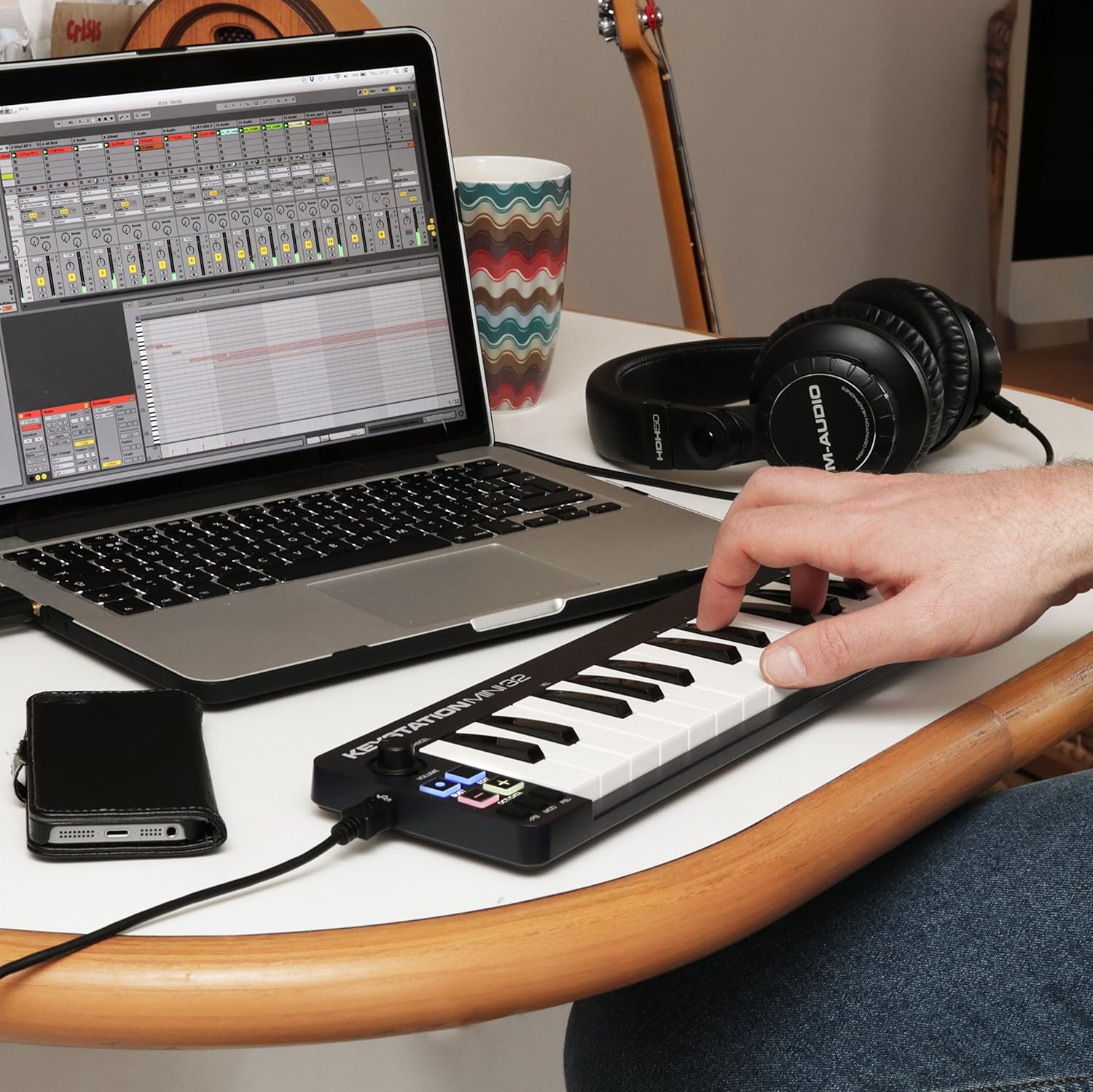
Figure 2: Keystation Mini 32 connected to a laptop, demonstrating a typical setup for music production.
iOS Connectivity
For iOS device connectivity, the Apple iPad Camera Connection Kit (sold separately) is required. This allows you to use the Keystation Mini 32 with audio applications on your iPad and other iOS devices.
Installazione del software
The Keystation Mini 32 includes bundled software:
- AIR Music Technology's Ignite: Over 275 instrument sounds. Use the provided Ignite Card for activation.
- Ableton Live Lite: A popular performance and production program.
Refer to the Quickstart Guide and the Ignite Card for detailed instructions on downloading and activating the included software.
Operazione
The Keystation Mini 32 features 32 velocity-sensitive, synth-action mini keys and several controls for expressive performance.
Caratteristiche e controlli principali

Figura 3: in alto view of the Keystation Mini 32, highlighting the various controls and keys.
- 32 mini tasti sensibili alla velocità: These keys respond to how hard you play them, allowing for dynamic musical expression.
- Octave/Data Buttons: Use these to shift the keyboard's octave range up or down, providing access to the full melodic keyboard range. These buttons can also function as data entry controls in certain modes.
- Pulsanti Pitch Bend: These buttons allow you to bend the pitch of notes up or down for expressive effects.
- Modulation Button: Engages modulation effects, often used for vibrato or other tonal changes.
- Pulsante Sustain: Functions like a sustain pedal, holding notes after the key is released. Some users note a mode where pressing and holding sustains, and releasing stops sustain.
- Manopola del volume: Regola il volume di uscita.
- Pulsante Modifica: Used to access advanced functions and settings. Refer to the full user guide for detailed information on edit mode.
Suonare lo strumento
Once connected and your software is running, select the Keystation Mini 32 as your MIDI input device within your Digital Audio Workstation (DAW) or virtual instrument software. You can then play virtual instruments, sequence music, and control various parameters using the keyboard and its dedicated controls.
Manutenzione
To ensure the longevity and optimal performance of your Keystation Mini 32, follow these maintenance guidelines:
- Pulizia: Utilizzare un panno morbido e asciutto per pulire la superficie del controller. Evitare detergenti abrasivi, solventi o cere.
- Magazzinaggio: Conservare il dispositivo in un luogo fresco e asciutto, lontano dalla luce solare diretta, da temperature estreme e da elevata umidità.
- Gestione: Maneggiare il controller con cura. Evitare di farlo cadere o di sottoporlo a forti urti.
- Porta USB: The USB port is a critical component. Connect and disconnect the USB cable gently to prevent damage. Avoid excessive force or bending the cable while connected.
Risoluzione dei problemi
If you encounter issues with your Keystation Mini 32, consider the following common solutions:
- Nessuna alimentazione/Non riconosciuto:
- Ensure the USB cable is securely connected to both the Keystation Mini 32 and your computer.
- Prova una porta USB diversa sul tuo computer.
- Se si utilizza un hub USB, provare a collegarlo direttamente al computer.
- Verify that your computer's operating system is up to date.
- Nessuna uscita audio:
- Check your DAW or virtual instrument software settings to ensure the Keystation Mini 32 is selected as the MIDI input device.
- Confirm that the volume knob on the Keystation Mini 32 is turned up.
- Ensure your software instruments are loaded and active.
- Keys Not Responding or Incorrect Velocity:
- The keys are velocity-sensitive. Ensure you are pressing them with sufficient force if you expect a louder sound.
- Check your software's velocity curve settings, as these can often be adjusted to match your playing style.
- Assicurarsi che non vi siano detriti incastrati sotto i tasti.
- Software Activation Issues:
- Refer to the instructions on the Ignite Card for software download and activation.
- Visit the M-Audio support website for assistance with software registration.
Specifiche
| Peso dell'articolo | 1.01 libbre |
| Dimensioni del prodotto | 5.38 x 17.5 x 2.25 pollici |
| Numero di modello | 102432 |
| Data prima disponibilità | 14 aprile 2014 |
| Nome del colore | Nero |
| Dispositivi compatibili | Computer portatile, tablet |
| Tipo di connettore | USB |
| Interfaccia Hardware | USB |
| Software supportato | Ableton Live |
| Tipo di materiale | Guida |
| Stile musicale | Elettronico |
| Chiave dello strumento | Qualunque |
| Numero di tasti della tastiera | 32 |
| Misurare | 32 mini-key |
| Piattaforma hardware | x86_64, ARM |
| Marca | M-AUDIO |
| Tecnologia di connettività | USB |
| Caratteristica speciale | Portatile |
| Nome del modello | Keystation Mini II |
Garanzia e supporto
For detailed warranty information, please refer to the "Safety & Warranty Manual" included in your product box. This document outlines the terms and conditions of your product warranty.
For technical support, software assistance, or further inquiries, please visit the official M-Audio website. Their support section typically provides FAQs, driver downloads, and contact information.
Note: This product is an International Version and may not include a U.S. Warranty. Please check your specific purchase details for warranty coverage.