1. Introduzione
This manual provides essential information for the installation, operation, and maintenance of your Intel Core i7-4790 Processor. Designed for desktop computing, this processor offers a balance of performance and efficiency for various applications, from everyday tasks to demanding gaming and content creation. Please read this manual thoroughly before proceeding with installation.
2. Informazioni sulla sicurezza
Always observe the following safety precautions to prevent damage to the processor or other components, and to ensure personal safety:
- Prevenzione delle scariche elettrostatiche (ESD): Processors are sensitive to static electricity. Always wear an anti-static wrist strap or frequently touch a grounded metal object before handling the processor.
- Maneggiare con cura: Avoid touching the gold contacts or the bottom of the processor. Hold the processor by its edges.
- Spegni: Prima di installare o rimuovere qualsiasi componente, assicurarsi che il computer sia completamente spento e scollegato dalla presa a muro.
- Ventilazione: Assicurare un adeguato flusso d'aria all'interno del case del computer per evitare il surriscaldamento.
- Installazione professionale: In caso di dubbi su qualche passaggio, consultare un tecnico qualificato.

Figure 2.1: System Protection Reminder
This image illustrates the importance of protecting your computer system, emphasizing the need for careful handling and proper installation practices to ensure the longevity and security of your components.
3. Contenuto della confezione
Verifica che il pacco contenga i seguenti articoli:
- Processore Intel Core i7-4790
- Dissipatore per CPU Intel Stock (se acquistato come processore in scatola)
- Documentation (e.g., Quick Start Guide, Warranty Information)
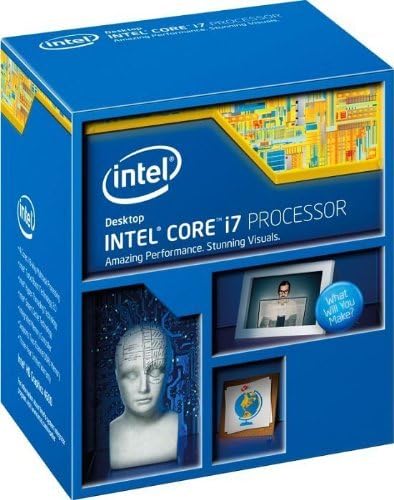
Figure 3.1: Processor Retail Box (Front)
This image displays the front of the Intel Core i7 Processor retail packaging, highlighting the brand and product line.

Figure 3.2: Processor Retail Box (Side)
This image shows the side of the Intel Core i7 Processor retail box, where the model number BX80646I74790 and UPC are visible for identification.
4. Configurazione e installazione
The Intel Core i7-4790 Processor uses the LGA 1150 socket. Ensure your motherboard is compatible with this socket type and supports 4th Generation Intel Core processors (Haswell refresh). A BIOS update may be required for some Z87 motherboards.
4.1 Lista di controllo pre-installazione
- Scheda madre compatibile (socket LGA 1150)
- Pasta termica (se non pre-applicata sul dissipatore)
- Screwdriver (for cooler installation)
- Cinturino da polso antistatico
4.2 Passaggi di installazione del processore
- Preparare la scheda madre: Open the CPU socket retention lever on the motherboard. Lift the metal load plate.
- Orientare il processore: Carefully align the processor with the socket. Look for the golden triangle or notch on one corner of the processor and match it with the corresponding mark on the socket. Do not force the processor into the socket.
- Posizionare il processore: Gently lower the processor straight down into the socket. It should sit without resistance.
- Proteggere il processore: Close the metal load plate over the processor, then push down the retention lever until it clicks into place.
- Applicare la pasta termica (se necessario): If your CPU cooler does not have pre-applied thermal paste, apply a small amount (pea-sized dot) to the center of the CPU's integrated heat spreader (IHS).
- Installare il dissipatore della CPU: Mount the CPU cooler according to its specific instructions. Ensure it makes firm, even contact with the processor's IHS.
- Collegare la ventola di raffreddamento: Connect the CPU cooler fan cable to the designated CPU_FAN header on the motherboard.

Figure 4.1: Intel Core i7-4790 Processor
Questa immagine mostra la parte superiore view of the Intel Core i7-4790 Processor, illustrating its physical appearance and branding, which is crucial for correct orientation during installation.
5. Funzionamento del processore
Once installed, the Intel Core i7-4790 Processor operates automatically within your system. Its performance is managed by the operating system and motherboard BIOS/UEFI settings. Key features include:
- Tecnologia Intel Turbo Boost 2.0: Aumenta dinamicamente la frequenza del processore secondo necessità sfruttando i vantaggitage of thermal and power headroom to deliver a burst of speed when you need it.
- Tecnologia Intel Hyper-Threading: Allows each processor core to work on two tasks at the same time, improving multitasking performance.
- Grafica Intel HD 4600: Integrated graphics solution for display output and light graphics tasks.
- Tecnologia Intel di virtualizzazione (VT-x): Enables one hardware platform to function as multiple "virtual" platforms, offering improved manageability, security, and flexibility.
For optimal performance, ensure your operating system and drivers are up to date. Adjusting power management settings in your operating system or BIOS can also influence processor behavior and power consumption.
6. Manutenzione
Processors generally require minimal maintenance. The primary focus should be on maintaining an optimal operating environment:
- Rimozione della polvere: Regularly clean dust from your computer case, especially from CPU cooler fins and fans, to ensure efficient heat dissipation. Use compressed air for this purpose.
- Pasta termica: If you remove the CPU cooler for any reason, it is recommended to clean off the old thermal paste from both the CPU and the cooler base and apply fresh thermal paste before reinstallation.
- Monitoraggio della temperatura: Use system monitoring software to keep an eye on CPU temperatures, especially under heavy load, to ensure it stays within safe operating limits.
7. Risoluzione Dei Problemi
If you encounter issues after installing your Intel Core i7-4790 Processor, consider the following troubleshooting steps:
- Nessun display/Nessun avvio:
- Double-check all power connections to the motherboard and CPU.
- Ensure the processor is correctly seated in its socket and the retention lever is locked.
- Verify RAM modules are properly installed.
- Confirm motherboard BIOS is updated to support the i7-4790, especially if using an older Z87 chipset.
- Surriscaldamento:
- Ensure the CPU cooler is correctly installed and making good contact with the CPU.
- Verificare l'applicazione della pasta termica.
- Check that the CPU cooler fan is spinning and connected to the correct header.
- Improve case airflow by ensuring proper fan configuration and removing obstructions.
- Instabilità/arresti anomali del sistema:
- Run diagnostic tools for memory and storage.
- Assicurarsi che tutti i driver (chipset, scheda grafica) siano aggiornati.
- Check for BIOS updates for your motherboard.
8. Specifiche
| Caratteristica | Specificazione |
|---|---|
| Numero di modello | Numero di telefono: BX80646I74790 |
| Core Name | Il tuo nome è Haswell. |
| Conteggio dei core | 4 |
| Numero di fili | 8 |
| Velocità di clock | 3.6 GHz |
| Frequenza Turbo Massima | 4.0 GHz |
| Intel SmartCache | 8 MB |
| DMI2 | 5.0 tonnellate/secondo |
| Litografia | 22 nm |
| PRESA | LGA1150 |
| Max Thermal Design Power (TDP) | 84 L |
| Larghezza di banda massima della memoria | 25.6 GB/s |
| Grafica del processore | Grafica Intel HD 4600 |
| Frequenza di base della grafica | 350 MHz |
| Frequenza dinamica massima della grafica | 1.2 GHz |
| Max CPU Configuration | 1 |
| Tecnologie avanzate | Intel Turbo Boost 2.0, Hyper-Threading, Virtualization (VT-x, VT-d), AES New Instructions, Secure Key, OS Guard, Trusted Execution Technology |
9. Garanzia e supporto
This Intel processor is covered by Intel's standard warranty. For specific warranty terms and conditions, please refer to the documentation included with your processor or visit the official Intel support website. Please note that opening the product or improper installation may void the warranty.
For technical support, driver downloads, and further assistance, please visit the official Intel support portal. When contacting support, have your processor's model number (BX80646I74790) and any relevant system information ready.
Importante: No refunds or returns are accepted if the product has been opened, unless due to a manufacturing defect. In the event of a return, the buyer is responsible for return shipping costs. Please contact the seller or Intel support for return authorization and procedures.


