1. Introduzione
This manual provides essential instructions for the installation, operation, maintenance, and troubleshooting of your Antec TruePower Classic TP-750C 750W 80 PLUS GOLD Certified Power Supply. Please read this manual thoroughly before installation and retain it for future reference. This power supply is designed to provide stable and efficient power to your personal computer system.
2. Informazioni sulla sicurezza
- Prima dell'installazione o della manipolazione, assicurarsi che l'alimentazione sia scollegata dalla presa di corrente CA.
- Non aprire l'alimentatore casing. Alto volumetagI componenti interni presentano un rischio di scossa elettrica.
- Installare l'alimentatore in un'area ben ventilata per evitare il surriscaldamento.
- Utilizzare solo i cavi forniti con l'alimentatore.
- Evitare di esporre l'alimentatore a umidità o temperature estreme.
- Questo prodotto è destinato esclusivamente all'uso in sistemi di computer personali.
3. Contenuto della confezione
Prima di procedere con l'installazione, verificare che tutti gli elementi siano presenti nella confezione.
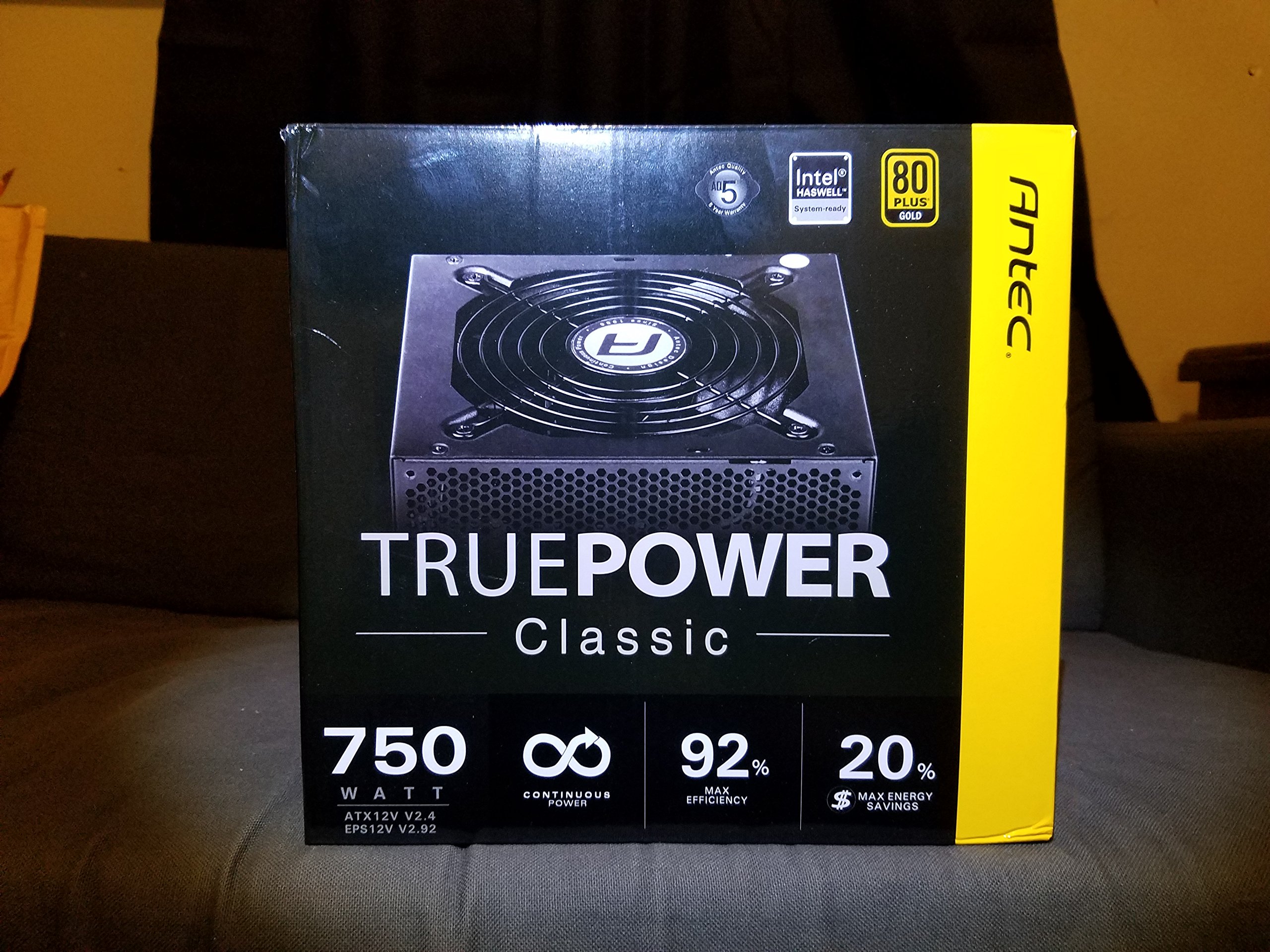
Image 1: Contents of the Antec TruePower Classic TP-750C package. The image displays the power supply unit, various power cables (including a main AC power cable), and user documentation neatly packed within a cardboard box.
- Antec TruePower Classic TP-750C Power Supply Unit
- Modular Cable Set (PCI-E, SATA, Molex, etc.)
- Cavo di alimentazione CA
- Viti di montaggio
- Manuale utente / Documentazione
4. Configurazione e installazione
Follow these steps to properly install your power supply into your computer chassis.
- Preparare il telaio: Ensure your computer chassis is powered off and disconnected from all power sources. Open the side panel of your computer case.
- Montare l'alimentatore: Carefully slide the Antec TP-750C power supply into the designated power supply bay in your chassis. Align the screw holes on the power supply with those on the chassis. Secure the power supply using the provided mounting screws.
- Collegare l'alimentazione della scheda madre: Connect the 24-pin ATX main power connector from the power supply to the corresponding port on your motherboard. Ensure it clicks into place.
- Collegare l'alimentazione della CPU: Connect the 4+4-pin (or 8-pin) EPS12V CPU power connector to the CPU power socket on your motherboard.
- Connect Graphics Card Power (PCI-E): If your graphics card requires external power, connect the appropriate 6+2-pin PCI-E power cables from the power supply to your graphics card.
- Connect Peripheral Power (SATA/Molex): Connect SATA power cables to your storage drives (SSDs, HDDs) and optical drives. Use Molex connectors for other peripherals as needed.
- Gestione dei cavi: Route cables neatly to improve airflow and aesthetics within your chassis.
- Controlli finali: Double-check all connections to ensure they are secure. Close the chassis side panel.
- Collegare l'alimentazione CA: Connect the AC power cord to the power supply and then to a wall outlet or surge protector.
5. Istruzioni per l'uso
The Antec TP-750C power supply operates automatically once correctly installed and connected to an AC power source. It provides stable DC power to all connected components.
- Accensione: After connecting the AC power cord, flip the power switch on the back of the power supply to the "ON" (I) position.
- Avvio del sistema: Press the power button on your computer chassis to start your system.
- Spegni: Shut down your computer through the operating system. For complete power disconnection, flip the power switch on the power supply to the "OFF" (O) position and unplug the AC power cord.
6. Manutenzione
Una corretta manutenzione garantisce la longevità e le prestazioni ottimali del tuo alimentatore.
- Pulizia della polvere: Periodically clean dust from the power supply's fan and ventilation grilles using compressed air. Ensure the power supply is disconnected from AC power before cleaning.
- Ventilazione: Ensure adequate airflow around the power supply. Do not block the intake or exhaust vents.
- Integrità del cavo: Regularly check power cables for any signs of damage or fraying. Replace damaged cables immediately.
- Ambiente operativo: Utilizzare l'alimentatore entro gli intervalli di temperatura e umidità consigliati.
7. Risoluzione Dei Problemi
If you encounter issues with your power supply, refer to the following common problems and solutions.
| Problema | Possibile causa | Soluzione |
|---|---|---|
| Il sistema non si accende. | AC power cord not connected, power switch off, loose internal connections, faulty components. |
|
| Il sistema si accende ma si spegne immediatamente. | Overload, overheating, short circuit, faulty component. |
|
| Unusual noise from the power supply. | Fan obstruction, faulty fan bearing, coil whine. |
|
If troubleshooting steps do not resolve the issue, contact Antec customer support for further assistance.
8. Specifiche
| Nome del modello | TruePower Classic TP-750C |
| Marca | Antec |
| Cosatage | 750 Watt |
| Certificazione 80 PLUS | Oro |
| Fattore di forma | ATX |
| Tipo di connettore | ATX |
| Volume minimo di ingressotage | 100 Volt |
| Dispositivi compatibili | Personal computer |
| Peso dell'articolo | 6.24 libbre (2.83 kg) |
| Dimensioni del pacco | 9.7 x 9 x 5.5 pollici (24.6 x 22.9 x 14 cm) |
| ASIN | B00JOFALL0 |
| Codice UPC | 132018316306 |
9. Garanzia e supporto
The Antec TruePower Classic TP-750C Power Supply comes with a Garanzia del produttore di 3 annoLa presente garanzia copre i difetti di materiali e di fabbricazione in normali condizioni di utilizzo.
For technical support, warranty claims, or further inquiries, please visit the official Antec webo contattare il servizio clienti. Conservare la prova d'acquisto per la convalida della garanzia.
Please note: Opening the power supply casing invaliderà la garanzia.


