Introduzione
This manual provides detailed instructions for the safe installation, operation, and maintenance of the Leviton 2460 Locking Blade Receptacle. This industrial-grade receptacle is designed for secure and reliable power connections in demanding environments. Please read this manual thoroughly before installation or use to ensure proper function and safety.
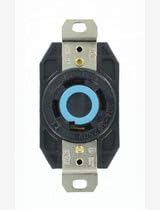
Immagine: Frontale view of the Leviton 2460 Locking Blade Receptacle, showcasing its robust black housing and the distinctive blue locking ring for secure plug retention.
Informazioni importanti sulla sicurezza
AVVERTIMENTO: Risk of electric shock or fire. Improper installation or use can lead to serious injury or death. Always follow these safety guidelines:
- Always turn off power at the circuit breaker or fuse box before installing, servicing, or removing the receptacle.
- Verificare che l'alimentazione sia disattivata utilizzando un voltagil tester prima di toccare qualsiasi cavo.
- All wiring must comply with national and local electrical codes. If you are unsure about any part of these instructions, consult a qualified electrician.
- Do not use this device with damaged wires or if the housing is cracked or broken.
- Assicurarsi che tutti i collegamenti siano ben saldi e sicuri per evitare surriscaldamenti e rischi di incendio.
- This receptacle is designed for specific voltage e amperage ratings. Do not exceed these ratings.
Caratteristiche del prodotto
- Locking Blade Design: Ensures a secure connection, preventing accidental disconnections in high-vibration or critical applications.
- Alto volumetage/Ampvalutazione età: Rated for 20A, 347/600V, suitable for industrial and commercial power distribution.
- 3-Phase, 4-Pole, 4-Wire (3PY 4P4W): Configured for specific three-phase electrical systems.
- Non-Grounding: Designed for systems where a separate grounding conductor is not required or provided at the receptacle.
- Costruzione durevole: Made from robust materials for long-lasting performance in harsh environments.
Installazione e configurazione
Follow these steps for proper installation of the Leviton 2460 Receptacle:
- Spegnimento dell'alimentazione: Locate the circuit breaker or fuse controlling the circuit where the receptacle will be installed. Turn it OFF. Verify power is off with a voltagetester.
- Preparare i cavi: Strip approximately 1/2 inch (12-15 mm) of insulation from the ends of the circuit wires. Ensure wires are clean and free of nicks.
- Collegare i fili: Connect the circuit wires to the corresponding terminals on the receptacle. This L20-20R receptacle is a 4-wire, 3-phase, non-grounding device. Refer to the wiring diagram provided with your specific electrical system documentation for correct phase connections. Ensure all screws are tightened securely to the manufacturer's specified torque.
- Presa di montaggio: Carefully position the receptacle into the electrical box. Secure it using the mounting screws provided. Ensure no wires are pinched or damaged during mounting.
- Install Faceplate (if applicable): Attach the appropriate faceplate or cover to the electrical box.
- Ripristina alimentazione: Once installation is complete and all connections are secure, turn the power back ON at the circuit breaker or fuse box.
Operazione
To use the Leviton 2460 Locking Blade Receptacle:
- Inserire la spina: Align the blades of the mating L20-20P locking plug with the slots on the receptacle.
- Gira per bloccare: Insert the plug fully and then twist it clockwise (typically 1/4 turn) until it locks into place. You should feel a positive engagement, and the plug will be securely retained.
- Rimuovere la spina: To remove the plug, twist it counter-clockwise to unlock and then pull it straight out from the receptacle. Do not yank the cord.
Manutenzione
Regular maintenance helps ensure the longevity and safe operation of your receptacle:
- Ispezione periodica: Annually inspect the receptacle for any signs of physical damage, such as cracks, discoloration, or loose connections.
- Pulizia: If necessary, clean the exterior of the receptacle with a dry, lint-free cloth. Do not use liquid cleaners or solvents. Ensure power is off before cleaning.
- Stringere le connessioni: Periodically check and re-tighten terminal screws to ensure secure electrical connections. Turn off power before performing this check.
- Condizioni ambientali: Ensure the receptacle is not exposed to conditions beyond its specified operating environment (e.g., excessive moisture, extreme temperatures) unless specifically rated for such conditions.
Risoluzione dei problemi
If you encounter issues with your Leviton 2460 Receptacle, refer to the table below:
| Problema | Possibile causa | Soluzione |
|---|---|---|
| Nessuna alimentazione alla presa | Interruttore automatico scattato o fusibile bruciato. Collegamento elettrico allentato. | Check and reset circuit breaker or replace fuse. Turn off power and check all wiring connections for tightness. |
| La spina non si blocca saldamente | Incorrect plug type. Debris in receptacle slots. Damaged receptacle or plug. | Ensure you are using a compatible L20-20P locking plug. Turn off power and inspect slots for obstructions. Replace damaged components. |
| Il contenitore è caldo | Overload on circuit. Loose connections. | Reduce load on the circuit. Turn off power and check all wiring connections for tightness. If problem persists, consult an electrician. |
Specifiche tecniche
| Caratteristica | Valore |
|---|---|
| Numero di modello | 2460 |
| Marca | Levitone |
| Amprabbia | 20 Amps |
| Voltage | 347/600 V |
| Configurazione | L20-20R, 3PY 4P4W, Non-Grounding |
| Colore | Nero |
| Materiale | Viton (Note: This material is typically used for seals/gaskets, not the main housing. Assuming 'viton' from input refers to a durable plastic compound used by Leviton.) |
| Dispositivi compatibili | All compatible L20-20P locking plugs |
Garanzia e assistenza clienti
Leviton products are manufactured to the highest quality standards and are backed by a limited warranty. For specific warranty details, including terms and conditions, please refer to the warranty information provided with your product packaging or visit the official Leviton websito.
If you require technical assistance, have questions about installation, or need to report a product issue, please contact Leviton Customer Support directly. Contact information can typically be found on the Leviton websito o sulla confezione del prodotto.
Ufficiale Leviton Websito: www.leviton.com


