Introduzione
This manual provides essential instructions for setting up, operating, maintaining, and troubleshooting your Motorola CT2 corded phone. Please read this manual thoroughly to ensure proper use and to maximize the features of your device.

Figure 1: Motorola CT2 Corded Phone, side view. This image shows the handset resting on the base unit, connected by a coiled cord.
Impostare
- Disimballaggio: Rimuovere con attenzione tutti i componenti dall'imballaggio. Assicurarsi di avere la base del telefono, la cornetta, il cavo spiralato della cornetta e il cavo della linea telefonica.
- Connetti il telefono: Plug one end of the coiled handset cord into the handset and the other end into the designated jack on the phone base.
- Collegare la linea telefonica: Plug one end of the telephone line cord into the LINE jack on the phone base and the other end into your telephone wall jack.
- Fonte di energia: The Motorola CT2 is a corded phone and draws power directly from the telephone line. No external power adapter is typically required for basic operation. However, a non-standard battery may be required for memory backup features (e.g., storing numbers during a power outage). Refer to the battery compartment for specific instructions if applicable.
- Impostazioni di visualizzazione iniziali: Once connected, the 7-segment LCD should activate. You may need to adjust the LCD contrast (see Operating section) for optimal visibility.

Figure 2: Motorola CT2 Corded Phone, front view. This image displays the keypad, 7-segment LCD screen, and function buttons, illustrating the phone's layout for setup and operation.
Istruzioni per l'uso
Effettuare una chiamata
- Sollevate il microtelefono.
- Ascolta il segnale di linea.
- Comporre il numero di telefono desiderato utilizzando la tastiera.
- Attendi che la chiamata si connetta.
Ricevere una chiamata
- Quando il telefono squilla, sollevare la cornetta per rispondere alla chiamata.
Using Memory Keys
The phone features 10 two-touch memory keys for frequently dialed numbers.
- Per memorizzare un numero:
- Sollevate il microtelefono.
- Premere il tasto NEGOZIO button (if available, or refer to specific key markings).
- Dial the telephone number (up to 16 digits).
- Press the desired memory key (e.g., M1-M10).
- Riagganciare il ricevitore.
- Per comporre un numero memorizzato:
- Sollevate il microtelefono.
- Press the desired memory key (e.g., M1-M10). The number will be dialed automatically.
Ricomposizione dell'ultimo numero
The phone can redial the last number called (up to 32 digits).
- Sollevate il microtelefono.
- Premere il tasto RICOMPOSIZIONE button. The last dialed number will be automatically redialed.
Regolazione del volume della suoneria
Adjust the ringer volume to High or Low using the dedicated switch or button on the phone base.
Regolazione del contrasto LCD
The 7-segment LCD has 5 contrast levels. Use the contrast adjustment button (often labeled 'Contrast' or with an icon) to cycle through the levels until the display is clear.
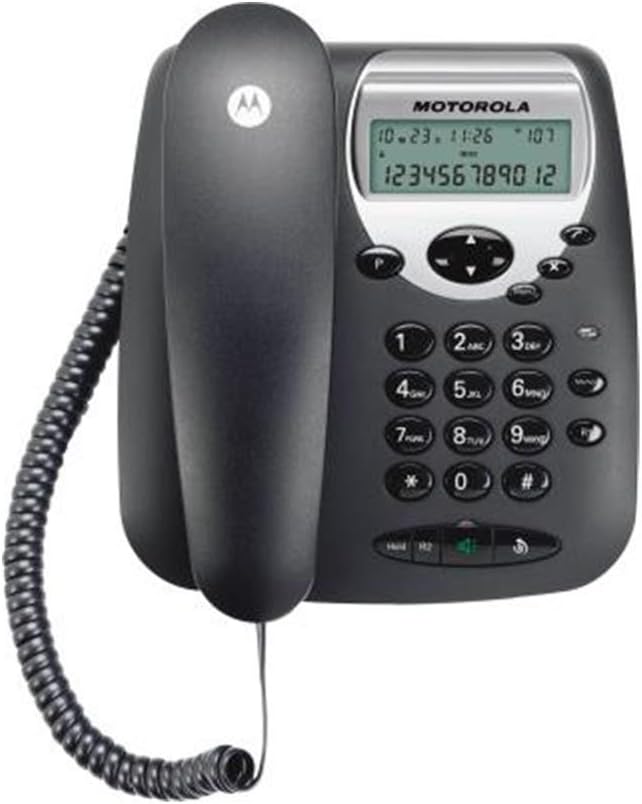
Figure 3: Motorola CT2 Corded Phone, angled front view. This image provides a closer look at the keypad and display, highlighting the buttons for dialing, memory, and feature adjustments.
Manutenzione
- Pulizia: Utilizzare una pasta morbida e leggermenteamp cloth to clean the phone's exterior. Do not use harsh chemicals or abrasive cleaners. Ensure no liquid enters the phone's openings.
- Magazzinaggio: Se si conserva il telefono per un periodo prolungato, scollegarlo dalla linea telefonica e conservarlo in un luogo fresco e asciutto, lontano dalla luce solare diretta e da temperature estreme.
- Cura del cavo: Evitare di aggrovigliare o tirare eccessivamente i cavi del ricevitore e della linea telefonica per evitare danni.
Risoluzione dei problemi
| Problema | Possibile causa | Soluzione |
|---|---|---|
| Nessun tono di linea | Il cavo della linea telefonica è scollegato o difettoso. | Ensure the telephone line cord is securely plugged into both the phone base and the wall jack. Test with another phone if possible. |
| Nessuna visualizzazione sul display LCD | LCD contrast is set too low or too high. | Adjust the LCD contrast using the dedicated button. |
| Non è possibile effettuare o ricevere chiamate | Problema con la linea telefonica o interruzione del servizio. | Controlla se gli altri telefoni sulla stessa linea funzionano. Se il problema persiste, contatta il tuo operatore telefonico. |
| La suoneria è troppo bassa o troppo alta | Ringer volume setting is incorrect. | Adjust the ringer volume switch/button on the phone base to High or Low. |
Specifiche
- Nome del marchio: Motorola
- Numero modello articolo: CT2
- Tipo di telefono: Telefono con filo
- Colore: Nero
- Materiale: Plastica
- Fonte di energia: Wired Electric (Line Powered)
- Connettività: Reti PSTN
- Operazione: Funzionamento a linea singola
- Tipo di visualizzazione: LCD a 7 segmenti
- Contrasto LCD: 5 livelli regolabili
- Volume della suoneria: High/Low adjustable
- Ricomposizione ultimo numero: Fino a 32 cifre
- Number Memory: 16 numeri
- Tasti di memoria: 10 two-touch memory keys
- Tipo di tastiera: Tastiera singola
- Batterie: Non-standard battery required (for memory backup)
- Peso dell'articolo: Approximately 32 g (Note: This weight may refer to a component or packaging, actual product weight may vary)
- Dimensioni di spedizione: Dimensioni: 33 x 20.7 x 7 cm
- Prima data disponibile: 25 luglio 2014
Garanzia e supporto
For warranty information or technical support, please refer to the documentation included with your purchase or contact Motorola customer service. Keep your proof of purchase for warranty claims.


