1. Introduzione
This manual provides essential instructions for the safe operation and maintenance of your QFX PBX-410204BTD PA Speaker. Please read this manual thoroughly before using the device and retain it for future reference.
1.1. Prodotto finitoview
The QFX PBX-410204BTD is a versatile battery-powered PA speaker system featuring dual 10-inch woofers and dual 1-inch tweeters. It includes multiple audio input options such as Bluetooth, USB, SD card, FM radio, and DVD playback. Additional features include a disco light and karaoke functionality, making it suitable for various entertainment and public address applications. The unit operates on a 12V 12AH rechargeable battery and supports AC 100-240V input.
1.2. Istruzioni di sicurezza
- Fonte di energia: Assicurarsi che l'alimentazione corrisponda al voltage requirements (AC 100-240V or DC 12V).
- Ventilazione: Non ostruire le aperture di ventilazione. Mantenere uno spazio adeguato attorno all'unità per un corretto flusso d'aria.
- Acqua e umidità: Do not expose the unit to rain, moisture, or liquids.
- Fonti di calore: Tenere l'unità lontana da fonti di calore quali termosifoni, bocchette di ventilazione, stufe o altri apparecchi che producono calore.
- Pulizia: Disconnect the power before cleaning. Use a dry cloth.
- Manutenzione: Non tentare di riparare questo prodotto da soli. Affidare tutte le operazioni di manutenzione a personale di assistenza qualificato.
- Batteria: The unit contains a rechargeable battery. Follow proper disposal guidelines for batteries. Do not expose to excessive heat.
2. Contenuto della confezione
Si prega di controllare la confezione per verificare la presenza dei seguenti elementi:
- QFX PBX-410204BTD PA Speaker Unit
- Adattatore/cavo di alimentazione
- Telecomando (se incluso)
- Microfono (se incluso)
- Manuale dell'utente (questo documento)
3. Controlli e funzionalità
Familiarize yourself with the various controls and connection ports on your PA speaker.
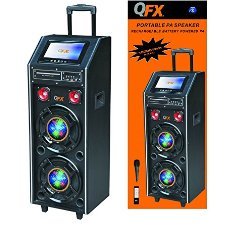
Figura 1: Fronte view of the QFX PBX-410204BTD PA Speaker. This image displays the speaker's front panel, including the dual 10-inch woofers, the central control panel with various buttons and knobs, and the integrated disco light.
3.1. Pannello di controllo finitoview
- Interruttore di alimentazione: Accende/Spegne l'unità.
- Controllo del volume: Regola il volume principale.
- Ingresso microfono: Connects a wired microphone.
- Echo/Mic Volume: Adjusts microphone volume and echo effect.
- Porta USB: Per la riproduzione tramite unità flash USB.
- Slot per scheda SD: Per la riproduzione su scheda SD.
- Pulsante Modalità: Switches between input modes (Bluetooth, USB, SD, FM, DVD).
- Pulsante Play/Pausa: Controlla la riproduzione multimediale.
- Pulsanti traccia precedente/successiva: Navigates media tracks or FM stations.
- Antenna FM: Per una migliore ricezione della radio FM.
- Interruttore luce discoteca: Turns the disco light ON/OFF.
- Lettore DVD: Integrated DVD disc slot and controls.
- Ingresso CA: Connects the power adapter for charging and AC operation.
- DC 12V Input/Output: For external 12V power source or output.
4. Impostazione
4.1. Ricarica iniziale
Before first use, fully charge the internal battery. Connect the power adapter to the AC input on the speaker and plug it into a standard wall outlet. The charging indicator will illuminate. Charging typically takes several hours. The indicator will change or turn off once fully charged.
4.2. Posizionamento
Place the speaker on a stable, flat surface. Ensure there is adequate space around the unit for ventilation. Avoid placing it near direct sunlight, heat sources, or areas with high humidity.
5. Istruzioni per l'uso
5.1. Accensione/spegnimento
To power on the unit, toggle the Power Switch to the "ON" position. To power off, toggle it to "OFF".
5.2. Connessione Bluetooth
- Turn on the speaker and press the "Mode" button until "Bluetooth" mode is selected.
- Enable Bluetooth on your mobile device or audio player.
- Cercare "QFX PBX-410204BTD" (or similar name) in your device's Bluetooth settings.
- Seleziona l'altoparlante da associare. Verrà emesso un tono di conferma una volta effettuata la connessione.
- Ora puoi riprodurre l'audio dal tuo dispositivo tramite l'altoparlante.
5.3. Riproduzione tramite scheda USB/SD
- Inserire una chiavetta USB o una scheda SD nell'apposito slot.
- Press the "Mode" button to select "USB" or "SD" mode. The unit will automatically begin playing compatible audio files.
- Utilizzare i pulsanti Riproduci/Pausa, Precedente e Successivo per controllare la riproduzione.
5.4. Radio FM
- Press the "Mode" button to select "FM" mode.
- Estendi l'antenna FM per una migliore ricezione.
- Tenere premuto il pulsante Play/Pausa per eseguire la scansione automatica e salvare le stazioni FM disponibili.
- Utilizzare i pulsanti Precedente/Successivo per navigare tra le stazioni salvate.
5.5. Riproduzione DVD
- Insert a DVD disc into the DVD slot.
- Press the "Mode" button to select "DVD" mode.
- Use the integrated DVD controls or the remote control to manage playback.
5.6. Funzione Karaoke
- Connect a microphone to the Microphone Input jack.
- Adjust the Microphone Volume and Echo controls to your preference.
- Play music from any source (Bluetooth, USB, SD, DVD) and sing along.
5.7. Luce da discoteca
Toggle the Disco Light Switch to activate or deactivate the integrated disco light feature.
6. Manutenzione
6.1. Pulizia
Wipe the exterior of the unit with a soft, dry cloth. Do not use abrasive cleaners, waxes, or solvents. Ensure the unit is powered off and unplugged before cleaning.
6.2. Cura della batteria
To prolong battery life, fully charge the unit before storing it for extended periods. Recharge the battery at least once every 3 months if not in regular use. Avoid completely draining the battery frequently.
6.3. Conservazione
Conservare l'altoparlante in un luogo fresco e asciutto, lontano dalla luce solare diretta e da temperature estreme.
7. Risoluzione Dei Problemi
| Problema | Possibile causa | Soluzione |
|---|---|---|
| Nessun potere | Unit not plugged in; Power switch off; Battery drained. | Check power connection; Turn power switch ON; Charge the battery. |
| Nessun suono | Volume troppo basso; Modalità di input errata; Dispositivo non associato (Bluetooth). | Aumentare il volume; Selezionare la modalità di input corretta; Riassociare il dispositivo Bluetooth. |
| Il Bluetooth non si connette | Altoparlante non in modalità Bluetooth; Dispositivo troppo lontano; Interferenza. | Assicurarsi che l'altoparlante sia in modalità Bluetooth; Avvicinare il dispositivo; Evitare gli ostacoli. |
| USB/SD non in riproduzione | Non corretto file format; USB/SD card corrupted; Incorrect mode. | Garantire files are compatible (e.g., MP3); Try another USB/SD card; Select correct mode. |
| scarsa ricezione della radio FM | Antenna non estesa; segnale debole. | Estendere completamente l'antenna FM; provare a riposizionare l'unità. |
8. Specifiche
- Modello: PBX-410204BTD
- Tipo di altoparlante: Altoparlante PA alimentato a batteria
- Dimensione woofer: 2 x 10 pollici
- Dimensione tweeter: 2 x 1 pollici
- Connettività: Bluetooth, USB, SD, FM Radio, DVD
- Caratteristiche speciali: Disco Light, Karaoke
- Batteria: Ricaricabile 12V 12AH
- Ingresso CA: 100-240 V
- Ingresso/uscita CC: 12V
- Uscita Wattage: 346 Watt
- Dimensioni del pacco: 100.33 x 43.18 x 43.18 cm (39.5 x 17 x 17 pollici)
- Peso dell'articolo: 29.94 kg (66 libbre)
9. Garanzia e supporto
For warranty information and technical support, please refer to the warranty card included with your product or contact QFX customer service directly. Keep your purchase receipt as proof of purchase.
Nota: i termini specifici della garanzia possono variare in base alla regione e al rivenditore.


