Introduzione
Thank you for choosing the GEWA 902620 CMT-100 Tuner/Metronome. This versatile device combines a chromatic tuner, a metronome, and a tone generator into one compact unit, designed for musicians of all levels. This manual provides detailed instructions for proper setup, operation, and maintenance to ensure optimal performance and longevity of your device.
The CMT-100 features a large LCD screen with switchable backlight, 3 LEDs for tuning indication, Jack input and output, a headphone connection, volume control, and a convenient rear stand.
Caratteristiche del prodotto
- Chromatic Tuner, Metronome, and Tone Generator functions.
- Large LCD screen with switchable backlight and 3 LED indicators.
- Tuner range: 433-447 Hz, with flat-tuning capability (up to 4 semitones).
- Supports C, Eb, F, or B instrument modes for tuning.
- Metronome tempo range: 30-250 BPM, with 7 beat types and 5 rhythms.
- TAP function for setting metronome tempo.
- Tone generator with 1-octave range, flat-tuning, and C, Eb, F or B modes.
- Jack input and output for instrument connection.
- Headphone connection for private practice.
- Controllo del volume regolabile.
- Integrated rear stand for convenient placement.
- Compact size: 99 x 72 x 18 mm, lightweight: 86 g.
Contenuto della confezione
- GEWA 902620 CMT-100 Tuner/Metronome unit
- 2 batterie alcaline AA (incluse)
- Manuale dell'utente (questo documento)
Impostare
1. Installazione della batteria
The GEWA CMT-100 requires two AA alkaline batteries for operation. These are included with your device.
- Individuare il coperchio del vano batterie sul retro dell'unità.
- Far scorrere il coperchio aperto nella direzione indicata dalla freccia.
- Inserire due batterie AA, assicurandosi che la polarità sia corretta (+ e -) come indicato all'interno del vano.
- Chiudere saldamente il coperchio del vano batterie.
Nota: Always use fresh alkaline batteries. Remove batteries if the device will not be used for an extended period to prevent leakage.
2. Collegamento di dispositivi esterni
- Instrument Input (Jack IN): Connect your instrument (e.g., guitar, bass) to the Jack IN port using a standard 1/4-inch instrument cable for direct tuning.
- Output (Jack OUT): If desired, connect the Jack OUT port to an amplifier o altre apparecchiature audio.
- Cuffie: For silent practice or monitoring, plug standard headphones into the headphone jack.
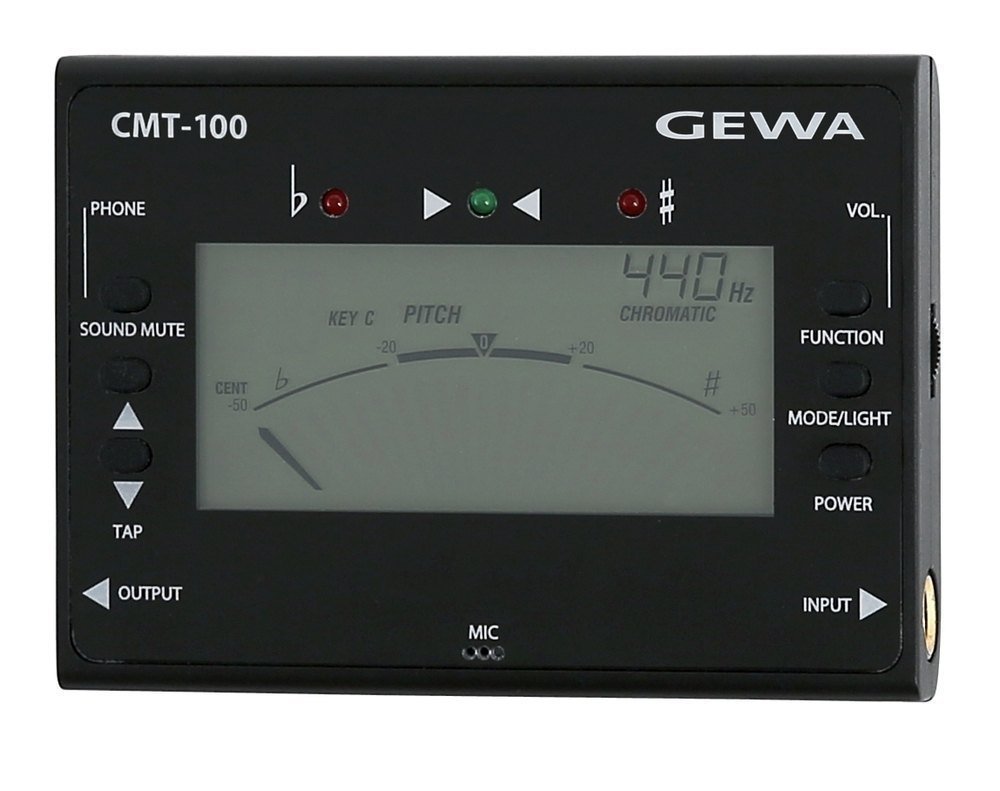
Figura 1: Davanti e di lato view of the GEWA 902620 CMT-100 Tuner/Metronome, showing the display, control buttons, and input/output jacks.
Istruzioni per l'uso
1. Accensione/spegnimento
Premere e tenere premuto il tasto ENERGIA button (usually located on the front or side) to turn the device on or off. The LCD screen will illuminate upon power-on.
2. Selezione della modalità
Utilizzare il MODALITÀ button to cycle through the three main functions: Tuner, Metronome, and Tone Generator. The current mode will be indicated on the LCD screen.
3. Modalità sintonizzatore
In Tuner mode, the device detects the pitch of your instrument. The LCD will display the note name, and the LEDs will indicate tuning accuracy.
- Accordatura cromatica: Play a single note on your instrument. The display will show the detected note.
- Indicatori LED:
- Left LED (red): Note is flat.
- Right LED (red): Note is sharp.
- Center LED (green): Note is in tune.
- A4 Calibration: Adjust the A4 reference frequency (433-447 Hz) using the appropriate buttons (refer to device markings, typically SU/GIÙ or CALIB).
- Accordatura piatta: For instruments requiring flat tuning, activate the flat-tuning function (up to 4 semitones) using the designated button (e.g., PIATTO).
- Instrument Modes (C, Eb, F, B): Select the appropriate mode for your instrument (e.g., C for guitar/bass, Eb for alto saxophone) using the STRUMENTO or CHIAVE pulsante.
4. Modalità metronomo
The metronome provides a steady beat for rhythm practice.
- Regolazione del tempo: Utilizzare il SU/GIÙ buttons to set the desired tempo (30-250 BPM).
- Tipo di battuta: Select from 7 different beat types (e.g., 1/4, 2/4, 3/4) using the COLPO pulsante.
- Selezione del ritmo: Choose from 5 different rhythms using the RITMO pulsante.
- Funzione TAP: Premere il tasto RUBINETTO button repeatedly at your desired tempo to set the BPM automatically.
- Avvio/Arresto: Premere il tasto AVVIO/ARRESTO button to begin or pause the metronome.
5. Modalità generatore di toni
The tone generator produces a reference pitch for ear training or manual tuning.
- Nota Selezione: Utilizzare il SU/GIÙ buttons to select the desired note within the 1-octave range.
- Accordatura piatta: Apply flat-tuning if needed using the PIATTO pulsante.
- Instrument Modes (C, Eb, F, B): Select the appropriate instrument mode for the generated tone.
6. Controllo del volume
Adjust the output volume for the metronome and tone generator using the dedicated VOLUME control (typically a dial or buttons).
7. Retroilluminazione
The LCD screen features a switchable backlight for visibility in low-light conditions. Press the LEGGERO or RETROILLUMINAZIONE pulsante per attivarlo o disattivarlo.
Manutenzione
- Pulizia: Pulire l'unità con un panno morbido e asciutto. Non utilizzare detergenti abrasivi, solventi o cere.
- Sostituzione della batteria: Replace batteries when the display becomes dim or the unit stops functioning correctly. Always replace both batteries at the same time with new AA alkaline batteries.
- Magazzinaggio: Conservare il dispositivo in un luogo fresco e asciutto, lontano dalla luce solare diretta e da temperature estreme. Rimuovere le batterie se si prevede di non utilizzarlo per periodi prolungati.
- Evitare l'umidità: Do not expose the unit to water or high humidity.
Risoluzione dei problemi
- Il dispositivo non si accende:
- Controllare che le batterie siano inserite correttamente, con la giusta polarità.
- Sostituirle con batterie alcaline AA nuove.
- Tuner is not detecting notes accurately:
- Ensure your instrument is properly connected to the Jack IN port.
- Check the A4 calibration setting.
- Ensure the correct instrument mode (C, Eb, F, B) is selected if applicable.
- Play notes clearly and sustain them for accurate detection.
- Metronome sound is too low or absent:
- Regola il controllo del volume.
- If using headphones, ensure they are fully plugged in and functional.
Specifiche
| Numero di modello | 902620 CMT-100 |
| Funzioni | Chromatic Tuner, Metronome, Tone Generator |
| Gamma del sintonizzatore | A4 = 433-447 Hz |
| Accordatura piatta | Up to 4 semitones |
| Gamma di tempo del metronomo | 30-250 battiti al minuto |
| Beat Types | 7 tipi |
| ritmi | 5 tipi |
| Tone Generator Range | 1 ottava |
| Connettori | Jack Input, Jack Output, Headphone Jack |
| Alimentazione elettrica | 2 batterie alcaline AA |
| Dimensioni (L x P x A) | 99 x 72 x 18 mm (3.9 x 2.8 x 0.7 pollici) |
| Peso | 86 g (0.19 libbre) |
| Produttore | GEWA |
Garanzia e supporto
GEWA products are manufactured to high-quality standards. This product is covered by a manufacturer's warranty against defects in materials and workmanship. Please refer to the warranty card included with your purchase or visit the official GEWA websito per termini e condizioni di garanzia dettagliati.
For technical support, service, or inquiries, please contact your authorized GEWA dealer or visit the GEWA official websito per le informazioni di contatto.
Websito: www.gewamusic.com


