1. Introduzione
This manual provides essential information for the proper installation, operation, and maintenance of your Intel Core i3-370M Mobile CPU Processor. Please read this guide thoroughly before proceeding with installation to ensure correct handling and optimal performance.
2. Informazioni sulla sicurezza
Processors are sensitive electronic components. Observe the following safety precautions:
- Always handle the processor by its edges to avoid touching the pins or electrical contacts.
- Use an anti-static wrist strap or take other anti-static precautions to prevent electrostatic discharge (ESD) damage.
- Ensure the system is powered off and unplugged from the electrical outlet before installing or removing the processor.
- Avoid bending or damaging the pins on the processor.
3. Prodotto finitoview
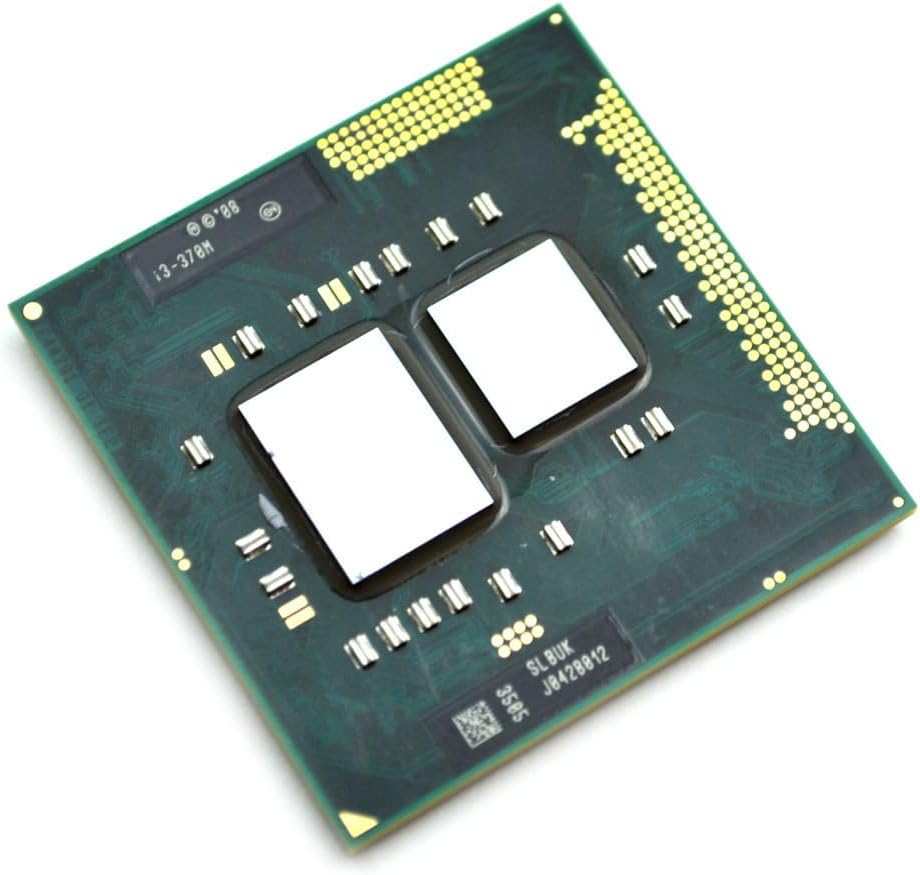
The Intel Core i3-370M is a mobile dual-core processor designed for laptop systems. It operates at a base frequency of 2.40 GHz, features a 3 MB L3 cache, and utilizes the Socket G1 (rPGA988A) interface. This processor is suitable for general computing tasks and multimedia consumption.
4. Configurazione (installazione)
Follow these steps to install the Intel Core i3-370M processor into a compatible laptop motherboard:
- Preparare la scheda madre: Ensure the laptop motherboard is compatible with Socket G1 (rPGA988A) processors. Locate the CPU socket and gently lift the socket retention lever to the open position.
- Installare il processore: Carefully align the triangular marker on the corner of the processor with the corresponding marker on the CPU socket. Gently lower the processor straight down into the socket. Do not force the processor; it should drop in easily if aligned correctly.
- Proteggere il processore: Once the processor is fully seated, push the socket retention lever back down and lock it into place to secure the processor.
- Applicare la pasta termica: Apply a small, pea-sized amount of high-quality thermal paste to the center of the processor's integrated heat spreader (IHS). This ensures efficient heat transfer to the cooling solution.
- Install the Heatsink: Mount the CPU heatsink and fan assembly according to your laptop manufacturer's instructions. Ensure even pressure is applied when securing the heatsink to the motherboard to maintain good contact with the processor.
5. Operativo
Once correctly installed, the Intel Core i3-370M processor will function automatically within your laptop system. The operating system will detect and utilize the processor. Ensure that your laptop's cooling system is functioning correctly to prevent overheating during operation, especially under heavy workloads. You may use system monitoring software to observe CPU temperatures if desired.
6. Manutenzione
To ensure the longevity and stable performance of your processor, consider the following maintenance practices:
- Clean Cooling System: Regularly clean the laptop's cooling system, including the fan blades and heatsink fins, to prevent dust buildup. Dust can impede airflow and lead to increased operating temperatures.
- Pasta termica: The thermal paste applied between the CPU and heatsink can degrade over time. Consider reapplying high-quality thermal paste every few years, or if you notice consistently high CPU temperatures.
- Aggiornamenti software: Keep your operating system and drivers updated. BIOS/UEFI updates from your laptop manufacturer may include performance improvements or bug fixes related to CPU operation.
7. Risoluzione Dei Problemi
If you encounter issues after installing the processor, consider the following troubleshooting steps:
- Il sistema non riesce ad avviarsi: Verify that the processor is correctly seated in the socket and the retention lever is fully closed. Check for any bent or damaged pins on the processor. Ensure all power connections to the motherboard are secure.
- Surriscaldamento: If the system experiences high temperatures or unexpected shutdowns, confirm that the heatsink is properly installed and making good contact with the CPU. Check if the thermal paste was applied correctly and if the cooling fan is spinning. Clean any dust from the heatsink and fan.
- Instabilità del sistema: Ensure your laptop's BIOS/UEFI is updated to the latest version compatible with your motherboard and processor. Verify that your operating system drivers are current.
8. Specifiche
| Caratteristica | Specificazione |
|---|---|
| Modello del processore | Intel Core i3-370M |
| Numero di core | 2 |
| Velocità di clock di base | 2.40 GHz |
| Nascondi | 3 MB di cache L3 |
| Tipo di presa | Socket G1 (rPGA988A) |
| Marca del processore | Intel |
| Piattaforma | Non specifico per la macchina |
9. Informazioni sulla garanzia
This Intel processor is typically covered by a limited manufacturer's warranty. The duration and terms of the warranty may vary depending on your region and point of purchase. Please refer to Intel's official website or the documentation provided with your original system for detailed warranty terms and conditions.
10. Informazioni di supporto
For technical assistance, driver downloads, or further product information regarding your Intel Core i3-370M processor, please visit the official Intel support website. You can also contact Intel customer service for direct support.
Supporto Intel Websito: https://www.intel.com/content/www/us/en/support.html


