Introduzione
The DigiTech TRIO is an innovative electric guitar multi-effect pedal designed to be your personal band. It listens to your guitar playing and automatically generates accompanying bass and drum parts. This manual provides comprehensive instructions for setting up, operating, and maintaining your TRIO pedal, ensuring you get the most out of its unique features.
Caratteristiche principali
- Seven Music Genres and Twelve Song Styles Per Genre to Choose From
- The TRIO can learn up to three different song parts that can be recalled on-the-fly
- Adjustable Tempo & Alternate Half Time/Double Time Variants Bass & Drum Level Controls
- Hands-Free Control Using a DigiTech FS3X Footswitch (optional)
- Amp & Mixer Outputs Headphone Output w/Level Control Power Supply Included
Guida all'installazione
Follow these steps to set up your DigiTech TRIO pedal:
- Collegare l'alimentatore CC da 9 V incluso al ENERGIA input on the pedal and plug it into a power outlet.
- Collega la tua chitarra elettrica al CHITARRA IN jack utilizzando un cavo per strumenti standard da 1/4 di pollice.
- Collegare il AMP FUORI jack alla tua chitarra ampl'ingresso del lifier utilizzando un altro cavo per strumenti da 1/4 di pollice.
- For connecting to a mixer or PA system, use the USCITA MISCELATORE cricco.
- Per la pratica privata, collegare le cuffie al CUFFIA USCITA cricco.
- Optionally, connect a DigiTech FS3X Footswitch to the CONTROLLO IN jack for extended hands-free control.
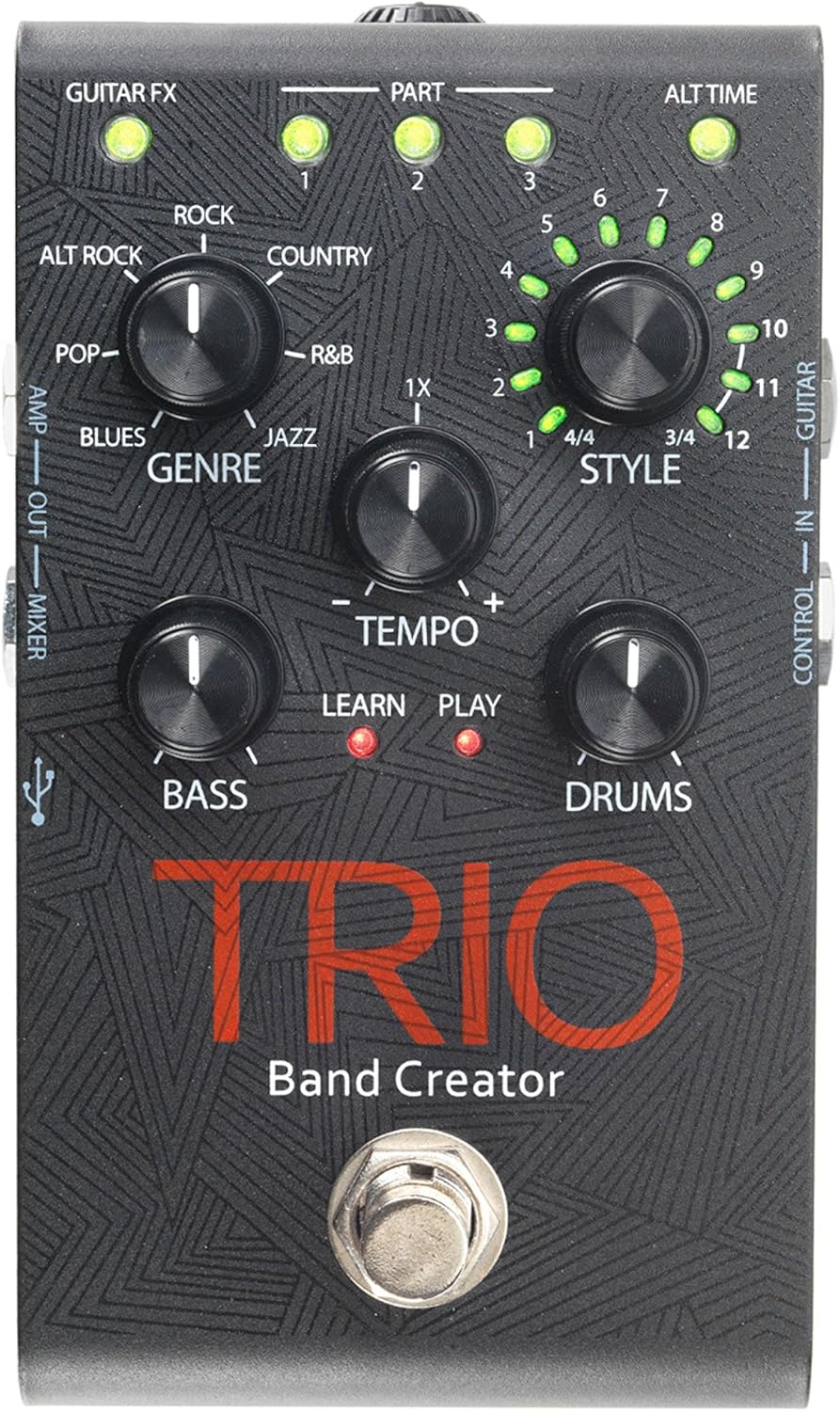
Figura 1: in alto view of the DigiTech TRIO pedal, showing the main controls and footswitch.
Istruzioni per l'uso
Basic Operation: Teaching the TRIO a Song
- Premere il tasto BANDA footswitch once to enter 'Listen' mode. The IMPARARE Il LED si accenderà.
- Play your desired chord progression and rhythm clearly. The TRIO will analyze your playing.
- Premere il tasto BANDA footswitch again to stop 'Listen' mode. The GIOCARE LED will illuminate, and the TRIO will immediately begin playing generated bass and drum parts.
- You can now play along with your virtual band.
Genre and Style Selection
- Utilizzare il GENERE knob to select from Blues, Pop, Alternative Rock, Rock, Country, R&B, and Jazz. The genre affects the overall feel of the generated bass and drum parts.
- Utilizzare il STILE knob to choose from twelve different song styles available for each genre. This allows for further customization of the rhythm and feel.
- IL ALT TIME button allows you to switch between 3/4 and 4/4 time signatures.
Looping and Song Parts
- The TRIO can learn up to 3 different song parts. To record a new part, select an empty PARTE slot (1, 2, or 3) using the corresponding buttons.
- Follow the 'Basic Operation' steps to teach the TRIO the new song part.
- During playback, you can switch between learned song parts on-the-fly by pressing the corresponding PARTE pulsante.
- IL LOOPER footswitch allows you to record and playback your own guitar loops. Press once to start recording, press again to stop recording and start playback, and press and hold to clear the loop.
Adjusting Levels and Tempo
- IL TEMPO knob adjusts the playback speed of the band and loops.
- IL BASS knob controls the volume level of the generated bass line.
- IL BATTERIA knob controls the volume level of the generated drum track.
- IL CICLO CONTINUO knob controls the volume level of your recorded guitar loop.

Figura 2: Angolato view of the DigiTech TRIO pedal, highlighting the control knobs and input/output jacks.
Controlli e connessioni
The DigiTech TRIO pedal features a user-friendly layout with clearly labeled controls and versatile connection options:
Controlli del pannello frontale:
- GUITAR FX: Activates built-in guitar effects tailored to the selected genre.
- PART 1, 2, 3: Buttons to select and recall different learned song parts.
- ALT TIME: Toggles between 3/4 and 4/4 time signatures.
- TEMPO Knob: Adjusts the overall playback speed.
- GENRE Knob: Selects the musical genre (Blues, Pop, Alt Rock, Rock, Country, R&B, Jazz).
- STYLE Knob: Selects one of twelve styles within the chosen genre.
- LOOP Knob: Controls the volume of your recorded guitar loop.
- Manopola BASSO: Controlla il volume della linea di basso generata.
- DRUMS Knob: Controlla il volume della traccia di batteria generata.
- Pedale LOOPER: Records/plays/clears guitar loops.
- Pedale BAND: Enters 'Listen' mode to learn chords/rhythm, or starts/stops band playback.
Collegamenti del pannello laterale e posteriore:
- CHITARRA IN: 1/4-inch input for your electric guitar.
- AMP FUORI: 1/4-inch output to your guitar amppiù vivace.
- MIXER OUT: 1/4-inch output for connecting to a mixer or PA system.
- USCITA CUFFIE: 1/8-inch stereo output for headphones.
- CONTROLLO IN: 1/4-inch input for optional DigiTech FS3X Footswitch.
- ENERGIA: 9V DC input for the included power supply.
- USB: Mini-USB port for firmware updates.

Figura 3: Posteriore view of the DigiTech TRIO pedal, showing the power input and headphone jack.
Specifiche
| Caratteristica | Dettaglio |
|---|---|
| Peso dell'articolo | 10.6 once (0.3 kg) |
| Dimensioni del prodotto | 4.63 x 3.19 x 2.13 pollici (11.76 x 8.10 x 5.41 cm) |
| Numero modello articolo | TRIO |
| Batterie | 1 9V battery required (for internal use, not primary power) |
| Interfaccia Hardware | Audio da 1/4 di pollice |
| Formato del segnale | Analogico |
| Fonte di alimentazione | Corded Electric (9V DC adapter included) |
| Voltage | 9 Volt |
| Amprabbia | 300 milioneamps |
Manutenzione
- Mantenere pulito il pedale pulendolo con un panno morbido e asciutto. Evitare l'uso di detergenti abrasivi o solventi.
- Conservare il pedale in un luogo fresco e asciutto, lontano dalla luce solare diretta e da temperature estreme.
- Assicurarsi che tutti i cavi siano collegati saldamente per evitare perdite o danni al segnale.
- Evitare di far cadere il pedale o di sottoporlo a forti urti.
Risoluzione dei problemi
- Nessun suono: Controllare tutti i collegamenti dei cavi (chitarra, amp, power). Ensure the pedal is powered on and the volume knobs are not set to zero.
- Scarsa qualità del suono: Verifica che il tuo strumento e amplifier are functioning correctly. Check for damaged cables.
- Band Not Generating Correctly: Ensure you are playing clear, distinct chords during the 'Listen' phase. Try different genres and styles to see if a different setting better interprets your playing.
- Il pedale non risponde: Disconnect and reconnect the power supply. If using an optional FS3X footswitch, ensure it is properly connected.
Garanzia e supporto
Per informazioni sulla garanzia e supporto tecnico, fare riferimento al sito ufficiale DigiTech websito o contattare il servizio clienti. Conservare la prova d'acquisto per eventuali reclami in garanzia.


