1. Introduzione
This manual provides essential information for the installation, operation, and maintenance of the Nice TT2N receiver. The TT2N is a control unit designed for roller shutters, featuring an integrated radio receiver. It is compatible with 230V AC roller shutter motors up to 500W. Please read these instructions carefully before installation and use to ensure proper function and safety.
2. Informazioni sulla sicurezza
- Installation and wiring must be performed by qualified personnel in accordance with local electrical codes and regulations.
- Ensure the main power supply is disconnected before performing any installation, wiring, or maintenance.
- The device operates on 230V AC. Handle with extreme care to avoid electric shock.
- Non esporre l'unità a umidità, temperature estreme o luce solare diretta.
- Tenere fuori dalla portata dei bambini.
- Non tentare di modificare o riparare l'unità autonomamente. Contattare personale di assistenza qualificato.
3. Contenuto della confezione
- 1 x Nice TT2N Receiver Unit
4. Prodotto finitoview
The Nice TT2N is a compact control unit designed for seamless integration with roller shutter systems. It features clearly marked connection points for power and motor control, along with an integrated radio receiver for remote operation.
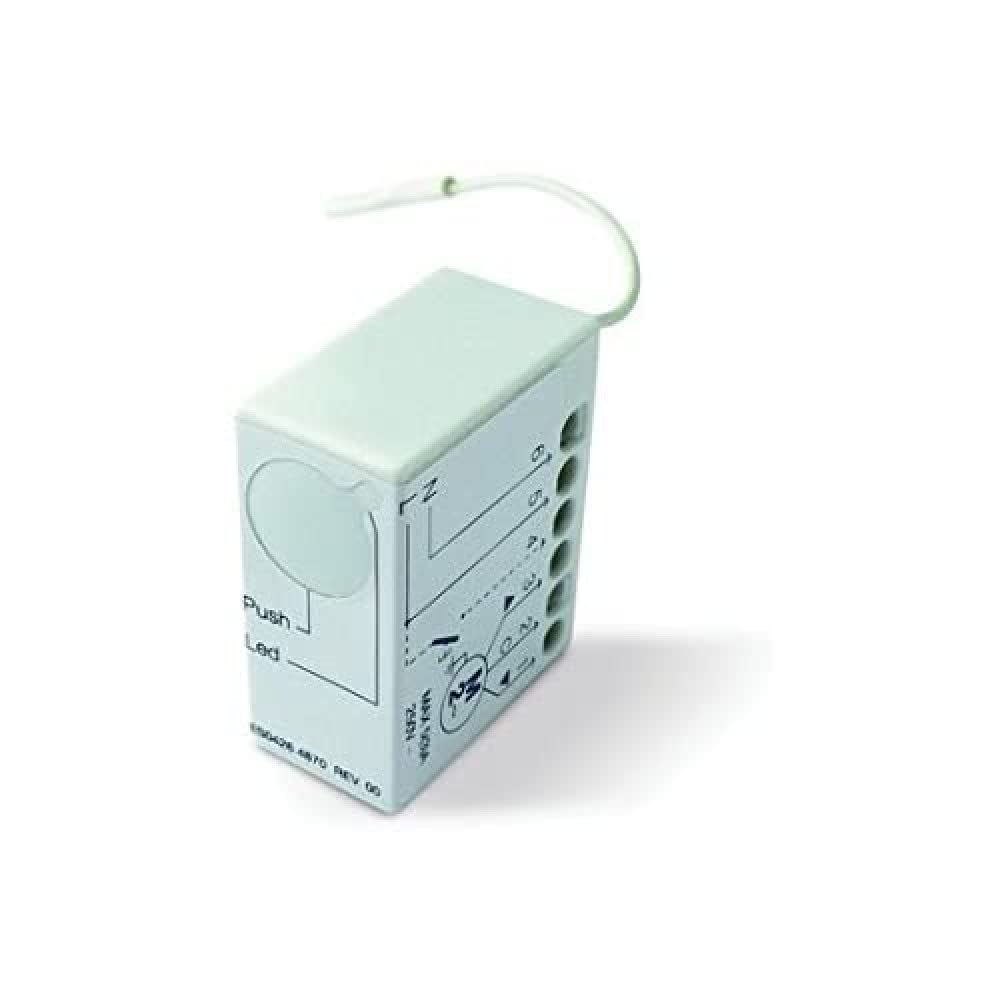
Figure 1: Nice TT2N Receiver Unit. The image displays the Nice TT2N receiver unit, a compact white rectangular device. One side features multiple numbered connection ports (1-6) and a simplified wiring diagram indicating connections for power (N, L) and motor control. Another side shows labels for 'Push' and 'Led', suggesting a button and indicator light for local control and status indication. A thin white antenna wire extends from the top of the unit. The unit's dimensions are approximately 40 x 33 x 18 mm.
5. Configurazione e installazione
The Nice TT2N receiver is designed for integration with 230V AC roller shutter motors up to 500W. It also allows for connection of a wired push-button for local control.
5.1 Collegamenti di cablaggio
Refer to the wiring diagram printed on the unit (as shown in Figure 1) and the detailed instructions provided with your motor for specific connection points. General connections include:
- Alimentazione elettrica: Connect the 230V AC power supply to the designated 'N' (Neutral) and 'L' (Live) terminals.
- Collegamenti motore: Connect the roller shutter motor wires to the appropriate output terminals (typically for 'Up' and 'Down' movement).
- Wired Push-Button (Optional): A push-button can be connected for cable control. This allows for various operational modes: no lowering, always raised, or always lowered, depending on configuration.
Importante: Ensure all connections are secure and insulated. Incorrect wiring can damage the unit or motor and poses a safety risk.
6. Istruzioni per l'uso
The TT2N receiver allows control of your roller shutter via a compatible Nice radio transmitter or a wired push-button.
6.1 Programmazione di un telecomando
The process for programming a Nice radio transmitter to the TT2N receiver typically involves a sequence of button presses on the receiver and the remote. Specific steps may vary; consult the detailed programming guide available from Nice or the product's official documentation. A common method involves:
- Pressing the 'Push' button on the TT2N unit for a short duration until the 'Led' indicator lights up.
- Immediately pressing a button on the remote control you wish to program.
- The 'Led' on the TT2N should flash or change state to confirm successful programming.
6.2 Wired Push-Button Operation
If a wired push-button is connected, it can be used for direct control. The operational mode (e.g., single press for full open/close, or continuous press for movement) will depend on the configuration set during installation or programming.
7. Manutenzione
The Nice TT2N receiver is designed for long-term, reliable operation with minimal maintenance. Follow these general guidelines:
- Mantenere l'unità pulita e priva di polvere. Per la pulizia, utilizzare un panno morbido e asciutto.
- Non utilizzare detergenti abrasivi o solventi.
- Controllare regolarmente tutti i collegamenti elettrici per verificarne la tenuta e l'eventuale presenza di segni di usura.
- Ensure the unit is not obstructed or covered, allowing for proper ventilation.
8. Risoluzione Dei Problemi
If you encounter issues with your Nice TT2N receiver, consider the following common problems and solutions:
- L'unità non risponde:
- Controllare l'alimentazione dell'unità.
- Verificare che tutti i collegamenti elettrici siano saldi.
- Ensure the remote control has working batteries and is within range.
- Remote control not operating the shutter:
- Confirm the remote control is correctly programmed to the TT2N receiver. Refer to Section 6.1.
- Check for any interference that might be blocking the radio signal.
- Shutter movement is erratic or incomplete:
- This may indicate an issue with the motor itself or its limit switch settings, rather than the receiver.
- Ensure the motor's power rating does not exceed the TT2N's 500W limit.
- Difficoltà di programmazione:
- Some users have reported that the included instructions for programming can be minimal. It is recommended to search for more detailed programming guides or tutorials online, or contact Nice support for assistance.
If problems persist after attempting these solutions, contact a qualified technician or Nice customer support.
9. Specifiche
| Produttore | Carino |
| Numero di modello | TT2N |
| Dimensioni del prodotto (L x P x A) | 40 x 33 x 18 mm (approximate unit dimensions) |
| Dimensioni imballo (L x P x A) | Dimensioni: 20 x 15 x 3 cm |
| Peso | 60 grammi |
| Colore | Bianco |
| Alimentazione elettrica | 230 V CA |
| Frequenza | 433.920 MHz |
| Potenza massima del motore | 500 L |
| Componenti inclusi | TT2N Receiver Unit |
| Batterie richieste | NO |
| Paese di origine | Italia |
10. Garanzia e supporto
Specific warranty information for the Nice TT2N receiver is not provided in this document. Please refer to the official Nice websito o contattare il rivenditore per i termini e le condizioni di garanzia dettagliati.
For technical support, additional documentation, or service inquiries, please visit the official Nice website or contact their customer service department. A downloadable manual may be available on the manufacturer's website, which could offer more in-depth programming and installation details.
Produttore: Carino
Websito: www.niceforyou.com (Si prega di verificare la regione corretta websito)


