
Introduzione
This manual provides comprehensive instructions for the proper installation, operation, and maintenance of your LAMAX DRIVE C7 Dashcam. Please read this manual thoroughly before using the device to ensure optimal performance and longevity. The LAMAX DRIVE C7 is designed to record your journeys in Full HD 1080p, offering crucial evidence in case of incidents and enhancing your driving safety.
Contenuto della confezione
- LAMAX DRIVE C7 Dashcam
- Caricabatterie per auto
- Supporto a ventosa
- Supporto adesivo
- Cavo USB
- Memory Card (as per product specifications)
- Manuale dell'utente (questo documento)
Dispositivo suview
Familiarize yourself with the various components and controls of your LAMAX DRIVE C7 Dashcam.
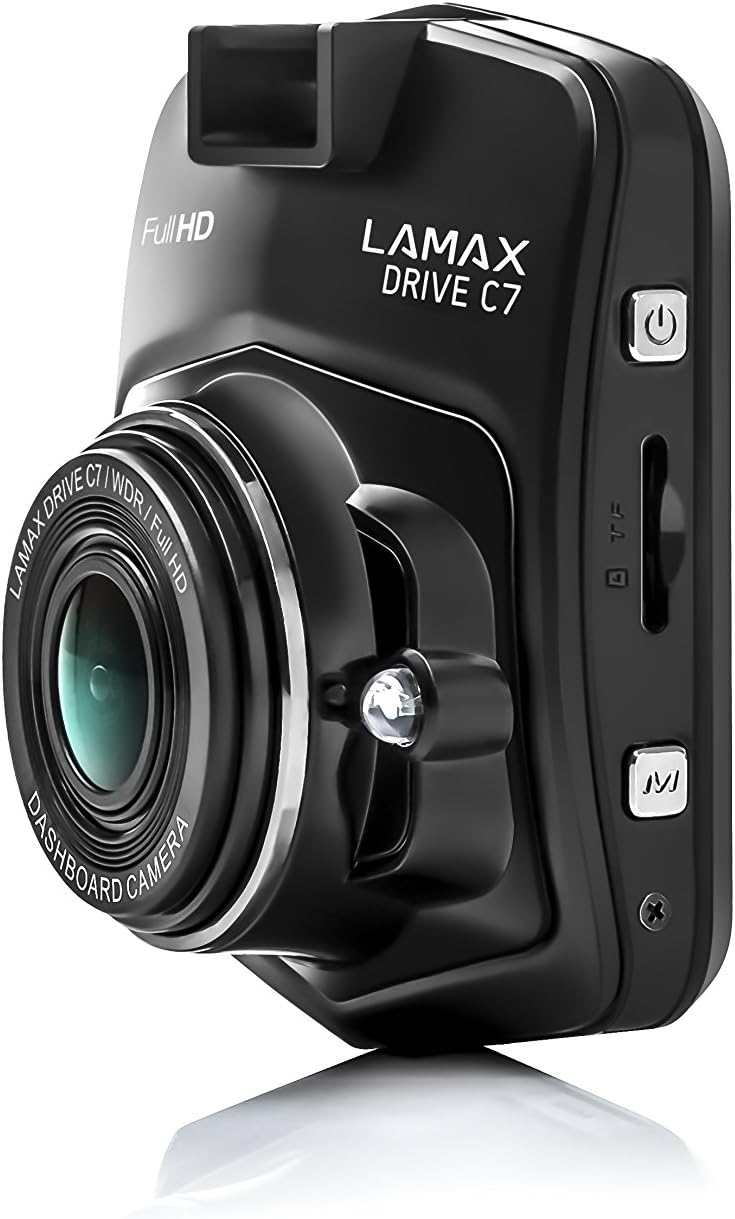
Immagine: Lato view of the dashcam, highlighting the power button, memory card slot, and USB port.

Immagine: Frontale view of the dashcam with the 2.4-inch LCD display and control buttons below.
- Lente: Obiettivo della fotocamera ad alta risoluzione.
- Display: Schermo LCD da 2.4 pollici per viewing recordings and menu.
- Pulsante di accensione: Accende/spegne il dispositivo.
- Pulsante Menu: Accede alle impostazioni e alle opzioni.
- Pulsanti su/giù: Navigare attraverso le opzioni del menu.
- Pulsante OK: Conferma le selezioni.
- Slot per scheda MicroSD: Insert memory card here.
- Porta USB: Per l'alimentazione e il trasferimento dati.
- Pulsante di reset: Resets the device (use a thin object).
Impostare
1. Inserimento della scheda di memoria
Ensure the dashcam is powered off before inserting or removing the microSD card. Insert the card into the slot until it clicks into place. Use a Class 10 or higher microSD card, up to 32GB capacity, for optimal performance. It is recommended to format the memory card within the dashcam settings before first use and periodically thereafter.
2. Montaggio della Dashcam
Scegli una posizione sul parabrezza che non ostruisca il tuo view of the road. Clean the windshield surface thoroughly before applying the mount.

Image: The dashcam attached to its suction cup mount, ready for windshield installation.

Immagine: Posteriore view of the dashcam with the suction cup mount attached, showing the screen and buttons.
- Attach the chosen mount (suction cup or adhesive) to the dashcam.
- Press the mount firmly against the windshield and secure it.
- Regolare l'angolazione della telecamera per garantire una visione chiara view della strada da percorrere.
3. Collegamento all'alimentazione
Connect the car charger to the dashcam's USB port and plug the other end into your vehicle's 12V power outlet (cigarette lighter socket). The dashcam will automatically power on and begin recording when the vehicle's ignition is turned on.
Istruzioni per l'uso
Accensione/spegnimento
- Automatico: The dashcam powers on/off automatically with the vehicle's ignition.
- Manuale: Tenere premuto il pulsante di accensione per accendere o spegnere manualmente il dispositivo.
Modalità di registrazione
- Registrazione in loop: The dashcam records video in continuous loops (e.g., 1, 3, or 5 minutes). When the memory card is full, the oldest unlocked filevengono sovrascritti.
- Sensore G: In the event of a sudden impact or collision, the G-Sensor automatically locks the current recording, preventing it from being overwritten. The sensitivity of the G-Sensor can be adjusted in the settings.
- Modalità parcheggio: When enabled, the dashcam will automatically start recording if it detects motion or an impact while the vehicle is parked. This feature provides 24-hour surveillance for your vehicle.
- Video time-lapse: This feature allows the camera to record at a lower frame rate (e.g., 1 frame per second), compressing long periods of time into short videos. This can significantly extend the recording capacity of your memory card.
Navigazione nei menu
Premere il tasto Menu button to access the settings. Use the Su/Giù pulsanti per navigare tra le opzioni e OK button to confirm selections. Press Menu di nuovo per uscire dalle impostazioni.
Riproduzione
A view recorded videos, stop recording (if active), then press the Modalità button to switch to playback mode. Use the Su/Giù pulsanti per selezionare a file E OK to play it. You can also connect the dashcam to a computer via USB to access filedirettamente.
Manutenzione
Gestione della scheda di memoria
- Formattazione: Regularly format your microSD card (at least once a month) using the dashcam's format function to prevent data corruption and ensure smooth recording.
- Capacità: Ensure sufficient free space on the memory card. Locked files from G-Sensor events can accumulate and fill the card. Periodically review ed elimina i blocchi non necessari files.
Pulizia
Wipe the camera lens with a soft, lint-free cloth to ensure clear video quality. Use a slightly damp cloth to clean the body of the dashcam. Do not use harsh chemicals or abrasive cleaners.
Aggiornamenti del firmware
Check the official LAMAX website periodically for available firmware updates. Updates can improve performance, add new features, or fix bugs. Follow the instructions provided with the firmware update carefully.
Risoluzione dei problemi
| Problema | Possibile causa/soluzione |
|---|---|
| La dashcam non si accende. |
|
| La registrazione si interrompe inaspettatamente. |
|
| La qualità del video è scarsa o sfocata. |
|
| Dashcam freezes or becomes unresponsive. |
|
Specifiche
| Caratteristica | Dettaglio |
|---|---|
| Risoluzione video | Risoluzione completa 1080p |
| Viewangolo di ing | 150° |
| Dimensioni dello schermo | 2.4 inches (6.1 cm) LCD |
| Registrazione in loop | SÌ |
| Sensore G | SÌ |
| Modalità parcheggio | Yes (24h) |
| Visione notturna | SÌ |
| GPS integrato | Optional (via external module) |
| Magazzinaggio | MicroSD card (Class 10+, up to 32GB recommended) |
| Dimensioni | Dimensioni: 3.3 x 6.1 x 7.2 cm |
| Peso | 60 grammi |
| Componenti inclusi | Memory Card (as per product details) |
Garanzia e supporto
Informazioni sulla garanzia
The LAMAX DRIVE C7 Dashcam comes with a standard manufacturer's warranty. Please refer to the warranty card included in your package or visit the official LAMAX webPer i termini e le condizioni di garanzia dettagliati specifici per la tua regione, visita il sito. Conserva la prova d'acquisto per eventuali reclami in garanzia.
Assistenza clienti
For technical assistance, troubleshooting, or product inquiries, please visit the official LAMAX support webo contattare il servizio clienti. I dettagli di contatto sono in genere reperibili sul sito ufficiale del marchio. websito o sulla confezione del prodotto.
Official LAMAX Store: Visit LAMAX Store on Amazon


