Introduzione
This manual provides detailed instructions for the proper setup, operation, and maintenance of your Neewer 52MM High Definition Telephoto Lens Kit. This kit is specifically designed to enhance the telephoto capabilities of your GoPro Hero 3+ or Hero 4 camera. Please read this manual thoroughly before use to ensure optimal performance and longevity of your product.

Image: Neewer 52MM High Definition Telephoto Lens Kit packaging.
Prodotto finitoview
The Neewer 52MM High Definition Telephoto Lens Kit includes the following components:
- 52MM 2X High Definition Telephoto Lens: This lens provides 2x magnification, ideal for capturing distant subjects. It features high definition optical resolution and multi-coated elements.
- 52MM Lens Filter Ring Adapter: Made of anodized black aluminum, this adapter allows the telephoto lens to be securely attached to your compatible GoPro housing.
- Lens Bag: A protective bag for safe storage and transport of the telephoto lens.
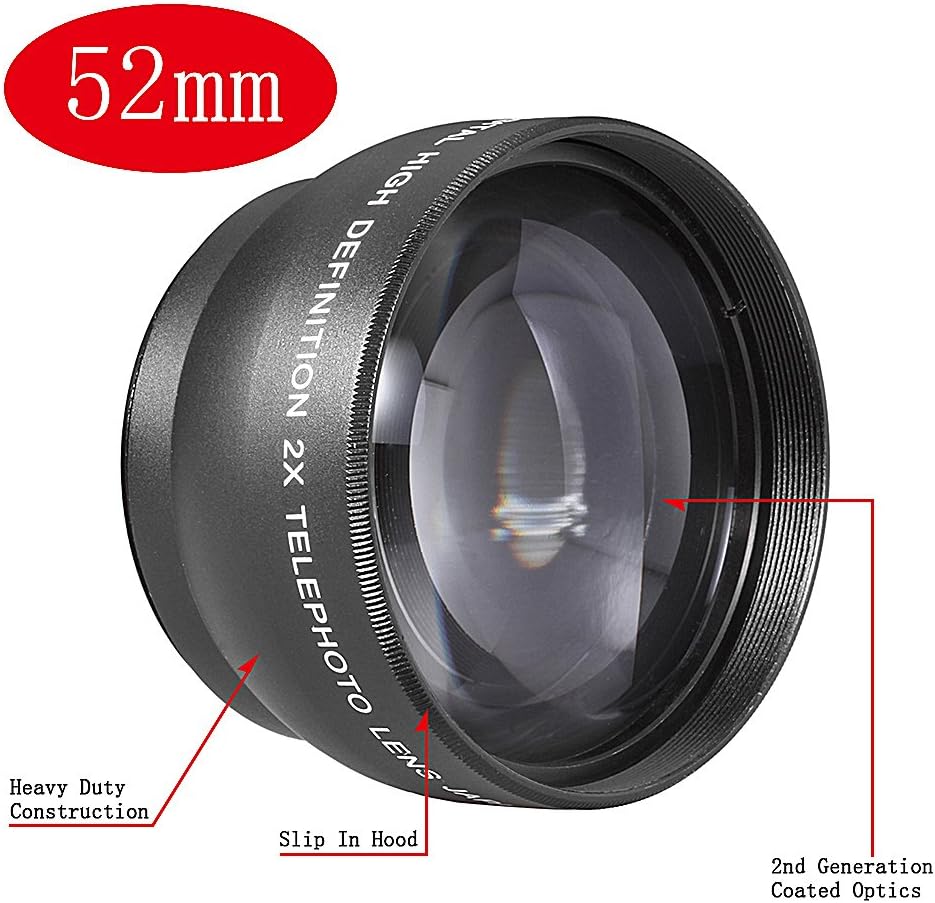
Immagine: dettagliata view of the Neewer 52MM 2X Telephoto Lens, highlighting its heavy-duty construction, slip-in hood, and 2nd generation coated optics.

Image: The Neewer 52MM 2X Telephoto Lens shown alongside its protective carrying bag.
Impostare
Follow these steps to properly attach the telephoto lens to your GoPro Hero 3+ or Hero 4 camera.
- Garantire la compatibilità: This kit is compatible ONLY with GoPro Hero 3+ and Hero 4 cameras. It is NOT suitable for GoPro Hero 3 or other models.
- Preparare GoPro: Place your GoPro Hero 3+ or Hero 4 camera into its standard housing. Ensure the housing is clean and free of debris.
- Fissare l'anello adattatore: Carefully screw the 52MM Lens Filter Ring Adapter onto the front of your GoPro's standard housing. The adapter is designed to fit securely. Do not overtighten.
- Mount Telephoto Lens: Once the adapter ring is securely in place, screw the 52MM 2X High Definition Telephoto Lens onto the adapter ring. Turn clockwise until it is firmly attached.
Your Neewer telephoto lens is now ready for use.

Immagine: Esploso view showing the GoPro Hero 4 camera in its housing, the 52MM adapter ring, and the 52MM 2X Telephoto Lens, illustrating the assembly process.

Image: The Neewer 52MM 2X Telephoto Lens fully attached to a GoPro Hero 4 camera in its housing, viewscattata dal fronte.
Operativo
The 52MM 2X Telephoto Lens allows you to capture subjects at a greater distance with your GoPro camera. Here are some considerations for optimal use:
- Campo di View: When using the telephoto lens with your GoPro, especially in wider field-of-view settings, you may observe a circular vignetting effect around the edges of your image or video. This is a characteristic of using a telephoto lens with a wide-angle camera and can be managed by adjusting your GoPro's field of view settings (e.g., to Narrow or Medium) or by cropping in post-production.
- Messa a fuoco: The lens is designed to work with your GoPro's existing focus system. No manual focus adjustment is required on the telephoto lens itself.
- Applicazioni: This lens is suitable for capturing distant subjects such as wildlife, sporting events, or candid portraits where you need to bring the subject closer without physically moving the camera.

Immagine: Un example photograph taken with the Neewer 52MM 2X Telephoto Lens, showing a butterfly on a flower. Note the circular frame, which is a common effect when using this type of lens with a wide-angle camera.
Manutenzione
Proper care will ensure the longevity and performance of your telephoto lens kit.
- Pulizia della lente: Use a soft, lint-free microfiber cloth specifically designed for optical lenses. For stubborn smudges, use a small amount of lens cleaning solution applied to the cloth, not directly to the lens.
- Magazzinaggio: When not in use, store the telephoto lens in its provided protective bag to prevent dust accumulation and scratches. Keep it in a dry, cool place away from direct sunlight.
- Gestione: Avoid touching the lens glass directly with your fingers. Always handle the lens by its barrel.
- Cura dell'adattatore: Keep the adapter ring clean. If it becomes dirty, wipe it with a soft, dry cloth.
Risoluzione dei problemi
If you encounter issues with your telephoto lens kit, refer to the following common problems and solutions:
- Problema: The lens does not fit onto my GoPro camera.
Soluzione: Ensure your GoPro is a Hero 3+ or Hero 4 model. This kit is not compatible with Hero 3 or other GoPro models. Verify that the 52MM adapter ring is correctly screwed onto the GoPro housing before attempting to attach the telephoto lens. - Problema: Images/videos have a dark circle or 'tunnel vision' effect.
Soluzione: This is a common characteristic when using a telephoto lens with a wide-angle camera like the GoPro. To minimize this, try adjusting your GoPro's field of view setting to 'Narrow' or 'Medium'. Alternatively, the circular edges can often be cropped out during post-production editing. - Problema: Le immagini appaiono sfocate.
Soluzione: Ensure the lens surfaces (both the telephoto lens and your GoPro's lens) are clean and free from smudges or dust. Verify that the telephoto lens is securely attached to the adapter ring and that the adapter ring is securely attached to the GoPro housing. - Problema: The adapter ring feels loose or strips easily.
Soluzione: The adapter ring is made of aluminum. While durable, avoid overtightening when attaching it to the GoPro housing. Ensure it is screwed on straight to prevent cross-threading.
Specifiche
| Numero di modello | 90084452 |
| Tipo di lente | Teleobiettivo |
| Ingrandimento | 2X |
| Dimensione filettatura filtro | 52mm |
| Fotocamere compatibili | GoPro Hero 3+, GoPro Hero 4 |
| Materiale | Optical Glass, Anodized Aluminum (Adapter) |
| Dimensioni del prodotto | 3.6 x 3.6 x 2.8 pollici (circa, confezionato) |
| Peso dell'articolo | 7.2 once |
Garanzia e supporto
For warranty information or technical support regarding your Neewer 52MM High Definition Telephoto Lens Kit, please refer to the official Neewer website or contact Neewer customer service directly. Contact details are typically provided with your purchase documentation or on the manufacturer's websito.


