1. Introduzione
This manual provides comprehensive instructions for the safe and efficient operation, setup, and maintenance of your Sealey SDH70 Industrial Dehumidifier. Please read this manual thoroughly before operating the unit and retain it for future reference. The Sealey SDH70 is designed for professional use in various industrial and commercial environments to effectively control humidity levels.
2. Istruzioni di sicurezza
Osservare sempre le seguenti precauzioni di sicurezza per ridurre il rischio di incendi, scosse elettriche o lesioni.
- Assicurarsi che l'alimentazione corrisponda al voltage specificato sull'etichetta dei dati tecnici del deumidificatore.
- Do not operate the unit with a damaged power cord or plug. Contact qualified service personnel for repair.
- Place the dehumidifier on a stable, level surface to prevent tipping.
- Maintain adequate clearance around the unit for proper airflow (at least 20 cm from walls or other objects).
- Non inserire oggetti nelle griglie di ingresso o di uscita dell'aria.
- Unplug the unit before cleaning, performing maintenance, or moving it.
- Questo apparecchio non è destinato all'uso da parte di persone (bambini compresi) con ridotte capacità fisiche, sensoriali o mentali, o prive di esperienza e conoscenza, a meno che non siano supervisionate o abbiano ricevuto istruzioni riguardanti l'uso dell'apparecchio da una persona responsabile della loro sicurezza.
- Non utilizzare il deumidificatore in aree in cui sono conservati liquidi o gas infiammabili.
- The unit contains R290 refrigerant. Servicing should only be performed by qualified personnel.
3. Prodotto finitoview
Familiarize yourself with the components of your Sealey SDH70 Industrial Dehumidifier.

Figura 3.1: Fronte view of the Sealey SDH70 Industrial Dehumidifier. This image shows the robust red and black casing, the control panel on the side, and the durable wheels for portability.
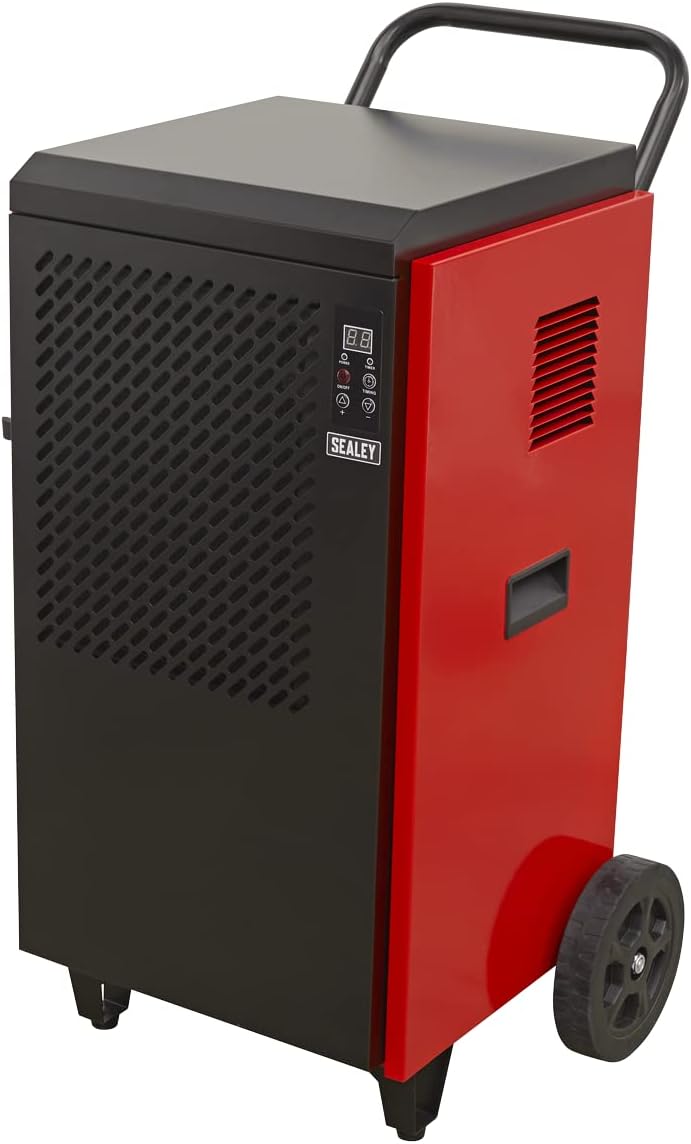
Figura 3.2: Lato view of the dehumidifier, highlighting the continuous drainage hose connection point at the bottom. The hose allows for direct water removal without manual emptying.

Figura 3.3: Dettagliato view of the digital control panel. It features a digital display for humidity readings, power button, full tank indicator, timer indicator, and up/down buttons for setting desired humidity levels and timer functions.
4. Impostazione
- Disimballaggio: Carefully remove the dehumidifier from its packaging. Inspect for any shipping damage. Retain packaging for future transport or storage.
- Posizionamento: Position the unit on a firm, level surface in the area requiring dehumidification. Ensure there is at least 20 cm (8 inches) of clear space around all sides of the unit to allow for proper air circulation. Do not block the air inlet or outlet.
- Configurazione del drenaggio: The SDH70 is designed for continuous drainage. Connect the provided drainage hose to the drainage outlet at the bottom of the unit. Route the hose to a suitable drain or collection container, ensuring it is sloped downwards to allow gravity flow. Ensure the hose is not kinked or blocked.
- Collegamento elettrico: Collegare il cavo di alimentazione a una presa elettrica con messa a terra che corrisponda al voltage requisiti dell'unità.
5. Istruzioni per l'uso
- Accensione/spegnimento: Premere il tasto ENERGIA button on the control panel to turn the unit on or off. The digital display will illuminate.
- Impostazione dell'umidità desiderata:
- When the unit is running, the display shows the current room humidity.
- Premere il tasto UP (▲) O GIÙ (▼) buttons to adjust the desired humidity level. The setting range is typically between 30% and 90% Relative Humidity (RH).
- The unit will operate until the set humidity level is reached, then cycle off. It will restart automatically if the humidity rises above the set level.
- Funzione timer:
- Premere il tasto TEMPI button to set the auto-off timer. Each press increases the timer by one hour, up to 24 hours.
- The unit will automatically shut off after the set number of hours.
- Per annullare il timer, premere il tasto TEMPI button until "00" is displayed.
- Funzionamento continuo: For continuous dehumidification, set the desired humidity level to the lowest possible setting (e.g., 30% RH). The unit will run continuously, provided the drainage hose is properly set up.
6. Manutenzione
Una manutenzione regolare garantisce prestazioni ottimali e prolunga la durata del deumidificatore.
- Pulizia del filtro dell'aria:

Figura 6.1: Demonstrates the removal of the washable air filter from the side of the dehumidifier for cleaning.
- The air filter should be cleaned every two weeks or more frequently depending on the operating environment.
- Unplug the unit before attempting to clean the filter.
- Locate the air filter access panel (typically on the side or rear). Remove the filter.
- Lavare il filtro con acqua tiepida e sapone. Risciacquare abbondantemente e lasciarlo asciugare completamente all'aria prima di reinserirlo. Non utilizzare la lavastoviglie.
- A clean filter ensures efficient operation and prevents dust buildup inside the unit.
- Pulizia dell'esterno: Pulire l'esterno dell'unità con un panno morbido, damp panno. Non utilizzare prodotti chimici aggressivi, abrasivi o solventi.
- Magazzinaggio: If storing the unit for an extended period, ensure it is clean and dry. Coil the power cord neatly. Store in a cool, dry place, preferably in its original packaging.
7. Risoluzione Dei Problemi
Prima di contattare l'assistenza clienti, consulta la tabella seguente per i problemi più comuni e le relative soluzioni.
| Problema | Possibile causa | Soluzione |
|---|---|---|
| L'unità non si accende. | No power supply; Power cord loose; Circuit breaker tripped. | Controllare la presa di corrente; assicurarsi che il cavo di alimentazione sia collegato saldamente; ripristinare l'interruttore automatico. |
| Il deumidificatore non raccoglie acqua. | Humidity setting too high; Room temperature too low; Air filter clogged; Drainage hose kinked/blocked. | Lower humidity setting; Ensure room temperature is above 5°C (41°F); Clean air filter; Check drainage hose for obstructions. |
| L'unità è rumorosa. | Unit not level; Air filter clogged; Internal components loose. | Posizionare su una superficie piana; Pulire il filtro dell'aria; Se il rumore persiste, contattare l'assistenza. |
| Il flusso d'aria è debole. | Filtro dell'aria intasato; ingresso/uscita dell'aria bloccati. | Clean air filter; Ensure no obstructions around air vents. |
8. Specifiche
Technical specifications for the Sealey SDH70 Industrial Dehumidifier.
| Caratteristica | Dettaglio |
|---|---|
| Marca | Marea |
| Numero di modello | SDH70 |
| Colore | Rosso |
| Dimensioni del prodotto (L x P x A) | Dimensioni: 49 x 60 x 105 cm |
| Peso dell'articolo | 46.7 chilogrammi |
| Capacità | 70 Litres (dehumidification capacity per day) |
| Refrigerante | R290 (Ecologico) |

Figura 8.1: The R290 Eco Friendly logo, indicating the type of refrigerant used in the SDH70 dehumidifier.
9. Garanzia e supporto
Your Sealey SDH70 Industrial Dehumidifier comes with a manufacturer's warranty.

Figura 9.1: Sealey 1 Year Guarantee logo, indicating the product warranty.
Sealey products are manufactured to a high standard and are guaranteed for 1 year from the date of purchase against manufacturing defects. This guarantee is subject to the terms and conditions available on the official Sealey website or from your retailer.
For technical support, spare parts, or warranty claims, please contact your authorized Sealey dealer or visit the official Sealey website for contact information. When contacting support, please have your model number (SDH70) and purchase details ready.


